...i would like to buy some nice keyboard for PC, something with buttons similar like one on laptops, very nice to use...im pretty much frustrated with typical PC keyboards i have and its really feeling like hitting bricks with fingers after i move from MAC..can you recommend any desktop keyboard with such features like one we usually use on laptops??
Keyboard model..
Miscellaneous Forums/General Discussion/Keyboard model.. extra buttons on a laptop keyboard?
ive only ever seen keyboards with buttons cut off (ie the number pad)
the only extra buttons i recall would be to act as a 'symbol shift' from the speccy days to access a 3rd option on the qwerty layout to get the 'num pad' working
i know you can get programmable full sized keyboards and gaming keyboards (even the type that you pull out the qwerty bit and slap in a custom game specific layout)
ive only ever seen keyboards with buttons cut off (ie the number pad)
the only extra buttons i recall would be to act as a 'symbol shift' from the speccy days to access a 3rd option on the qwerty layout to get the 'num pad' working
i know you can get programmable full sized keyboards and gaming keyboards (even the type that you pull out the qwerty bit and slap in a custom game specific layout)
I recently got one of these. Cost me about £15.
Low profile keys and really easy to type on, just like a laptop. And the keys are in the same place that they would be on a standard keyboard. I bought a different laptop-style keyboard a few years ago but couldn't get used to the key layout (cursors, home/insert/pg up, etc). No such bother with this.
Low profile keys and really easy to type on, just like a laptop. And the keys are in the same place that they would be on a standard keyboard. I bought a different laptop-style keyboard a few years ago but couldn't get used to the key layout (cursors, home/insert/pg up, etc). No such bother with this.
If you don't mind paying a huge sum for a keyboard, get logitech G11 or G15.
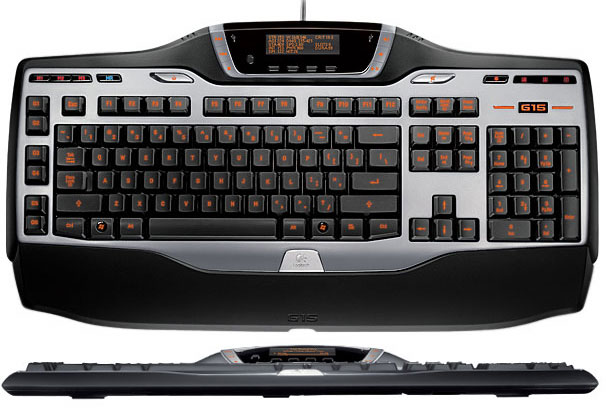
I've never understood why those ugly things are so wanted... Why would I want to have a display on my keyboard?
The display can be configured. Because the extra programmable keys on those keyboards (of which there are 18 x 3 mode options) are numbered, it can be difficult to remember what each one is. Having the display can remind you of the button configs. Also it can display specific other info that may be useful to know while in a full-screen game without having to exit the game to check on windows.
I got a backlit keyboard so i could type and code into the wee small hours. Unfortunatly, i bought a lamp for my room, so it's a bit pointless. Still, it is great in the dark. That keyboard looks nice Gfk. The one i have is pretty quiet, but still too noisey.
I have two Logitech G15s - the series one and series two. The picture that was posted above is of the series two - the main difference is that the series one has 18 programmable macro keys instead of 6, and the backlight is blue. Also, the LCD screen flips up, with extra media buttons and a volume control underneath.
Maybe it's because I use the series one more often (it's hooked up to my main computer), but the keys feel slightly better on the series two.
They even come with an SDK - if you know C or C++, it's very easy to create your own programs for the LCD, or even integrate it with your games!
There are also two USB ports on the back of the keyboard - they don't have enough power for, say, a ChillStream Gamepad, but they're great for a USB drive or something, especially when you're strapped for USB ports.
There's also special keys for muting the speakers, and switching into Game Mode. With Game Mode on, it disables Windows commands (shift-shift-shift to bring up Accessibility options, Control-Alt-Delete, etc), which I find very useful for games that make use of those buttons.
The backlight is great, though I think my series one is starting to dim. I've been using it for about 1 1/2 years though, with the backlight on for easilly 10 hours a day.
I had done a lot of research on a keyboard, and I tried a lot of different kinds - the G15 is, in my opinion, the best keyboard out there. I would fully recommend it.
And if you're into FPSs or RTSs, Logitech is now coming out with the G13. It's a small pad for your left hand, and has 21 full programmable macro keys, a small LCD, and an 8 way joystick. And it's backlit!! I can't wait till it come out. :-)
Maybe it's because I use the series one more often (it's hooked up to my main computer), but the keys feel slightly better on the series two.
They even come with an SDK - if you know C or C++, it's very easy to create your own programs for the LCD, or even integrate it with your games!
There are also two USB ports on the back of the keyboard - they don't have enough power for, say, a ChillStream Gamepad, but they're great for a USB drive or something, especially when you're strapped for USB ports.
There's also special keys for muting the speakers, and switching into Game Mode. With Game Mode on, it disables Windows commands (shift-shift-shift to bring up Accessibility options, Control-Alt-Delete, etc), which I find very useful for games that make use of those buttons.
The backlight is great, though I think my series one is starting to dim. I've been using it for about 1 1/2 years though, with the backlight on for easilly 10 hours a day.
I had done a lot of research on a keyboard, and I tried a lot of different kinds - the G15 is, in my opinion, the best keyboard out there. I would fully recommend it.
And if you're into FPSs or RTSs, Logitech is now coming out with the G13. It's a small pad for your left hand, and has 21 full programmable macro keys, a small LCD, and an 8 way joystick. And it's backlit!! I can't wait till it come out. :-)
I've got one of these: http://www.pixmania.co.uk/uk/uk/575805/art/advent/kbw100-aluminium-multimed.html
The keys are, as you say you like, laptop-ish. They are short travel and low profile. It compares to my laptop's keyboard, but sturdier. I don't always appreciate the layout, but it has the 'extra buttons' thing as well.
I've had it umpteen years and it's as grubby as hell, but I use it quite often and it's quite comfortable.
I also have one of these: http://pckeyboards.stores.yahoo.net/customizer.html
Fantastic keyboard. The best I've ever used. It's tethered to my old desktop machine, so it (sadly) doesn't get as much use as I'd like. it was expensive, but I'd pay the money again if I had to, quite gladly.
The keys are, as you say you like, laptop-ish. They are short travel and low profile. It compares to my laptop's keyboard, but sturdier. I don't always appreciate the layout, but it has the 'extra buttons' thing as well.
I've had it umpteen years and it's as grubby as hell, but I use it quite often and it's quite comfortable.
I also have one of these: http://pckeyboards.stores.yahoo.net/customizer.html
Fantastic keyboard. The best I've ever used. It's tethered to my old desktop machine, so it (sadly) doesn't get as much use as I'd like. it was expensive, but I'd pay the money again if I had to, quite gladly.
IBM Model M.
Which is what the second link in my previous post is, almost. Same technology, licensed from IBM. The plastic injection molding is perhaps not as good quality, but you'd be looking quite closely to determine the differences.
IBM Model M.
Was wondering how long that'd take.I use a classic Das Keyboard (not the new one, although I'd like to try one out). Haven't had any problems with it yet, and it works quite well as a weapon.
I have a Logitech G15.
Handiest thing I've found about the lil mini screen (there are many things to choose from, including a neat lil status indicator for WinUAE) is the ability to conduct all my IM conversations on Pidgin on the little screen while using the 'big screen' (my 24" monitor) to do whatever I want full-screen eg play a game, watch a movie etc...
Is neat. :o)
Handiest thing I've found about the lil mini screen (there are many things to choose from, including a neat lil status indicator for WinUAE) is the ability to conduct all my IM conversations on Pidgin on the little screen while using the 'big screen' (my 24" monitor) to do whatever I want full-screen eg play a game, watch a movie etc...
Is neat. :o)
I just use the aluminum Mac keyboard here. Nice and flat, easy to type on, solid keyboard. Works in Windows after you do a little key-remapping so F13 through F19 can be used for functions typically not found on a mac keyboard. (such as print-screen, insert, and num-lock)
Not really that cheap though, although I'm starting to quite like the fact it has 2 USB ports built-in to split power too, felt like a bit of a 'well duh' moment when I saw that for the first time, hope it becomes more common in modern keyboards.
(More space to move my mouse around when it's tethered to the keyboard rather than the back of my PC tower)
Not really that cheap though, although I'm starting to quite like the fact it has 2 USB ports built-in to split power too, felt like a bit of a 'well duh' moment when I saw that for the first time, hope it becomes more common in modern keyboards.
(More space to move my mouse around when it's tethered to the keyboard rather than the back of my PC tower)
I bought a entertainment desktop 7000 combo mouse and keyboard and like it a lot. High quality slightly curved notebook style keyboard less than an inch thick.
I really like it, great for vista and using it to control DVD's etc. Has a touchpad/dpad combo for your right thumb and mouse buttons on the left so you can use it to watch stuff on your HDTV from your lap with no mouse. It's well built, less bout 2cm thick and has a range of about 15 feet
Got an OEM boxed one online for $65 + shipping (recommended retail $150)

Some might not like it because of the lack of the numpad but for me that was a plus. You can use a function key to get the numpad, but I never used it anyway. the touch sensitive F keys, Esc, home, end, take a couple of days to get used to. More comfortable than a normal notebook keyboard and very good quality and feel to the keys.

profile view so you can see how thin it is. If your one of those linux people, or someone that hates MS then you should probably look elsewhere, what with the windows button, media player center and gizmo/sidebar button. It's obviously designed with vista and windows 7 in mind.
I really like it, great for vista and using it to control DVD's etc. Has a touchpad/dpad combo for your right thumb and mouse buttons on the left so you can use it to watch stuff on your HDTV from your lap with no mouse. It's well built, less bout 2cm thick and has a range of about 15 feet
Got an OEM boxed one online for $65 + shipping (recommended retail $150)
Some might not like it because of the lack of the numpad but for me that was a plus. You can use a function key to get the numpad, but I never used it anyway. the touch sensitive F keys, Esc, home, end, take a couple of days to get used to. More comfortable than a normal notebook keyboard and very good quality and feel to the keys.
profile view so you can see how thin it is. If your one of those linux people, or someone that hates MS then you should probably look elsewhere, what with the windows button, media player center and gizmo/sidebar button. It's obviously designed with vista and windows 7 in mind.
Maybe someone could even write space invaders for the keyboard display :)
Haven't had any problems with it yet, and it works quite well as a weapon.
The weight certainly helps with fending off aliens, not to mention the *click*. ;) (The model M, that is)I can take all the faces off my keys (or even swap them around) to make it look like the 'Ultimate' Das model :P.
I have a G11 version (The one without the little screen) I too required a backlit keyboard to see the keys in the dark better.
The USB ports in the keyboard are really handy. I have my joystck in one and keep the other for wheneer I wanna transfer things onto a flash thing.
I had another backlit keyboard that was much cheaper, but it had some real issues with pressing certain key combinations.
The USB ports in the keyboard are really handy. I have my joystck in one and keep the other for wheneer I wanna transfer things onto a flash thing.
I had another backlit keyboard that was much cheaper, but it had some real issues with pressing certain key combinations.
That's beautiful Flameduck! :)
Yeah, I don't see the point in displays on keys either, 90% of the time your fingers will be over top the keyboard. And it teaches bad keyboarding habits by looking at your keyboard when using it!
Yeah, I don't see the point in displays on keys either, 90% of the time your fingers will be over top the keyboard. And it teaches bad keyboarding habits by looking at your keyboard when using it!
@FlameDuck: Heh. I remember that, check this one out too: http://hackaday.com/2009/01/17/scrabble-keyboard/
I have the Kinesis Freestyle VIP http://www.kinesis-ergo.com/freestyle.htm
While the keys are ok (not great), I love that it's split. It's much more comfortable to type with than any keyboard I've used. It does require you to know touch though, as you would be pretty lost with hunt-and-peck on it.
I've also wanted to try these http://www.typematrix.com/ but never gotten around to it. Seems like an interesting idea.
Personally I don't like all the extra media keys that seem to be so in lately. What happened to just using keyboard shortcuts (Ctrl-v, ctrl-c etc.). I don't need a dedicated key for that, plus those keys are generally require some software installed on Windows (and don't do much in other OS). My wireless keyboard I use on one of my computers actually has a power-off key that shuts Windows down without asking anything. The key is at the top edge of the keyboard, so a few times when picking it up I've actually hit it by accident and the machine shuts down. :P
If you want a no bs keyboard, you might want to get the Happy Hacking keyboard http://www.pfusystems.com/hhkeyboard/leaflet/hairetu.html It supposedly has very good feel when typing, especially the more expensive versions. They even had one with blank keys that is pretty cool (at least for geeks like me). :)
Oh...and check this one out http://www.combimouse.com/ You can't buy it yet, but I would definately like to try one.
While the keys are ok (not great), I love that it's split. It's much more comfortable to type with than any keyboard I've used. It does require you to know touch though, as you would be pretty lost with hunt-and-peck on it.
I've also wanted to try these http://www.typematrix.com/ but never gotten around to it. Seems like an interesting idea.
Personally I don't like all the extra media keys that seem to be so in lately. What happened to just using keyboard shortcuts (Ctrl-v, ctrl-c etc.). I don't need a dedicated key for that, plus those keys are generally require some software installed on Windows (and don't do much in other OS). My wireless keyboard I use on one of my computers actually has a power-off key that shuts Windows down without asking anything. The key is at the top edge of the keyboard, so a few times when picking it up I've actually hit it by accident and the machine shuts down. :P
If you want a no bs keyboard, you might want to get the Happy Hacking keyboard http://www.pfusystems.com/hhkeyboard/leaflet/hairetu.html It supposedly has very good feel when typing, especially the more expensive versions. They even had one with blank keys that is pretty cool (at least for geeks like me). :)
Oh...and check this one out http://www.combimouse.com/ You can't buy it yet, but I would definately like to try one.
I just use the cheapest wireless keyboard I could find that didn't use the messed up newfangled microsoft/logitech layout.
(I need my insert key, thankyouverymuch)
(I need my insert key, thankyouverymuch)
I have the first series of the Logitech G15 with blue light and display and my girlfriend has the second series with red light.
As a gaming keyboard they are perfect because you have the option to disable the Windows key, give extra info about computer status/time/emails/extra game info while playing fullscreen and has no troubles when pressing 3 direction buttons at once (Needed in TrackMania United Forever sometimes to brake steer and throttle at the same time when cornering).
For the rest they are very comfy with typing. The only downside I can think of is that these keyboards are huge, so you need a bit of room on your desk, else you'll end up with an extra table for your mouse.
As a gaming keyboard they are perfect because you have the option to disable the Windows key, give extra info about computer status/time/emails/extra game info while playing fullscreen and has no troubles when pressing 3 direction buttons at once (Needed in TrackMania United Forever sometimes to brake steer and throttle at the same time when cornering).
For the rest they are very comfy with typing. The only downside I can think of is that these keyboards are huge, so you need a bit of room on your desk, else you'll end up with an extra table for your mouse.
The only downside I can think of is that these keyboards are huge
They aren't that big, it's about 4 cm wider and 6 cm longer than an average cherry keyboard.
My gripe would be the pointless USB ports, since the keyboard sucks so much power that you have none spare for any device you plug in.
Keyboard USB ports generally do not pass the 5Volts to power devices plugged into them.
I bought an apple aluminium keyboard. it's awesome, small, and has 2 usb ports in it.
I bought an apple aluminium keyboard.
Yeah, I think it's the best keyboard I've ever had. Great feel to the keys... just so sweet to type on.
Would be nice if the USB ports were hi-speed capable, but no great loss - Works for most things, like yer basic usb stick, but doesn't play nice with my 16gig hi-speed stick.
It won't charge most usb devices as well, but it's good enough for a stick and device from time to time. A great keyboard.
the one flame duck posted reminds me of the typewriter plugged into a tv that controllers and bryce lynch used in max headroom