Common Vector Operations

BlitzMax Forums/BlitzMax Programming/Common Vector Operations

Hi

I'm wondering if anybody could explain in simple terms and concrete orientate game examples the most common math operations with vector.

I suspect very efficient optimisation or simplification can be done with operations like : cross product / dot product / Scalar multiplication / Normalization / vector projection / squared length / etc.

2D vector would be enough for me but if there's specific operation for 3D, why not.

Since it's a math question it's very possible there isn't only one usage of those operations.
But most comment usages would be very helpful !

Thanks for any help ;)
I use vector code in the archives to get the angle between 2 points

Very quickly:

- cross product gets you a vector that is at right-angles to two other vectors. Obviously this only makes sense in 3d. You might want this for working out the normal of a polygon, for the purposes of collision or shading.

- dot product can either get you the angle between two vectors, or lets you 'project' one vector on to another. You might want to do that to constrain an object's movement onto a given line, for example.

-Scalar multiplication is just the mulitplication of every component of a vector by some fixed number. you might multiply a velocity vector by a small number to get a friction effect.

-Normalization gives you a vector of length 1 which is still pointing in the same direction as the original vector. This is used in collision detection, or for all sorts of reasons.


Honestly, you don't need to just memorise these and their uses off by heart. If you come up against something you need and you don't know how to do it, just look up how to do it and you'll learn that way.

Thank you very much Warpy and Jeremy !

It's actually the way I'm working with specific behaviour, when I need something I search on the net for answer.
But it's always nice to be aware of those operations.

great description Warpy!

I have used cross in '2d' when small projectiles had to impart rotational acceleration on larger fixed masses as they passed, the sign of the cross told we which direction to rotate. I am an idiot though so this may have been wrong.

No, that's right.

> lets you 'project' one vector on to another

That's one the the areas I can't get to grips with. I have seen terms such as, "we need to project vec1 onto vec2 and use the resulting 'normal' to do ... blah"
Other times its, "We project vec1 onto vec2 and use the resulting projection vector to do ... blah"

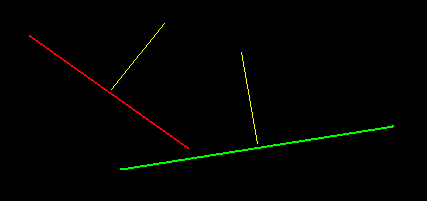
Example. If the RED and GREEN lines are vectors and the yellow lines represent the vector normals, what would the results be for projecting RED's normal onto GREEN's?


I've had an Information Technology Disaster after upgrading ubuntu and my scanner and tablet are knackered, so here's a hand-drawn explanation:


Note: when you project one vector onto another, you pretend they're both starting from the same origin. As normals don't really have a position in space, this isn't an unreasonable leap to make. Remember vectors are only relative to the co-ordinate system you're using them in. Understanding this makes working with vectors a lot easier on the noggin.

here's my yah.tvec2 object/module... uses OOP to represent vectors... was very fun to write:

SuperStrict

Module yah.tVec2

ModuleInfo "Name: Yahfree's 2d vector Object"
ModuleInfo "Description: Object for handling vectors"
ModuleInfo "License: Public Domain"
ModuleInfo "Author: Yahfree"

Import brl.math

Public
Rem
bbdoc: 2D Vector Object
End Rem
Type TVec2
	Field x:Float , y:Float
	
	Rem
	bbdoc: Initalizes vector with x/y values
	EndRem
	Method Init:TVec2(_x:Float,_y:Float) 
		x = _x
		y = _y
		Return Self
	End Method
	
	Rem
	bbdoc: Get the vector's X value
	EndRem
	Method GetX:Float() 
		Return x
	End Method
	
	Rem
	bbdoc: Get the vector's Y value
	EndRem
	Method GetY:Float()
		Return y
	End Method
	
	Rem
	bbdoc: Set the vector's X value
	EndRem
	Method SetX(_x:Float) 
		x = _x
	End Method
	
	Rem
	bbdoc: Set the vector's Y value
	EndRem
	Method SetY(_y:Float) 
		y = _y
	End Method
	
	Rem
	bbdoc: Get the vector's angle
	EndRem
	Method GetAngle:Float()
		Return ATan2(y,x)
	End Method
	
	Rem
	bbdoc: Rotate the vector to an angle
	EndRem
	Method Rotate(ang:Float)
		Local xprime:Float=Cos(ang)*x - Sin(ang)*y 
		Local yprime:Float=Sin(ang)*x + Cos(ang)*y
		x=xprime
		y=yprime
	End Method
	
	Rem
	bbdoc: Add values to X and Y
	EndRem
	Method Add(_x:Float,_y:Float)
		x:+_x
		y:+_y
	End Method
	
	Rem
	bbdoc: Add a vector's x/y to this vector
	EndRem
	Method AddVec(Vec:TVec2)
		If Vec=Null Return
		x:+Vec.x
		y:+Vec.y
	End Method
	
	Rem
	bbdoc: Subtract values from X and Y
	EndRem
	Method Subtract(_x:Float,_y:Float)
		x:-_x
		y:-_y
	End Method
	
	Rem
	bbdoc: Subtract a vector's x/y from this vector
	EndRem
	Method SubtractVec(Vec:TVec2)
		If Vec=Null Return
		x:-Vec.x
		y:-Vec.y
	EndMethod
	
	Rem
	bbdoc: Multiply a vector's x/y by 2 respective factors
	EndRem
	Method Multiply(_x:Float,_y:Float)
		x:*_x
		y:*_y
	EndMethod
	
	Rem
	bbdoc: Multiply this vector by another vector's x/y values
	EndRem
	Method MultiplyVec(Vec:TVec2)
		If Vec=Null Return
		x:*Vec.x
		y:*Vec.y
	EndMethod
	
	Rem
	bbdoc: Divide a vector's x/y by 2 respective factors
	EndRem
	Method Divide(_x:Float,_y:Float)
		If _x = 0 Or _y = 0 Return
		x:/_x
		y:/_y
	EndMethod
	
	Rem
	bbdoc: Divide this vector by another vector's x/y values
	EndRem
	Method DivideVec(Vec:TVec2)
		If Vec=Null Return
		x:/Vec.x
		y:/Vec.y
	EndMethod
	
	Rem
	bbdoc: Get the dot product of this vector and "Vec"
	EndRem
	Method DotProduct:Float(Vec:TVec2)
		Return x*Vec.x+y*Vec.y
	End Method
	
	Rem
	bbdoc: Get the angle difference between this vector and "Vec"
	EndRem
	Method GetAngleDif:Float(Vec:TVec2) 
		If Vec=Null Return 0
		Return Abs(TrueMod(ATan2(y,x)+180-ATan2(Vec.y,Vec.x),360)-180)
	EndMethod
	
	Rem
	bbdoc: Returns a new vector that is the result of this vector reflecting off of "Vec"
	EndRem
	Method Reflected:TVec2(Vec:TVec2) 
		Local VecN:TVec2 = Vec.Normalized()
		Local Vec1:TVec2 = Self.Copy()
		Local VecN_DOT_Vec1:Float = VecN.DotProduct(Vec1) 
		VecN.Multiply(2*VecN_DOT_Vec1, 2*VecN_DOT_Vec1)
		Vec1.SubtractVec(VecN) 
		Return Vec1
	End Method
	
	Rem
	bbdoc: Returns a new vector that is the normalized version of this vector
	EndRem
	Method Normalized:TVec2() 
		Local magn:Float=Self.GetMagnitude()
		Local Vector:TVec2=Self.Copy()
		If magn<>0
			Vector.x=x/magn
			Vector.y=y/magn
		EndIf
		Return Vector
	End Method
	
	Rem
	bbdoc: Get the length (magnitude) of the vector
	EndRem
	Method GetMagnitude:Float() 
		Return Sqr(x*x+y*y)
	End Method
	
	Rem
	bbdoc: Returns a new vector that is an exact copy of this vector.
	EndRem
	Method Copy:TVec2() 
		Return New TVec2.Init(x,y)
	End Method
End Type

Private
Function TrueMod:Float(val:Float,modul:Short)
	val:Mod modul
	If val<0 Then val:+modul
	Return val
EndFunction