Dead pc help

Miscellaneous Forums/General Discussion/Dead pc help

Hi Guys

I was given a un-working P4 tower, Ive tested the ram and hd in another pc these both work. the problem might be either the cpu or motherboard or something else? gfx is onboard however ive tested a working agp gfx card with the same results below.


The pc power leads light on the tower case, power switch works hd makes some sound however the monitor led still blinks. ie i see no bios startup on either onboard gfx or using the agp card.

any idea what could cause this?

thanks
kev

Have you tried hooking up a different monitor?
It could be the graphics is fried. The CPU is another option. Both are nasty in this case. :-P
Also, double check that power is hooked up correctly. Hopefully it's something simple like that.
Good luck.


Have you tried hooking up a different monitor?


The monitor ive tested the tower using is my main base system's and works fine.


It could be the graphics is fried. The CPU is another option. Both are nasty in this case. :-P


Yes this could be the problem, im hoping someone had seen this before and has figured the cause :)

kev

If someone was messing about in bios and played with the CPU setttings (just find the motherboards manual and reset CMOS.) Or the worst case someone has tried and failed to update the bios.

Well, let's just cut to the chase.
I was given a un-working P4 tower


It doesn't work.

Take it in the garden, dig a nice hole, salute it and bury it.


It doesn't work.

Take it in the garden, dig a nice hole, salute it and bury it.


Sure but the case is much better than mine and its components work. If all else fails then at least i have these for free :)

@dawlane
I dont know the history of the tower its quite possable and worth looking into, however theres nothing i can do if its a broken bois update.

kev

theres nothing i can do if its a broken bois update.

Some Intel (and may be others) boards can boot off a CD/DVD drive if the bios is screwed. This means that you can down load a bios recovery and recover a dead system. And if every component checks out ok the bios can be re-flashed as long as the cost to mobo age ratio is worth while.

Is there a speaker connected to the motherboard and does it beep when you turn the machine on? If not, you might have a dead CPU or a short circuit somewhere.

Disconnect everything from the motherboard: HDD, FDD, even the graphics card, keyboard and any other devices. Just let it have power and the internal speaker. Without a graphics card, the motherboard should beep like crazy when it is turned on.

When you hear a speaker beep, switch it off, add the graphics card and see whether there is a signal.

If it does not beep, check whether there is a removable CMOS battery on the motherboard. Remove it for a few minutes, then put it back on. On an older system, this could cause the system to go back to factory default settings.

Many motherboards have a RESET jumper that will do the same. If this motherboard has something like this, put a jumper on it, switch on the machine, wait for it to scream, switch it off, remove the jumper, then start it again.

In any case it is a good idea to check all jumper settings on the board: Maybe somebody screwed up the settings.

Once you get a first life signal from the motherboard, add one component after another, not all at once. Switch the box off, connect the device, turn the machine on and see if it still works. Turn it off again, add the next device, power up the system and see if it still works. But start with just the motherboard and an internal speaker connected to the board.

I bet if someone gave him a dead badger for free he'd hook it up to the mains, light it up like a Christmas tree, whilst frantically using a balloon pump to breathe life into it, whilst using his nose to flick the mains switch on and off.

@Winni
I can confirm that the motherboard has a built in speeker but does not beep even without components. possable the cpu is dead?

@puki
LOL, its possable i did i cant recall if it was after the last can i drank last night though.

kev

Kev, if it doesn't even beep, yes, you could have a dead CPU. Have you unplugged all other devices from the mainboard? And also go and disconnect all power cables from the HDDs, Floppy and so on. A wrongly connected power cable or an electrical short circuit can also cause that behavior.

Winni, Ive stripped the case down to just the motherboard and cpu. still no bois beeps ive also lifted the motherboad to ensure theres no stray screws causing a short its clean.

one question, The WinXP Pro COA sticker is on the case, is it legal for me to tranfer to another pc? B.T.W the COA says 1-2CPU does that mean it can be used on two pc's?

The guy that gave me the tower has confirmed that the guy he got it from has a new pc and wont be using the COA.

kev

one question, The WinXP Pro COA sticker is on the case, is it legal for me to tranfer to another pc? B.T.W the COA says 1-2CPU does that mean it can be used on two pc's?


No, and no --

More than likely the COA is for an OEM version of Windows (check the label, it might say) -- an OEM version comes pre-installed on the computer, and is sold to the manufacturer at a greatly reduced price. They are NOT transferrable to another computer, unfortunately.

1-2 CPU means that it will be able to use a 1 or 2 CPU's in a computer. theorethically, if you install it on a system with 4 CPU's then windows will only be able to use the first 2. Now, to make things more complicated: Microsoft only counts CPU sockets, not cores -- you can have a PC with 2 quad-core CPU's (8 cores total) and it can use them. but have a PC with three single-core CPU's and it will only be able to use two of them. If you have more than 2 physical CPUs (sockets) then you can only use them with the higher-end server versions of windows... But bottom line: the 1-2 CPU does NOT mean that you get to run it on another computer.

Now, as far as the hardware is concerned:

Since you say that the power supply itself is bad, it's quite likely that it gave a powersurge to the motherboard during it's deaththrows, shorting out the motherboard and/or the processor.

If you try to power up the machine with just the motherboard and CPU (no memory) and you don't hear any beeps and don't see any LED signals, then most likely it's a problem with either the CPU or the motherboard itself.

On the off chance that it's NOT fried by the powersupply, here's something to check for: Do you see any leaking or bulging capacitors on the motherboard?

leaking:


bulging:
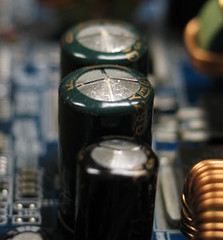

In the early stages bad capacitors lead to an unstable machine that crashes often, in the later stages it can prevent things from booting up altogether. If you see either of those, then the motherboard is most likely a goner.

Finally, something else to double-check: make absolutely sure that all the case header cables on the motherboard are attached properly. (power, reset, speaker, etc. If those header cables are not attached properly, many motherboards won't even POST.

You should look at the motherboard model no. and then search for it in Google so you can get the online manual for it, that should tell you how to reset the bios.

I'd reset the bios and try reseating the cpu. Also, if you have a motherboard with the same slot on it - a motherboard that you can live without if something goes horribly wrong and you kill it somehow - you could try that cpu on that second board and see if it works.

Good advice - but DO NOT

*DO NOT*

do what puki said and bury it in a garden!!!

Especially if any of the above is wrong with it, toxic chemicals will seep into the ground over time. I'm pretty sure it's illegal.
If you want to get rid of the system, I've heard of several companies that will recycle it for you, usually for free. But that's a waste of good computer equipment. It may only need a new power supply, mobo, or cpu. If so, you could get it working for $50-$100. And one can never have too many spare pcs around!

If you can't get it working, you can always sell the components on eBay as "slightly used". :-)


And one can never have too many spare pcs around!


Yeah my family and room mates beg to differ. :)

Yet I love working on my old PC (which I just found out was rated the 8th worst PC ever made) because I need it to play my old games. DOS games don't work at all with XP/Vista and games circa 98 and back tend to crash a lot and play really buggy. And I don't like using emulators.

So good luck to Kev, sorry I have no advice to offer, as I've never had this problem.

I can confirm that the motherboard has a built in speeker but does not beep even without components
You positive on this?

Could be that the motherboard has an on-board speaker connector with no actual speaker on it. I have a bag full of the damn things I've collected over the years.


@xlsior

Thanks for the pointer about the COA ticket, it does not say its OEM so im unsure.

the capacitors are all clean and seem uniform in size, heres a photo taken of the board. sorry is not great quality but you can see there nice and clean. Click here!

for the manual i now have it and have reset the bios with no luck.

@GfK
ummm now im not sure?

the board in question
http://www.intel.com/design/motherbd/rg2/

@everyone else
thanks and more to look into

kev

Many motherboards have a RESET jumper that will do the same. If this motherboard has something like this, put a jumper on it, switch on the machine, wait for it to scream, switch it off, remove the jumper, then start it again.


if that fails try a cardigan, then a scarf and finally threaten it with your aunties nightie and a blue rinse wig, that'll learn it.

@Sauer:
I hear you. Some of the *best* games only work on Win98.
Case in point: Streets of SimCity. Still great (and addictive) despite not running on anything more then an old Win98 rig...

Would someone please take DirectX to court about their outright LIES about 'backwards compatibility'?!! :-)

@GfK
ummm now im not sure?
Just had a look and the speaker is built onto the board - looks that way, anyhoo. Its right next to the CMOS battery.

Would someone please take DirectX to court about their outright LIES about 'backwards compatibility'?!! :-)

Just to point out the bleeding obvious. DirectX is a technology and is owned by Microsoft who happen to have some very clever (and expensive) lawyers as well as a EUL that basically says tough sh*t if it don't work right. Other wise I would have taken them to court a long time ago just for registering the word "Windows" as a copyright/trade mark ;).

@kev
To solve problems like this you need to have a few spares kicking around that you can swop around.

@dawlane:

Yeah, I know. And good point about Windows as a trademark..

I remeber a comic I read a while back about a famlly that only had a Mac, and the computer-illiterate dad bought some Windows software.
The kid says "Dad, no wonder it won't install! You bought the Windows version!!"
Dad: "So?"
Kid: "We don't have Windows!!!"
Dad: (looks confused) (points to the side of the room) "What are you talking about?! There's a window right there!!!"
Kid: (starts screaming)

lol

Sorry to get so off topic..

@Kev:
It's a process of elimination at this point. I'd
1) swap power supplies,
2) swap CPUS.

If still nothing, then it's the mobo. Good luck.

Ok guys thanks for all the pointers, I spoke with my brother who has lots of spairs turns out hes got a board to test the cpu on.

as soon as ive tested i will post the results for those that might encounter this problem.

kev

Neither Microsoft's nor Apple's EULAs are -laws-. They are just license agreements, and their terms are not necessarily legal or enforceable in all countries.

The license --is-- transferable to another computer, even if it is an OEM/Systembuilder version - provided that you live in Germany or any other country that does not have copyright laws that are as insane as the ones in the US. (The German Bundesgerichtshof has decided a few years ago that Microsoft's EULA violated German laws by saying that an OEM version cannot be transferred to another computer.) But the sticker and the license agreement must be go with the software.

1-2 CPU means ONE computer with 1 to 2 processors (actually physical CPUs, not just cores).

Good luck with the testing. ;-)