batched point sprites benchmark

BlitzMax Forums/BlitzMax Programming/batched point sprites benchmark

I'd like to compare the cards/machines from MGE and Grey's thread with this executable here.
http://www.ooeyug.com/files/pstest.exe

ok I expected more of a difference. I'm no opengl expert but point sprites -seem- pretty easy. I may be doing something wrong. the code below won't compile since I used some of my util includes... just remove that code if you want to modify.

my results (fast computer/card)
GL 2.0
1
63
4024 DrawPointSprites
3450 DrawImage

this test doesn't have any texture switching... maybe it's just not worth it on my card.... oh alphablended point sprites seem to do almost the same as DrawImage on my card.
SuperStrict

Framework brl.GLMax2D
Import pub.glew
Import BRL.RamStream
Import BRL.BMPLoader
Import brl.random


Include "..\..\includes\FixedRateRender.bmx"
Include "..\..\includes\debugUtil.bmx"

SetGraphicsDriver GLMax2DDriver()
Graphics 800,600,0

glewInit

Local out:String
If GL_VERSION_1_1
	If GL_VERSION_1_2
		If GL_VERSION_1_3
			If GL_VERSION_1_4
				If GL_VERSION_1_5
					If GL_VERSION_2_0
						out = "GL 2.0"
					Else
						out = "GL 1.5"
					EndIf
				Else
					out = "GL 1.4"
				EndIf
			Else
				out = "GL 1.3"
			EndIf
		Else
			out = "GL 1.2"
		EndIf
	Else
		out = "GL 1.1"
	EndIf
Else
	out = "GL ?.?"
EndIf
Local fSizes:Float[2]
GLGetFloatv(GL_ALIASED_POINT_SIZE_RANGE, fSizes)

For Local i:Float = EachIn fSizes
	out :+ "~n"+i
Next
Notify out

Graphics 800,600,32

FRR.ResetCounters
dinfo.textscale = 1


AutoMidHandle True
Incbin "particle.bmp"
Local image:TImage = LoadImage("incbin::particle.bmp")
SetTexturePoint image

For Local i:Int = 0 To 1000
	New TPS
Next

SetClsColor 0,0,0

Local txt:String[] = ["DrawImage","DrawPointSprite"]
Local pointSprite:Int = 1
While Not KeyHit(KEY_ESCAPE)
	Cls

	If KeyHit(KEY_S) Then pointSprite = 1 - pointSprite

	If pointSprite
		SetTexturePoint image
		glEnable GL_POINT_SPRITE
		glTexEnvi GL_POINT_SPRITE, GL_COORD_REPLACE, GL_TRUE 
		glPointSize 19.0
		glBegin GL_POINTS
		For Local t:TPS = EachIn TPS.list
			t.Update
			DrawPointSprite image,t.x,t.y,0
		Next
		glEnd

	Else
		SetScale .3,.3
		For Local t:TPS = EachIn TPS.list
			t.Update
			DrawImage image,t.x,t.y,0
		Next
		
	EndIf

	dinfo.AddText "FPS: " + FRR.GetFPS()
	dinfo.AddText "[S]"+txt[pointSprite]
	dinfo.Echo
	Flip 0
Wend


Function DrawPointSprite( image:TImage,x#,y#,frame:Int=0 )
	Local orx:Float
	Local ory:Float
	GetOrigin orx,ory
	glVertex2f x+orx,y+ory
End Function


Function SetTexturePoint( image:TImage )
	glBindTexture GL_TEXTURE_2D, TGLImageFrame(image.Frame(0)).name
	glTexParameteri GL_TEXTURE_2D, GL_TEXTURE_MIN_FILTER, GL_LINEAR
	glTexParameteri GL_TEXTURE_2D, GL_TEXTURE_MIN_FILTER, GL_LINEAR
	glEnable GL_TEXTURE_2D
End Function

Type TPS
	Global list:TList = New TList
	Field x:Float = Rnd(10,GraphicsWidth()-10)
	Field y:Float = Rnd(10,GraphicsHeight()-10)
	Field dx:Float = Rnd(-.02,.02)
	Field dy:Float = Rnd(-.02,.02)
	
	Method New()
		list.AddLast Self
	End Method
	
	Method Update()
		x :+ dx ; If x < 0 Or x > GraphicsWidth() Then dx = -dx
		y :+ dy ; If y < 0 Or y > GraphicsHeight() Then dy = -dy
	End Method
End Type

GL 1.3
1.0
256.0

PointSprites: Nothing rendered.
DrawImage: 54fps
GPU: Intel 82845G on Celeron 2.93ghz

Gl 2.0
1.0
8192.0

Not sure which mode is which, but when it says [S]DrawPointSprite I get 2500FPS and when it says [S]DrawImage I get 1500FPS.

CPU: P4 3.2GHz XP SP2
GPU: Radeon HD 2600XT AGP 512MB GDDR3

@MGE, that's funny, 1.3 is supposed to have point sprites. I'll make a change in the code when I get home tonight. is that a pretty old driver on that machine?

my work machine
GL 1.4
1.0
255.0

220 drawpointsprite
159 drawimage

CPU: intel 1.59GHz
GPU: intel 9466GZ onboard

GL 1.3
1.0
255

20FPS for pointsprites

Intel graphics

Jeremy, nothing for DrawImage?

press the 'S' key to switch between.

no, nothing, just pointsprites

GL 2.0
1.00000000
8192.00000

[S]DrawPointSprite: 3000FPS
[S]DrawImage: 1770FPS

GL 2.0
1
63

[S]DrawPointSprite: 3221FPS
[S]DrawImage: 2517FPS

GL 2.0, 1, 64

Image: 4223 FPS
Point: 2750 FPS

NV GF 8800GTS, Q6600

You might want to put together a more technically demanding benchmark. When your FPS value are in the thousands, the numbers are too small to accurately compare. What seems like a 50% speed difference at those values, could turn out to be 10% or 500%, or it could turn out to be bang on 50%, but it would be better to know.

i don't post any fps, because they are not accurate like Gabriel mentioned.
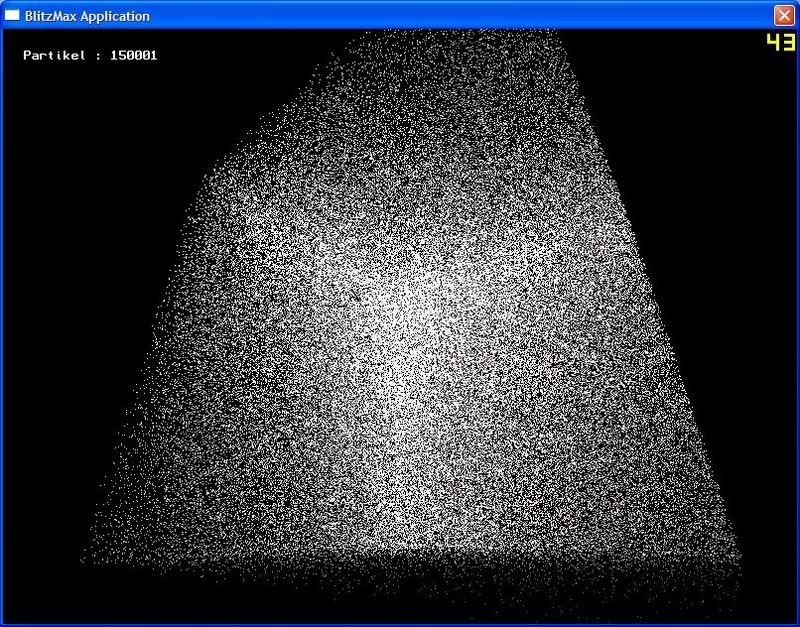
Here is an image of an early pointsprite particle test I've made with minib3d


As you may notice there are no textures or blending.
Also you may be able to speed it up a lot if you use VertexArrays instead of glvertex.
Next, you should never use extensions based on the GL Version. Check for the extension itself its much saver.
Unfortunatly pointsprites are not well supported on common hardware. Thats why i have dropped the mission to implement them in minib3d.
Maybe i will bring them back later ;)

oh, I think I misunderstood the text in the demo,
The first demo doesnt show anything but after pressing S some large white dots show up

When your FPS value are in the thousands, the numbers are too small to accurately compare.
yes on high end machines... I'm not worried about those, I get plenty of smooth action out of those. I was wondering if point sprites are worth adding to improve low end machines sprite/particle count. my work computer was 220.

Also you may be able to speed it up a lot if you use VertexArrays instead of glvertex.
ok, I'll give those a go

Next, you should never use extensions based on the GL Version. Check for the extension itself its much saver.
right, and in a proper application that's what I would do... I was more interested in what version were still being run

Unfortunatly pointsprites are not well supported on common hardware. Thats why i have dropped the mission to implement them in minib3d.
that was my fear.... maybe it's just not worth it all? though those flare screen savers that came with even the first "os x" computers make me want to think otherwise.

@Jeremy and MGE - are your drivers pretty out of date?

2005 drivers. The latest and final for the 82845G gpu's.

To be honest, I tend to think it may not be worth it. And here's why...

If you're worrying about more eye candy for the casual market, you can never count on anything and you're probably going to have to stick with DX drivers and just support the lowest spec you can.

If you're targeting the more hardcore market, they're going to have better hardware anyway so you might as well stick to drawimage. The recent benchmark I coded is drawing 2000 32x32 drawimages per frame with alpha and lightblend sprites and the frames rates on some of those better systems are in the 100's, sometimes 200's and occasionally even higher! ;)

I think point sprites also have some limitation in OpenGL, something to do with the texture coordinates at the corners of the sprite having to be 0,0 through 1,1 and you can't modify it on a sprite-by-sprite basis, so you have to either have one sprite image for all point sprites, or do them in batches, or generally not be able to keep the texture from switching between image sets. It's not exactly efficient or flexible that way. I think I heard something also about not being able to rotate/scale them or something? Also in GL it requires extensions to be supported which may not be.

I think you'd be better off using normal quad images with large spritesheet textures, minimal texture swaps and vertex arrays of some kind.

@Gabriel and klepto
When your FPS value are in the thousands, the numbers are too small to accurately compare.


yes on high end machines... I'm not worried about those, I get plenty of smooth action out of those. I was wondering if point sprites are worth adding to improve low end machines sprite/particle count. my work computer was 220.


with further testing I do see exactly what you mean... I feel kind of stupid because I knew this... I don't know what I was thinking. thanks, I'm going to try again but some new tests seems to show vertex arrays not really as fast as I was hoping?? I don't know what I should be expecting?

is %40 gain is fps when drawing 40,000 sprites (vertex array quads) good? I suppose anything is good if it's still able to run on low end hardware and vertex arrays started at 1.1 I think?

I post another that ramps up to the max number of sprites that one can display at 60fps...

I have the latest drivers also, same hardware as MSG

well, batching does not give great gains based on my opengl tests. I tried vertex arrays and interleaved vertex arrays with point sprites and quads. I think it just comes down to the fact that we are modifying all the vertexes each pass so the small gain over how blitz does it now doesn't seem to be worth it.