Keyboard and Mouse Recommendations
Miscellaneous Forums/General Discussion/Keyboard and Mouse Recommendations
I have now got to 24 weeks without smoking, which I think is a pretty damn good achievement and now when I look at my nicotine stained keyboard, with cigarette burn marks on a couple of keys, the nasty black muck that builds up on the keys from a combination of ash and sweat (probably?!)...
Anyway, I think, hey, I'm going to treat myself to a nice shiny new Keyboard and Mouse. But hark! Which one to choose!?
So here's what I want and if anyone has an recommendations I'd love to hear it.
1. Wired - Can't be bothered with batteries running out etc.
2. Ideally have a USB hub on the keyboard, just makes sense really.
3. Not look like something more suited to the bridge on star trek
4. I'm left handed so none of this fancy ergo mouse stuff that just makes it uncomfortable for a lefty.
Congrats on the no smoking achievement!
Have you considered a "natural" keyboard? I got one after having loads of RSI and it solved my problems (that and the "smart glove".) A normal keyboard feels awkward now (yes the natural keyboard felt weird at first too!)
I recommend a natural keyboard and smart glove too. Those are what I use. Originaly I was dubious about the keyboard but had terrible wrist pains that sometimes stopped me working for upto a week at a time. My wife insisted I try a natural keyboard which took about 3 days to adjust to. Much easier and forces you to learn to type correctly.
Ooh! A smart glove.. I'm going to have to get me one of those..
OT: I can't say much for a lefty, but the IBM Model M keyboards are the best ever created ;P
Just something to keep in mind: while a hub in the keyboard sounds great, there are some practical issues. for example, it's almost always an unpowered hub which means that not alld evices will work through it.
I've personally used the Dell Multimedia keyboards which have a hub, but those won't even power the USB thumb drives I've plugged into them. They'll take a mouse, but that's about it.... And in most cases plugging in a mouse in the keyboard means that you end up with 6 feet of cabling coiled up right next to it, which is worse than just having the cable go to the back of your computer.
Just get a wireless mouse that has a recharging dock and battery specific to the mouse (Lithium Ion?!)
Though probably to "fancy ergo" for your tastes, my MX Revolution 2 has been working fine for the past 2 years, and I got it from a friend so it has been used before.
I've never had anything but good experiences with Logitech peripherals. I currently have the G15 gaming keyboard (which with the programmable macro keys, is useful for things other than gaming (i.e. repetitive graphics tasks). It does light up which annoyed me at first, but you get used to it.
I currently have the G15 gaming keyboard
My brother has that keyboard. I can't stand using it in light because you can't see the keys. I prefer to stay low power, my monitor illuminates my keyboard so there is no need for any fancies.
EDIT: And the only reason I would need to look at his keyboard to type is the layout it has, and the feel of the keys.
I prefer to stay low power, my monitor illuminates my keyboard so there is no need for any fancies.
You can turn it off you know?
this mouse does the job:
http://www.logitech.com/index.cfm/mice_pointers/mice/devices/149&cl=gb,en[rant]
If you do go for an ergonomic keyboard, avoid the Microsoft Natural Ergonomic 4000 (I have one at work) it has an annoying 'feature' called the F Lock key, which I seem to be able to press on regular occasion. They've added shortcut keys to the function keys that perform common tasks, like undo and redo which are on F2 and F3, which also happen to be the shortcut keys for rename file in explorer and is used in most apps quite a bit. So, in explorer, you copy some files to back them up, go back to the original and press F2 to rename the file, it doesn't work, you get frustrated and just right click and choose rename instead, not realising that it's undone the copy operation and the backups you made have been deleted.
One of the many possibilities for F-Lock fun.
Also the back and forward buttons on the front of the keyboard are easy to knock, so I've disabled them.
Typing on it is just find however and apart from the above, it's a reasonable keyboard.
[/rant]
Still using an almost undestroyable IBM Model M keyboard.
I've never found something better but the new Apple keyboards are kind of neat too.
I use this one
http://www.kinesis-ergo.com/freestyle.htm with the VIP addon. It's a great keyboard. Got the one with 20" cable between the parts so I can keep my A5 wacom between them. Like my screen, it's in portrait mode. Works great, but looks crazy.
I generally don't like number pads on my keyboard. The more I can do without moving my hands from the touch typing position the better, and I don't like the increased distance to grab for a mouse. :-)
I haven't found the perfect mouse and keyboard yet, but if this one
http://www.combimouse.com ever gets into production (and doesn't cost an arm and a leg)...I'm buying it.
That combimouse looks horrendous.
You can turn it off you know?
But when its off you can't see it! Besides I don't use a G15, as I already mentioned, it is my brothers.
Still using an almost undestroyable IBM Model M keyboard.
;)
Perturbatio: The combimouse doesn't look horrendous! It doesn't look great either, just kind of okay and weird, but I'm hoping using it will FEEL great. :-)
Couple of things I find important about a keyboard:
- The cursor keys are in a proper upside-down capital T shape. I've seen diamond shaped cursor keys that are just HORRIBLE.
- There is a block of 6 keys that are Insert/Home/Page Up then Delete/End/Page Down. This is the classic block and when it gets moved down to add in another row of 3 stupid multi-media keys or something it totally throws me. I use "old-skool" Cut/Paste key combos like Shift+Delete and Shift+Insert often when programming (very quick) and I use Home and End when programming, and Page Up/Down of course. So when this block is screwed with I hate it.
As a result my MS Natural keyboard is REALLY OLD (in fact I bought it second hand from a company I used to work fo), because MS screwed with the layouts in more modern version.
I still have my Logitech Click mouse, and a Microsoft Internet Keyboard.
Both are looking a bit shabby now after probably five or six years, but they still work perfectly.
I have the Microsoft Internet Keyboard and a Microsoft mouse and both are great, to be honest I wouldn't object to getting new ones of both of them.
My problem with them both is that my mouse and keyboard both have melted bits on them from cigarette ends and no matter how much I try and clean them there's this constant grime on them from the years of abuse.
I totally agree with what Jake said about the cursor keys and insert / delete block and after what xlsior said about the USB hub keyboards that sounds like a bad idea now.
I think I might just have to pop into my local computer shop and see what's jumping.
Thanks for all the advice guys :)
I have the same requirements as Jake WRT a keyboard, so I tend to either have to buy really cheap keyboards or really old keyboards.
My Razor DeathAdder mouse is the nicest mouse I've ever touched. I used to think that all that DPI crap was a load of old pony, but you really do notice a huge difference. That wasn't the reason I bought it though. I bought it because it has shoulder buttons I can actually reach. Too many mice have piddly little shoulder buttons the size of a gnat's armpit, and they're always about halfway up the bloody mouse. Either I hold the mouse completely different to most people or these things are designed for people whose thumb joins their body about three inches =above= the wrist.
It's almost symmetrical, so I can't imagine it would present a problem for a lefty.
As a result my MS Natural keyboard is REALLY OLD (in fact I bought it second hand from a company I used to work for, because MS screwed with the layouts in more modern version.
I just this minute ordered the Microsoft Natural Ergonomic 4000 keyboard from Amazon.com(U.S) as they're offering it with an instant rebate, and it has the classic block of cursor keys and Insert/Delete etc.
So maybe MS has gone back to the old style configuration.
Mr M has removable key faces, beat that!
CGV: Thanks for the info it looks good, but I noticed that there's and FLock Key. I presume it can be made to default to FKeys as normal operation. Also looking at the + Key (two keys right of 0) it seems to have a minus sign on it instead of an equals sign, what's going on there?
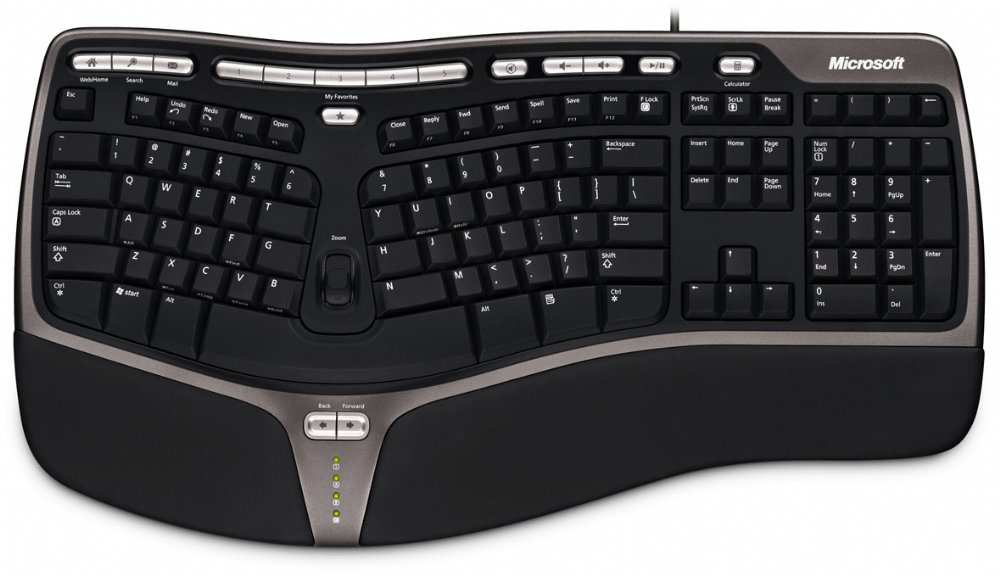
CGV: Thanks for the info it looks good, but I noticed that there's and FLock Key. I presume it can be made to default to FKeys as normal operation. Also looking at the + Key (two keys right of 0) it seems to have a minus sign on it instead of an equals sign, what's going on there?
See my post above (in the [rant][/rant] tags)
Yeah I already did which is why I mentioned it. So can you disable F-lock and leave it set to FKey mode?
That's an american layout keyboard, no? The Shift 2 is @
Yes it's an American keyboard. Hey anyone know what layout they use in Canada? British or US? (I guess US)
Hey anyone know what layout they use in Canada? British or US?
French? (!) Azerty Fun!
So can you disable F-lock and leave it set to FKey mode?
Nope, which is why it annoys me so much. :)
French? (!) Azerty Fun!
I hope not.
Nope, which is why it annoys me so much. :)
gah!
Logitech G15 (first rev if you can get it) for keyboard.
I would have suggested a Logitech G5 for mouse, but since you are a lefty, you might wanna go for something more like the Razer Copperhead.
For RSI stuff,
Workrave is a nicely done tool, although a good keyboard and mouse makes a huge difference :)
To that end, Microsoft's keyboards are quite good. It seems to me the only really ergonomic keyboard from Logitech is their Wave keyboard, which is pretty cool although it feels too "soft" for my liking.
Canada uses US keyboards, although it's a bit odd. There are two official languages (English and French) so keyboard manufacturers usually ship stickers that you can put over the existing keys that correspond to a specific English / French layout. (I don't have any report on those, however, since the operating system I use has a much better system for inputting special characters. For example, "Alt" + "," + "c" = "ç"; easier than finding the key on a multinational keyboard :)
People are generally driven mad by the non-US keyboard, so it's for the better that they don't apply the stickers themselves.
Make sure the function keys are grouped in clusters of 4. Some idiotic keyboards have them in 3s, which just screws up everything.
the F Lock key isn't THAT bad. You just have to remember to press it once when you boot up. There might be a way to switch it with a registly hack. Bothered me for a couple of weeks till I got used to it. I never use the functions that Flock activates. On occasion I manage to get CTRL+Printscrn stuff messes up, but otherwise its a non issue.
the F Lock key isn't THAT bad. You just have to remember to press it once when you boot up. There might be a way to switch it with a registly hack. Bothered me for a couple of weeks till I got used to it. I never use the functions that Flock activates. On occasion I manage to get CTRL+Printscrn stuff messes up, but otherwise its a non issue.
BTW the older Flock keyboards are a lot worse than that one, they had prtscrn/insert and pause/break on the same keys in an odd shaped cluster 2 columns with the long delete.
You just have to remember to press it once when you boot up.
You can set it to always be in the correct state, that's not the problem, the problem is that I on occasion accidentally hit it during normal use, resulting in 'unexpected functionality'.
You can set it to always be in the correct state
What there's a software option to have it off by default on boot?
Also looking at the + Key (two keys right of 0) it seems to have a minus sign on it instead of an equals sign, what's going on there?
I didn't notice that key before I ordered it but I don't see an = key anywhere else on the keyboard so that must be it.
In all the hundreds of reviews that I read, no one mentioned it so I don't think it's a problem.
As for the F Lock key, I can't see how I would accidentally hit it. I've never accidentally hit the F12 key on my current keyboard.
I wish I could say the same for the Caps Lock key. That key is my personal nemesis.
The Microsoft natural keyboard and mouse are the best things money can buy. They only have one disadvantage: The keyboard is not compatible with Apple's Java 6 VM. If you want to type in Java 6 on OS X, you have to switch to the Apple keyboard driver which is not compatible with the Microsoft layout. Duh!
There's also a plain black keyboard on the market that's on my christmas wishlist: It has NO letters printed on the keys - absolutely mega-cool! :)
There's also a plain black keyboard on the market that's on my christmas wishlist: It has NO letters printed on the keys - absolutely mega-cool! :)
The IBM Model M also has a sort of typing-without-looking functionality. Since you can remove the key plates, you could use it as a learning tool ;)
I like the MS natural keyboards a lot, and the ergonomics are typicaly better for me as far as their mice go. My keyboard and mouse combo are old enough that the silver has worn off, and the soft rubbery surface on the sides have worn through. About 3 or 4 years old now.
I'd like to know how to set the F lock key to be off by default, havent found an easy way to do it on mine.