Reccomend a Keyboard/Mouse
Miscellaneous Forums/General Discussion/Reccomend a Keyboard/Mouse
[continued from seperate thread...]
I need a new keyboard and mouse. I have no real issue buying a mouse, will probably buy a good optical one with high DPI or whatnot.
HOWEVER, my major issue is with keyboards. Yes I could fork out £100 but why bother if the keyboard has the same issue that all others have? a maximum key press limit?
So, my questions:
1) Are there keyboards without this limit? USB perhaps?
2) Any Reccomendations?
Preferably it should be ergonomic, I have terrible problems with my hands depending on how busy I am during my dayjob.
Ta Guys.
Any PS/2 keyboard is going to have the limit. Most USB keyboards will too, since it's kind of how keyboards work (matrixing and all that). Some vendors work around this and call them "gaming keyboards".
I've heard that the Logitech G15 keyboard has a higher than average simultaneous key press limit - like 6 or so instead of 3. I have no idea if that's true or not, but maybe there's some info on Logitech's site about it. I do know that it's kinda ugly, though.
Nope, that keyboard has a rather restrictive 2 key limit when using the arrow keys. Wow, that's bad!
I've never encountered a keypress limit with my logitech g15
Cheers.
Do you have rev1 or 2 of the hardware and do you ever use the cursor keys whilst playing? :-)
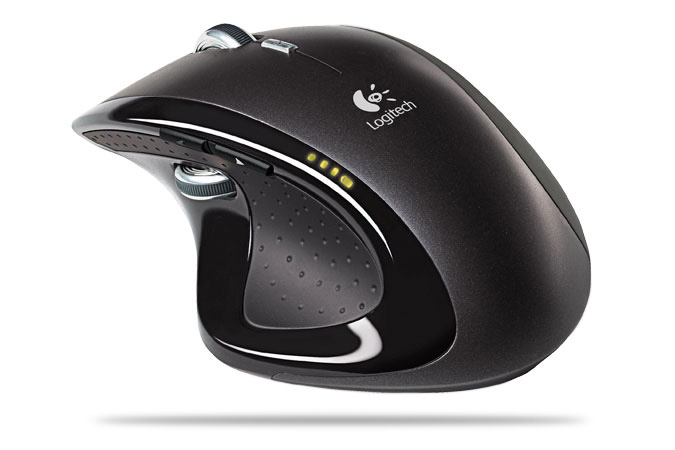
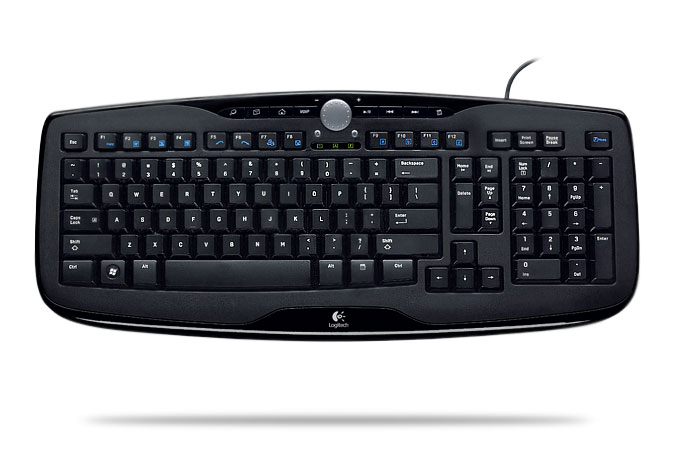
Personally I have the Logitech MX Revolution wireless mouse, which is the best mouse I ever had so far, even thoe it has some stuff that I find annoying, it is very good.. Second I have a USB keyboard that is pretty good called Logitech Access Keyboard 600, which is pretty much as good as I wish a keyboard should be. It has the media keys and volume wheel. The software for managing the mouse and keyboard are really good and not bloatware.
Take it or leave it!
http://www.extremetech.com/article2/0,1697,2007814,00.asphttp://www.logitech.com/index.cfm/keyboards/keyboard/devices/2996&cl=us,en I saw your edit X-)
Yeah I looked them up earlier, not too bad, like the mouse!
OK things that I personally dislike about the MX Revolution:
- The "one click search" button is wrongly located. Sometimes I click it without noticing and a web browser page pops up! Very annoying because the button is rather sensible. It can be disabled, but I haven't gone to that stretch.
- The wheel is a piece of genius, but it has some drawbacks. You may need to fine tune it to your needs as it can feel rather akward if you spin the wheel and it just continues scrolling while you didn't want it to. You can have the graded mode or the freespin mode, or an intelligent combination of both.
- The battery wich is a NimH is not THAT long lasting. If you plan on buying this mouse, remember that you can not change the battery that's inside it as there are no way to access it. So the mouse will last as long as the battery has life. It's pretty good thoe, as a charge will last you for over a week of intense usage. When it's getting low, the battery indicator turns red, which is quite nice to have. After that, your Windows will tell you that the battery in the mouse needs recharging! But if you put the mouse back in the stand after a day's usage, you'll never encounter these. I found it cheap that a 100$ mouse can't change it's battery! Keep your bill for warranty.
It is still a great mouse to own!
EDIT: It's funny when I turn back to a regular mouse, because no mouse that I know of has a freespin mode. I got totally used to this. Just spin the wheel and watch your webpage / documents / source file roll!!! Very good for some thread here ;) LOL!
Ah, I didn't know about the arrow key bug.
You can work around a lot of simultaneous keypress limits, up to a certain extent, by choosing different keys to press. It's only when you are hitting three within the same area on the matrix that you run into issues. The area on the matrix doesn't necessarily have anything to do with the layout on the keyboard, so some trial and error would be needed. I know this because I used to hack keyboard encoders for building arcade cabinets, and spent many hours decoding matrices so I could avoid blocking and ghosting.
Yeah i know the cause for the key limit, I just thought there MIGHT be a (more expensive) keyboard with the limits mostly removed.
I am liking the Zboard, up to 10 down rather than up to 5, still need to make a decision.
@_33 : Is it like hoding the middle button in and dragging? :-) As for battery replacement, I am not scared of opening 'er up to deal with that myself. Quite good with electronics, but by the sounds of it it won't be a problem anyway.
I'll keep looking though.
You can work around a lot of simultaneous keypress limits, up to a certain extent, by choosing different keys to press
Kind of defeats the point of wanting to use your favourite layout though. :-)
Do you have rev1 or 2 of the hardware and do you ever use the cursor keys whilst playing? :-)
The revision information isn't entirely clear, there's a circle with letters and an arrow pointing between C and D (I'm going with C). After it it says "02-CAV.01".
Yes I have played games with cursor keys without issue.
I don't however make a habit of using them if I can avoid it.
Make sure you try whatever you are interested in buying in the store. Some mice aren't comfortable for some hands or are a bit large if you have a smallish space to move it in.
Most mice now have a back browser button at least, which I can't live without :)
I have an MX Rev mouse (used to do a random glitch thingy, never see much of it anymore), and an old model M IBM clicky keyboard (best keyboard ever made)
pic.
Mine is actually a newer model (it has a colored IBM logo) but basically the same exact thing.
EDIT: multi-key tester (my old keyboard does 3 at once! w00t!)
Import brl.max2d

Graphics 800, 600

While Not KeyHit(KEY_ESCAPE)
  Cls
	If KeyDown(KEY_LEFT) Then DrawText "left", 15, 15
	If KeyDown(KEY_RIGHT) Then DrawText "right", 15, 30
	If KeyDown(KEY_UP) Then DrawText "up", 15, 45
	If KeyDown(KEY_DOWN) Then DrawText "down", 15, 60
  Flip
 Delay 1
Wend
EDIT: multi-key tester (my old keyboard does 3 at once! w00t!)
All four, no problem.
The limit on this keyboard for total number of keys pressed at any one time appears to be 6 excluding cursor keys and Shift, Ctrl or Alt:
Import brl.max2d

Graphics 800, 600

While Not KeyHit(KEY_ESCAPE)
  Cls
	'If KeyDown(KEY_LEFT) Then DrawText "left", 15, 15
	'If KeyDown(KEY_RIGHT) Then DrawText "right", 15, 30
	'If KeyDown(KEY_UP) Then DrawText "up", 15, 45
	'If KeyDown(KEY_DOWN) Then DrawText "down", 15, 60
	For Local i:Int = 8 To 227
		If KeyDown(i) Then DrawText i, 20*(i Mod 2), 2*i
	Next
  Flip
 Delay 1
Wend
Hmm, things are getting weird with this, I can press 7 letter keys and they all show up, also not including ctrl/shift/alt and cursor keys(as you mentioned)
Though its only certain keys: for example, I can press W+A+S+D and only 3 will come up, however if I press A+S+D+K+M+N they all show up.
I have a Microsoft Internet Keyboard, and a Logitech Click mouse. Both wired. Both work perfectly.
wasnt their an amiga easter egg when you pressed all the f-keys?
just as well there were only 10 of em iir
@Cygnus: Much much better than holding the middle button and dragging, because you just roll the page up or down and it just keeps on rolling with the momentum you gave it. It,s like spinning a wheel basically. There is something helping it keep it's momentum. It feels like a big wheel but it's really small.
EDIT: The new Model M's by unicomp»»
http://us.st11.yimg.com/us.st.yimg.com/I/pckeyboards_1996_1065677http://pckeyboards.stores.yahoo.net/customizer.html
The limit on this keyboard for total number of keys pressed at any one time appears to be 6 excluding cursor keys and Shift, Ctrl or Alt:
Dealbreaker :-(
Make sure you try whatever you are interested in buying in the store. Some mice aren't comfortable for some hands or are a bit large if you have a smallish space to move it in.
Don't worry, I'll want to see the product before I purchase.
Most mice now have a back browser button at least, which I can't live without :)
I turn that off, I have big lumpy hands and depending on the mouse end up clicking any buttons on the side of the mouse accidentally. :-)
Hmm, think i'll go check my bank at lunch and head into town and see what's around!
The back button on my mouse is quite high up, have to raise my thumb about .5 inches over a bump to reach the back button. Cant easily reach the forward button though.
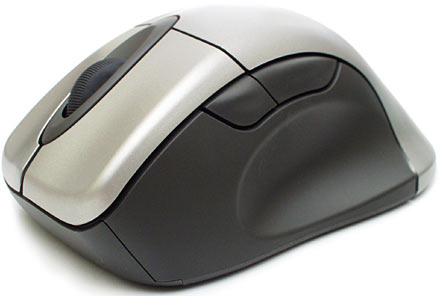
Pretty much the same mouse I have. I couldn't live without the side buttons since its also my undo button in many apps. Mines so old now that the silver has worn out to a glossy smoked black effect, and the velvety rubber on the side is polished where my thumb rests.
My main concern with a new keyboard is the layout -- many of the more recent ones started messing around with the shape of the island with the home/end/insert/delete/pageup/pagedown keys. Like in _33's screen shot above: It's been made vertical, and the INSERT has been removed in favor of a double-height delete key.
(The only 'insert' remaining shares the printscreen/sysrq button. Works OK to toggle insert/overwrite in programs like MS word, but it REMOVES the shift-insert universal paste ability. I tried one for a short time, and then realized that I actually use shift-insert to paste things about half a billion times a day... Making those keyboard layouts completely unusable to me.)
I got one of
these (mine was the black version though).
The keys are really low profile alloy, like a laptop keyboard and its fantastic to type on. However, I couldn't get used to where the Ins/Del etc keys were, so its sat on a shelf gathering dust.

I want one of these for 3D work (supports, blender, max, maya, google earth etc... works on debian...)
Its got 4 analogue axies: Up/Dn(pull push), Yaw(turn), Pitch(tip forward/back), roll(tip left/right)
Not cheap tho. although they do have a cheap licence for non commercial use?!?! (Not seen this on peripherals before, weird. :/ )
G5 + G15 = Win.