I hope someone can help me with this - I can't figure it out.
First a picture for reference;
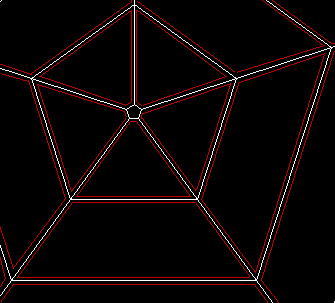
The code below will draw a 5 sided tube - a pentagon (the mesh shown in white in the picture, is the output from the code below).
Just a pentagon is pretty easily done, as the corners of the shapes are really just the points where the other sections join up.
What I would really like to do, is to have "free-floating plates" instead of a big connected mesh, but I can't quite figure out how to do it
(see picture - I've drawn in red how I'd like it to look)
It's easy to do for each "ring" as I can just add a little extra space between them - try to press F1 and you'll see what I mean.
...but I can't figure out how to do the calculations so it works the way I'd like it to, with the cells to the sides.
And I need it to be able to zoom and rotate. The sample already rotates - use arrowkeys left/right.
Can anyone help?
First a picture for reference;
The code below will draw a 5 sided tube - a pentagon (the mesh shown in white in the picture, is the output from the code below).
Just a pentagon is pretty easily done, as the corners of the shapes are really just the points where the other sections join up.
What I would really like to do, is to have "free-floating plates" instead of a big connected mesh, but I can't quite figure out how to do it
(see picture - I've drawn in red how I'd like it to look)
It's easy to do for each "ring" as I can just add a little extra space between them - try to press F1 and you'll see what I mean.
...but I can't figure out how to do the calculations so it works the way I'd like it to, with the cells to the sides.
And I need it to be able to zoom and rotate. The sample already rotates - use arrowkeys left/right.
Can anyone help?
'Test program to figure out how to make the right calculations

Strict
Graphics 800,600

Global rot=0,a,b,angle#=0,zoom=20,ang#,zoom2,zoom3,space

Repeat
Cls

zoom=8+zoom3
ang#=72
zoom2=0

For b=0 To 4	'5 sections outwards

For  a=0 To 4 	'5 sections around (5*72 degrees = full circle)
	Angle=(ang)
	Rect()
Next

zoom2:+space
zoom=zoom+100+zoom2+zoom3

Next
If keyhit(key_f1) Then space:~4 zoom2=0 zoom3=0
If keydown(key_left) Then rot:+2
If keydown(key_right) Then rot:-2
If rot<0 Then rot:+360
If rot>359 Then rot:-360

'If keydown(key_up) Then zoom3:+2	'not working corrently
'If keydown(key_down) Then zoom3:-2

Flip
Until keyhit(key_escape)
End

Function Rect()

	Local x1=400+Sin(a*angle+rot)*zoom
	Local y1=300-Cos(a*angle+rot)*zoom
	Local x2=400+Sin((a+1)*angle+rot)*zoom
	Local y2=300-Cos((a+1)*angle+rot)*zoom

	Local x1b=400+Sin(a*angle+rot)*(zoom+100)
	Local y1b=300-Cos(a*angle+rot)*(zoom+100)
	Local x2b=400+Sin((a+1)*angle+rot)*(zoom+100)
	Local y2b=300-Cos((a+1)*angle+rot)*(zoom+100)

	DrawLine x1,y1,x2,y2
	DrawLine x1b,y1b,x2b,y2b

	DrawLine x1,y1,x1b,y1b
	DrawLine x2,y2,x2b,y2b
End Function