Project Studio Express for BlitzMax - Take 2
Miscellaneous Forums/General Discussion/Project Studio Express for BlitzMax - Take 2
Welcome to Project Studio 2007 Express, the Advanced Integrated Development Environment for BlitzMax (and Blitz3d/Basic). This IDE has been created to provide the best developer experience available and is based on Visual Studio 2005.
The express version provides the same experience as the standard Blitz environments and has the following features:
* Advanced editor with all the features you would expect including editable color syntax highlighting, code outlining (folding), split views, line indicators, bookmarks, code snippets etc
* Full intellisense integration (the best currently available!)
* Flexible docking windows and toolbars and tabbed editing
* Integrated BlitzMax and Blitz3d/Basic language help
* Built-in compiler and debugger (utilises the external debugger for Blitz3d/Basic)
* Plug-in architecture to extend the environment with more languages
Prior usersFor those who have used the Blitz3d/Basic version, you will be pleased to know the intellisense has been upgraded to include all open files within the IDE (based on the language of the active file), providing an even better editing experience!
Updated the startup routine to provide some guidance such as setting your langauge configurations and building the BlitzMax language templates
IMPORTANT: Before starting, please remove any existing <user>/My Documents/Project Studio 2007/ folder from your systemProfessional versionThe professional version will be available in the next couple of weeks and includes many of the advanced features you require to manage your projects:
* Solution/Project Management system
* TaskLists and User Comments
* Solution Explorer
Once the Professional version is available, you will (until the end of the year) receive a full Blitz3d/Basic plug-in licence for free when you purchase Project Studio 2007 Professional for BlitzMax! More details will be available at the time of release.
Project Studio 2007 will run on Windows 2000, XP and Vista platforms and requires Microsoft.Net 2.0.
Please post any questions here, send an email to support@... or why not join the Project Studio
forum.
Download now! Can you please put some sort of version umber or something in the filename of your zip. You have created a new version or two, and there is no way for people to know if they have the newer or older version.
Hi,
i am sorry, but i have now the same problem as klepto, each time. :(
I have made everything, also deleted the config file. So for the moment i will return to the previous version how works perfekt.
bye
Edit ; Lol..goal, now also the old version not longer works.
Sorry, but the same problem as previous.
Don't getting highlighting to work :(
I think I'm going to try another IDE for my next game as the limitations of the basic one are getting to me espcially as my files are pretty large. this could be a contender.
as my files are pretty large
Is there a problem ore a limitation with large files? I have now tested a few hours, the IDE is very stable, its only a problem with the intelissense.
I using BMax's default IDE and large files load slowly and sometimes even typing in large files is slow due to code highlighting.
Abrexxes and Klepto,
Sorry guys - do you guys still have startup errors etc or is it just the intellisense is not working?? And when you say not working can you not hover the cursor over any words (blue or otherwise) and not get a popup tooltip with the information? Can you not press CTRL+Space and get a list??
Only the specific keywords listed in Help > Language > Idenfitiers are shown in Blue. I cannot highlight all 13000+ keywords due to speed. This also matches with Visual Studio on which the product is based.
Please download this
file, copy it into your base Mod folder and run it. It will clear any language definitions. Then restart Project Studio.
Please advise ASAP.
You should be able to load any file size in theory. The program works on threads in the backgorund.
TaskMaster - will do on the filenames
Startup and configuring works, but refreshing the intellisense comes up with an error.
And yes, internal intellisense seems to work. but I get no help or tooltips for module functions etc, only for the current open files.
Only the specific keywords listed in Help > Language > Idenfitiers are shown in Blue. I cannot highlight all 13000+ keywords due to speed. This also matches with Visual Studio on which the product is based.
Sorry to say this, but an Editor which only highlights standard identifiers is just useless (in my opinion) and if it is a speed issue, then you maybe have to search other codebox libs. As I have done it myself in VB.net and I had instance highlighting for each module element (const,fields types, functions and methods) with code completion and so on. This is no offense, just a fact that just identifier highlighting isn't enough for me, sorry.
PS: Maybe a compromise: there is a file called keywords.txt somewhere in the BMaxpath, this one includes at least the functions, so highlighting would be like standard ide.
Klepto - can you advise the error message please? and the version 1.0.37.0??
PS: Maybe a compromise: there is a file called keywords.txt somewhere in the BMaxpath, this one includes at least the functions, so highlighting would be like standard ide.
True this is where I started, but unfortunately you won't get true intellisense from this list (only approx 850 keywords that have no relationships). The process is extemely more complex than the Blitz3d/Basic version. I think it works very well once you get used to it - I guess I'm so used to Visual Studio that I don't look too much outside this.
GFK has been suggesting the same thing to me recently - I'll take a futher look, but can't promise anything.
Grey - The Professional version has full Solution Management including multiple projects etc.
As you said, its your ide and so you have to decide the way it will look.
I'm using Version 1.0.37.0 and the error is the same as before:
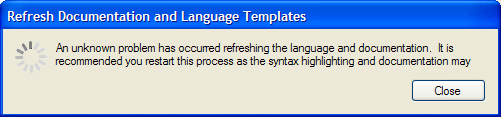
Klepto:
GFK has been suggesting the same thing to me recently - I'll take a futher look, but can't promise anything.
Thanks for refeshing me on the error. I'll re-check my code and get back to you.
Alright - added back the code to highlight Namespaces, Mods, Types, Functions and Identifiers - runs without any noticeable speed issues. Not too bad at all.
Functions and Identifiers represent all (plus all the additional ones that I scan) of the keywords shown in the BlitzMax IDE - so everything you will expect! Yay.
Still looking at your other issue Klepto - check you e-mails!
Is this now a new version or another privat beta test for klepto only? At the moment i have a notepad with a miniparser here. :)
Abrexxes, Not at all - If you would like to help try and fix the issue, I'm more than happy to give you a pre-release! Let me know.
Guys, give this a go - download this
update and unpack it into your base Project Studio folder (c:\program files\madisoft software\Project Studio 2007 Express\) and restart the program. Re-run the Documentation and Language refresh. If the error occurs click on the View Log button which will show you the error that occured.
Another thing you could try is renaming your base mods temporarely to disable them ie. keep BRL, rename the rest. Give the documentation and language templates a refresh and see if an error occurs. If not move on to the next mod ie. PUB and so on one by one. If you find one that doesn't work let me know. I'm going to review my code to see if I can do something to identify the problem - might try a log file.
After installing the copy in the post listed at the top of this thread, and then the update mentioned in your last message, I get the following problem:
Still almost no keywords detected.
When I try to rebuild the intellisense language definitions, it stops with an error:
- StackTrace ---------------------------------------------------------
Assert: docbmxfile - docPath in Select Case Kind ELSE
at PlugIns.Framework.MakeDocs.DocBmxFile(String filePath, String modId, String docPath)
at PlugIns.Framework.MakeDocs.DocModDefinition(Boolean forceFullRebuild)
at PlugIns.Framework.MakeDocs.Refresh(Boolean forceFullRebuild)
at PlugIns.Gui.Options.RefreshDocumentationLanguage.bkgWorker_DoWork(Object sender, DoWorkEventArgs e)
at System.ComponentModel.BackgroundWorker.OnDoWork(DoWorkEventArgs e)
at System.ComponentModel.BackgroundWorker.WorkerThreadStart(Object argument)
-- Operating System ---------------------------------------------------
OS Name: Microsoft Windows XP Professional
Version: 5.1.2600.131072
Total Physical Memory: 2146725888
Available Physical Memory: 1393958912
Total Virtual Memory: 2147352576
Available Virtual Memory: 1897189376
-- Project Studio System ----------------------------------------------
ProjectStudio.System.dll, Version: 1.0.37.0
ProjectStudio.PlugIn.BlitzBasic.dll, Version: 1.0.24.0
ProjectStudio.PlugIn.BlitzMax.dll, Version: 1.0.12.0
ProjectStudio.PlugIn.Common.dll, Version: 1.0.37.0
ProjectStudio.PlugIn.Web.dll, Version: 1.0.4.0
It does detect the installed BlitzMax modules, so it's definitely pointing to the right blitzmax folder....
I using BMax's default IDE and large files load slowly and sometimes even typing in large files is slow due to code highlighting.
This is mind-boggling. Why are you not using BLIde? Not to derail, because Project Studio Express may be a great product (I haven't used it), but BLIde is fantastic and has been available for a long time. I can't believe anyone manages to put up with the default IDE long enough to produce a large project.
SpaceAce
I'm getting the same documentation error as klepto. Log as follows:
Assert: docbmxfile - docPath in Select Case Kind ELSE-- StackTrace ---------------------------------------------------------
Assert: docbmxfile - docPath in Select Case Kind ELSE
at PlugIns.Framework.MakeDocs.DocBmxFile(String filePath, String modId, String docPath)
at PlugIns.Framework.MakeDocs.DocModDefinition(Boolean forceFullRebuild)
at PlugIns.Framework.MakeDocs.Refresh(Boolean forceFullRebuild)
at PlugIns.Gui.Options.RefreshDocumentationLanguage.bkgWorker_DoWork(Object sender, DoWorkEventArgs e)
at System.ComponentModel.BackgroundWorker.OnDoWork(DoWorkEventArgs e)
at System.ComponentModel.BackgroundWorker.WorkerThreadStart(Object argument)
-- Operating System ---------------------------------------------------
OS Name: Microsoft Windows XP Home Edition
Version: 5.1.2600.131072
Total Physical Memory: 536240128
Available Physical Memory: 99524608
Total Virtual Memory: 2147352576
Available Virtual Memory: 1884815360
-- Project Studio System ----------------------------------------------
ProjectStudio.System.dll, Version: 1.0.37.0
ProjectStudio.PlugIn.BlitzBasic.dll, Version: 1.0.24.0
ProjectStudio.PlugIn.BlitzMax.dll, Version: 1.0.12.0
ProjectStudio.PlugIn.Common.dll, Version: 1.0.37.0
ProjectStudio.PlugIn.Web.dll, Version: 1.0.4.0
(Unfortunately, I only have my old laptop to test on right now, but I somehow doubt conditions will change based on system specs)
This is mind-boggling. Why are you not using BLIde? Not to derail, because Project Studio Express may be a great product (I haven't used it), but BLIde is fantastic and has been available for a long time. I can't believe anyone manages to put up with the default IDE long enough to produce a large project.
I've been using Crimson Editor, as BlIde's means of managing files and whatnot is absolutely absurd and pisses me off to no end. The reason I'm responding to this at all is because you seem to give the impression that the only reasonable option next to the default IDE, up until now, has been BlIde.
Oh, in case it makes any difference: I did install Project studio in a non-standard folder:
c:\code\ProjectStudio
My BlitzMax folder is c:\code\BlitzMax
Thanks guys! Should help me out. Will get back to you soon.
IDEs:
From my point of view the one reason I started this program (almost 3 years ago!), was to provide intellisense for my programing. I use VB6, VBA and VS2005 and without intellisense, it is much harder to understand any language. In the long run I wanted something that felt familiar (VS), so this is based on it. I have tried a number of IDEs - even buying some of them, but I always come back to this environment.
I would love everyone to use mine, but like me you feel comfortable with something. I wish Ziggy all the best with Blide (and anyone else for that matter)- I know how hard it is to get it right!
Advertisement:
I do feel though the full Solution Management in the Professional version will blow anything else out of the water! If you want a preview load out the express versions of VS - that's what I'm aiming for - Multiple projects, multiple file, full control.
Programming:
Is it Murphys lore applying that after many months of testing as soon as someone else uses the program - it doesn't work!!! Arr....
Ok - found it! I'd partially replicated Mark's makedocs code and (stupidly) left the exception handlers in (should have made then write to the debug output - what was I thinking!). Hopefully that means it will still work Ok - will have a new update available in a couple of minutes.
I guess the other question is why I or the other testers haven't seen it! I'm guessing it probably relates to a non BRL/PUB/AXE/BAH mods.
Guys, give this new
update a go. As before unpack it into your base Project Studio folder (c:\program files\madisoft software\Project Studio 2007 Express\) and restart the program. Re-run the Documentation and Language refresh. If the error occurs click on the View Log button which will show you the error that occured.
Couple of other things:
- You can install anywhere on the local drive
- Once (hopefully) the thing refreshes, the intellisense will be working. The other change here will see more keywords highlighted as requested by GFK, Klepto and others.
That solves the modules issue.
So, what about projects/solutions? A Visual Studio-alike isn't worth a whole lot without that.
BlIde's means of managing files and whatnot is absolutely absurd and pisses me off to no end.
Hey that hurts!! BLIde will have solution explorer in next version. (
http://www.blitzmax.com/logs/userlog.php?user=6809&log=1528 and
http://www.blitzmax.com/logs/userlog.php?user=6809&log=1474 )
Back on topic, just wanted to say I also wish Matt all the best with Project Studio IDE, it looks awesome, I use it for B3D and it works great on my computer, and honestly the more options for the users to choose, the best for everyone!
EDIT: (now I promise I will not use Project Studio IDE threads any more to talk about BLIde, it will not be easy, but I'll do it :D )
Noel - I wanted the Express version to give everyone an opportunity to use the environment and enjoy their development time - I guess something for the community if you will, plus my way to give back you everyone for the enjoyment I get coming here everyday. Obviously, once everyone see how great it is, they will hopefully go for the Professional version! Yes there will be a cost, but only really to (hopefully one day) cover my costs of purchasing a number of controls and hosting a website (all up I've spent approx. $1500AU - don't tell the wife).
BTW, does it all appear to work OK - all the intellisense, tooltips, help, options etc??
Ziggy - thanks mate! where like the IDE brothers or something like that! Yep options gives variety and something for everyone.
hi, update2 , same problems.
Illegales Zeichen im Pfad.
   bei System.IO.Path.CheckInvalidPathChars(String path)
   bei System.IO.Path.Combine(String path1, String path2)
   bei PlugIns.Framework.MakeDocs.DocBmxFile(String filePath, String modId, String docPath)
   bei PlugIns.Framework.MakeDocs.DocBmxFile(String filePath, String modId, String docPath)
   bei PlugIns.Framework.MakeDocs.DocModDefinition(Boolean forceFullRebuild)
   bei PlugIns.Framework.MakeDocs.Refresh(Boolean forceFullRebuild)
   bei PlugIns.Gui.Options.RefreshDocumentationLanguage.bkgWorker_DoWork(Object sender, DoWorkEventArgs e)
   bei System.ComponentModel.BackgroundWorker.OnDoWork(DoWorkEventArgs e)
   bei System.ComponentModel.BackgroundWorker.WorkerThreadStart(Object argument)

-- Operating System ---------------------------------------------------
OS Name: Microsoft Windows XP Professional
Version: 5.1.2600.131072
Total Physical Memory: 1073201152
Available Physical Memory: 641331200
Total Virtual Memory: 2147352576
Available Virtual Memory: 1871450112

-- Project Studio System ----------------------------------------------
ProjectStudio.System.dll, Version: 1.0.37.0
ProjectStudio.PlugIn.BlitzBasic.dll, Version: 1.0.24.0
ProjectStudio.PlugIn.BlitzMax.dll, Version: 1.0.12.0
ProjectStudio.PlugIn.Common.dll, Version: 1.0.37.0
ProjectStudio.PlugIn.Web.dll, Version: 1.0.4.0
Abrexxes - give me a sec, just compiling up another one for you to try.
Ok - download this
version. Just unpack onto your desktop and run the refresh.
Good News: With the second update the error was gone, and I have now complete intellisense and highlighting.
Some issues are still in it:
- If I have all my modules checked for intellisense then the document is not highlighted, maybe a limitation of keywords?
- Also there is no scopecheck for the keywords, so I have a variable called 'move' (type of float) and the intellisense tooltip shows me that this is a method in one of my modules. (MiniB3D.CameraController.Move() )
At least highlighting is functional now :)
Hi, error at start + the same problems.
Take your time and relax. ;)

-- StackTrace ---------------------------------------------------------
Illegales Zeichen im Pfad.
   bei System.IO.Path.CheckInvalidPathChars(String path)
   bei System.IO.Path.GetDirectoryName(String path)
   bei PlugIns.Framework.MakeDocs.NodeUrl(ModuleDocItem node)
   bei PlugIns.Framework.MakeDocs.DocBmxFile(String filePath, String modId, String docPath)
   bei PlugIns.Framework.MakeDocs.DocBmxFile(String filePath, String modId, String docPath)
   bei PlugIns.Framework.MakeDocs.DocModDefinition(Boolean forceFullRebuild)
   bei PlugIns.Framework.MakeDocs.Refresh(Boolean forceFullRebuild)
   bei PlugIns.Gui.Options.RefreshDocumentationLanguage.bkgWorker_DoWork(Object sender, DoWorkEventArgs e)
   bei System.ComponentModel.BackgroundWorker.OnDoWork(DoWorkEventArgs e)
   bei System.ComponentModel.BackgroundWorker.WorkerThreadStart(Object argument)

-- Operating System ---------------------------------------------------
OS Name: Microsoft Windows XP Professional
Version: 5.1.2600.131072
Total Physical Memory: 1073201152
Available Physical Memory: 634945536
Total Virtual Memory: 2147352576
Available Virtual Memory: 1869230080

-- Project Studio System ----------------------------------------------
ProjectStudio.System.dll, Version: 1.0.38.0
ProjectStudio.PlugIn.BlitzBasic.dll, Version: 1.0.24.0
ProjectStudio.PlugIn.BlitzMax.dll, Version: 1.0.13.0
ProjectStudio.PlugIn.Common.dll, Version: 1.0.37.0
ProjectStudio.PlugIn.Web.dll, Version: 1.0.4.0
Excellent! Finally got there - thanks for your patience and testing.
If I have all my modules checked for intellisense then the document is not highlighted, maybe a limitation of keywords?
Sorry not sure what you mean by this - does a restart fix it or did you just un-select one item and now it works?? If so try-reselecting all again. Let me know how you go please.
Also there is no scopecheck for the keywords, so I have a variable called 'move' (type of float) and the intellisense tooltip shows me that this is a method in one of my modules. (MiniB3D.CameraController.Move() )
As explained previously, not much I can do about this as the syntax highlighting is automated. Certainly one of the reasons I turned it off as it's more of a distraction.
If I select all modules in the intellisense options section then my document doesn't get highlighted at all. If I select only some of the modules the highlighting works until I select a certain number of modules, then the IDE again refuses to highlight anything. Restarting or something else doesn't change anything.
It seems that your intellisense system is limited by the amount of items it is allowed to have highlighted and refuses to work if this amount is reached.
As explained previously, not much I can do about this as the syntax highlighting is automated. Certainly one of the reasons I turned it off as it's more of a distraction.
No problem, I just want to say it. And as far as I know you could check the scope before a tooltip pops up. At least it is so when using formaly Compona (yet Puzzle Framework) Syntaxbox. I don't know how ActiPro handles this.
Abrexxes - don't worry about the first error 'plugin' - its a version conflict. Sorry, I need to go to bed - leave any info and I'll check back tomorrow.
Ok - download
this version. Just unpack onto your desktop and run the refresh.
Any chance you can compile this on the Mono framework?
Would be nice to see some new IDE's appear for linux/mac as well and .NET (Mono) was intended to be platform independent after all :p
Jim,
I've had a little bit of a look at this, but currently isn't possible with the components that I use. Would love to though....
-- StackTrace ---------------------------------------------------------
Illegales Zeichen im Pfad.
   bei System.IO.Path.CheckInvalidPathChars(String path)
   bei System.IO.Path.GetDirectoryName(String path)
   bei PlugIns.Framework.MakeDocs.NodeUrl(ModuleDocItem node)
   bei PlugIns.Framework.MakeDocs.DocBmxFile(String filePath, String modId, String docPath)
   bei PlugIns.Framework.MakeDocs.DocBmxFile(String filePath, String modId, String docPath)
   bei PlugIns.Framework.MakeDocs.DocModDefinition(Boolean forceFullRebuild)
   bei PlugIns.Framework.MakeDocs.Refresh(Boolean forceFullRebuild)
   bei PlugIns.Gui.Options.RefreshDocumentationLanguage.bkgWorker_DoWork(Object sender, DoWorkEventArgs e)
   bei System.ComponentModel.BackgroundWorker.OnDoWork(DoWorkEventArgs e)
   bei System.ComponentModel.BackgroundWorker.WorkerThreadStart(Object argument)

-- Operating System ---------------------------------------------------
OS Name: Microsoft Windows XP Professional
Version: 5.1.2600.131072
Total Physical Memory: 1073201152
Available Physical Memory: 719106048
Total Virtual Memory: 2147352576
Available Virtual Memory: 1865228288

-- Project Studio System ----------------------------------------------
ProjectStudio.System.dll, Version: 1.0.38.0
ProjectStudio.PlugIn.BlitzBasic.dll, Version: 1.0.24.0
ProjectStudio.PlugIn.BlitzMax.dll, Version: 1.0.13.0
ProjectStudio.PlugIn.Common.dll, Version: 1.0.37.0
ProjectStudio.PlugIn.Web.dll, Version: 1.0.4.0
I try nothing then to get pub and brl..no other mods.
Also there is no scopecheck for the keywords, so I have a variable called 'move' (type of float) and the intellisense tooltip shows me that this is a method in one of my modules. (MiniB3D.CameraController.Move() )
Welp, that bit there killed my interest in this. Pretty interface, but the intellisense is implemented horribly
and apparently projects aren't going to be available for some time (and if there isn't a demo to see the project management, then there's zero reason to even consider buying the full version) (beta has more or less proven that project management is working). Back to Crimson.
OK --
After the 2nd update, everything appeared to work except for one minor thing:
"Warning: A Problem has occured loading your configuration settings. As a result one or more configuration items may have been reset back to their default settings"
After clicking "OK" the program starts and appears to be fully functional.
Then I noticed that you posted another update (#3), so I installed that one as well -- that one made things worse: when I start the program, it now gives
4 popups with the following notice:
"unable to load one or more of the requested type. Retrieve the LoaderExceptions property for more information"
When I click OK it reappears, 4 times in a row. Worse, the pop-up appears *behind* the splash screen, and needs to be dragged into view each time before I can clikc OK. (or press enter 4 times, the window does have focus)
After the 4th notice the IDE appears, which still gives the same error:
"Warning: A Problem has occured loading your configuration settings. As a result one or more configuration items may have been reset back to their default settings"
Aside from the problems mentioned above, it does appear functional... Which brings me to the following observations:
- I really think there should be a button in the toolbar to collapse/uncollapse all functions in a file in one go. Now it's a mouse click and two-menu's deep to do either one... Or alternatively a use double-shortcut like CTRL-M + CTRL-O / CTRL-M + CTRL-L
(The letters used for the shortcut appear entirely random, and not easy-to-remember either)
- After (finally) managing to collapse all functions, the scrollbar next to the code does not adjust itself. In a long source file, you'll all of a sudden look at an empty screen with the actually collapsed source way up high off-screen. You should probably move the cursor line up with the collapsed text, so the active line that's visible is now the function declaration of whatever function you were in at the time you initiated the collapse
- It would be nice if you had the ability to make your own color template. For example, I like the BlitzMax colors overall, but also like the ability of the B+ theme to have the numbers highlighted in a different color. There doesn't appear to be a way to do both (use the Bmax colors, but also highlight the numbers)
- One thing odd I noticed with the keyword highlighting:
?Win32
Extern "win32"
Function SetWindowTextA:Int(hWnd:Int, lpString:Byte Ptr)
Function GetActiveWindow:Int()
End Extern
?
- ?win32 is yellow
- The Extern and Function definitions are yellow too
- the closing ? is black (???)
- The plugin manager:
The list is shown in regular black-on-white, but the highlighted line is black-on-dark-blue and therefor impossible to read. You need to click on one of the other items in order to be able to read the first line, since it is highlighted by default.
Xlsior,
The problem loading the configuration is a monir inssue that can really be ignored for the most part.
The unable to load requested type issues are caused by configuration issues due to unexpected versions of the components - the test builds are not a properly tested installation. ;) But I do need to look at that message and provide something once the IDE is loaded.
The right-click menu contains options that allow to collapse and expand. Thanks for the suggestion of moving the cursor - I'll take a look at what I can do.
You will eventually add the ability to create your own Font and Color templates. I also have to add an option to allow yo to color conditional compiler tags - these were only recently added. You should be able to change the numbers to whatever color your wish. Take a look at Options > Environment > Font and Colors and select the required template from the List.
The plugin list I can take a look at.
I've been using Crimson Editor, as BlIde's means of managing files and whatnot is absolutely absurd and pisses me off to no end. The reason I'm responding to this at all is because you seem to give the impression that the only reasonable option next to the default IDE, up until now, has been BlIde.
Perhaps not the "only", but, in my opinion, the best. BLIde is fast (on my PC, at least), stable (on my PC, at least), free, and in active development. Any shortcomings BLIde may have that are within ziggy's power to fix, I believe he will fix.
BLIde is robust, free, well-known, and doesn't have problems with large files, which is what Grey Alien mentioned in his post. Therefore, I am surprised to hear that Grey Alien is still using the default IDE. Because I think BLIde is the best solution, I am more surprised to hear that he isn't using BLIde than any other individual solution. Grey Alien is, of course, free to prefer whichever editor he chooses, but I didn't feel it necessary to list every BlitzMax-capable editor I am aware of.
SpaceAce
I never get an app window, it crashes right after the title loading window says "starting program"
-- StackTrace ---------------------------------------------------------
An unhandled system exception has occurred.  Review the error message below for further information
System.InvalidOperationException: An error occurred creating the form. See Exception.InnerException for details.  The error is: Attempted to read or write protected memory. This is often an indication that other memory is corrupt. ---> System.AccessViolationException: Attempted to read or write protected memory. This is often an indication that other memory is corrupt.
   at TD.SandDock.DockControl.֩(Boolean ֪)
   at ProjectStudio.Gui.Forms.Ide.InitialiseForm()
   --- End of inner exception stack trace ---
   at My.MyProject.MyForms.Create__Instance__[T](T Instance)
   at My.MyApplication.OnCreateMainForm()
   at Microsoft.VisualBasic.ApplicationServices.WindowsFormsApplicationBase.OnRun()
   at Microsoft.VisualBasic.ApplicationServices.WindowsFormsApplicationBase.DoApplicationModel()

-- Operating System ---------------------------------------------------
OS Name: Microsoft® Windows Vista™ Ultimate
Version: 6.0.6000.0
Total Physical Memory: 3219062784
Available Physical Memory: 1479319552
Total Virtual Memory: 8796092891136
Available Virtual Memory: 8795405721600

-- Project Studio System ----------------------------------------------
ProjectStudio.System.dll, Version: 1.0.38.0
ProjectStudio.PlugIn.BlitzBasic.dll, Version: 1.0.24.0
ProjectStudio.PlugIn.BlitzMax.dll, Version: 1.0.13.0
ProjectStudio.PlugIn.Common.dll, Version: 1.0.37.0
ProjectStudio.PlugIn.Web.dll, Version: 1.0.4.0
it's looks like the same type error that Blide was getting a short while before on 64 bit OSs. ziggy took care of it.
dmaz,
I've just been to the component makers website and he released an update for 64bit issues. I believe Ziggy uses the same control, so he may had got a pre-release update.
I'll get another build out sometime within the next day.
Hi matt. I'm loving Project Studio but I really, really want a Project Manager. Any chance of joining the Pro beta test? :)
*sorry* delete this
siread,
I'm pretty right for testers at the moment, but I'll see what I can organise for everyone to take a look at the Project Management side of things sometime soon.
Apart from that I'll put you on my list for any future testing positions. Thanks for enquiring!
Ok, no worries. Looking forward to the pro release. :)
dmaz (or anyone running x64), can you please download and unzip the following to your destop to validate the 64bit issue is fixed please:
download that seems to fix it... all ok now.
Hi!
Just a little note, it seems to have trouble formatting hex numbers:

Not too bothered as I keep these arrays in a separate file but I thought I would let you know.
Cheers
dmaz, thanks mate for testing - glad to hear all is Ok.
Big& - thanks I'll take a look at what's happening there (not highlighting hex numbers correctly by the looks). Updated: Fixed the issue.
I should have another version available soon (the next day or so - just making some final changes).
So what's happening with the pro version?
Last time I heard from Matt he said he still wasn't happy with a few bits, I think it was mostly pertaining to the intellisense stuff as its quite a complex business in Blitzmax.
That said....
I've written about 200K+ of code in the beta version - some of it in XP, some of it in Vista and I can't think of a single problem I've encountered that should be holding off release of the Pro version.
Of course there'll be a few problems... a fresh pair of eyes will always see something that long-time testers missed. But the point is, its very usable.
Matt??
I use the Standard version, which has the BlitzMax plugin... As I mentioned in another thread, I'd be lost without this baby, well, not lost... just gone! :)
If I remember rightly, the standard version doesn't project management though, right? A must for me.
Guys,
Real work has held me back a little in the last few months, but this is coming to an end in the next few weeks. I have been working on a couple of things for the BlitzMax plugin which need to be finalised.
Saying that the Professional version for Blitz3d is done, just waiting for the work thing to slowdown so it can finalise the update my website to get it out.
Thanks to all those who have supported the program (especially GFK and Wiebo) - the wait will be over soon.
Yes, the Pro vesion has the full project management plus one or two other things.
Well, Matt, thank YOU for a great IDE. I was just happy to help and see this thing grow to the product it is now.
I've been programming these last two weeks and can't find a single thing wrong with it (according to the ways I work and the needs I have of course)
Good to see you're still working on it.