Project Studio Express for BlitzMax

Miscellaneous Forums/General Discussion/Project Studio Express for BlitzMax

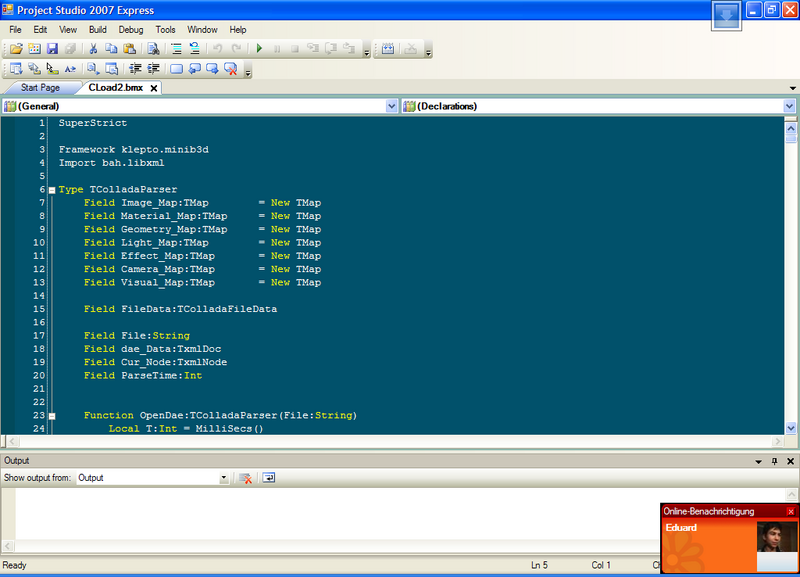
Welcome to Project Studio 2007 Express, the Advanced Integrated Development Environment for BlitzMax (and Blitz3d/Basic). This IDE has been created to provide the best developer experience available and is based on Visual Studio 2005.

The express version provides the same experience as the standard Blitz environments and has the following features:

* Advanced editor with all the features you would expect including editable color syntax highlighting, code outlining (folding), split views, line indicators, bookmarks, code snippets etc
* Full intellisense integration (the best currently available!)
* Flexible docking windows and toolbars and tabbed editing
* Integrated BlitzMax and Blitz3d/Basic language help
* Built-in compiler and debugger (utilises the external debugger for Blitz3d/Basic)
* Plug-in architecture to extend the environment with more languages

Prior users
For those who have used the Blitz3d/Basic version, you will be pleased to know the intellisense has been upgraded to include all open files within the IDE (based on the language of the active file), providing an even better editing experience!

In hindsight, you may also want to remove your current UserSettings.pssettings file from My Documents/Project Studio 2007/settings folder if your current version of from the orginal release

Professional version:
The professional version will be available in the next couple of weeks and includes many of the advanced features you require to manage your projects:

* Solution/Project management system
* TaskLists and User Comments
* Solution Explorer

Once the Professional version is available, you will (until the end of the year) receive a full Blitz3d/Basic plug-in licence for free when you purchase Project Studio 2007 Professional for BlitzMax! More details will be available at the time of release.

Project Studio 2007 will run on Windows 2000, XP and Vista platforms and requires Microsoft.Net 2.0.

Please post any questions here, send an email to support@... or why not join the Project Studio forum.

Download now!

[Update: New version available that fixes the issues below]
Downloading now and will test it with my current project. :)

Crashed when I tried to set the blitzmax path.

See the end of this message for details on invoking 
just-in-time (JIT) debugging instead of this dialog box.

************** Exception Text **************
System.InvalidCastException: Conversion from string "C:\Program Files\BlitzMax\mod" to type 'Integer' is not valid. ---> System.FormatException: Input string was not in a correct format.
   at Microsoft.VisualBasic.CompilerServices.Conversions.ParseDouble(String Value, NumberFormatInfo NumberFormat)
   at Microsoft.VisualBasic.CompilerServices.Conversions.ToInteger(String Value)
   --- End of inner exception stack trace ---
   at Microsoft.VisualBasic.CompilerServices.Conversions.ToInteger(String Value)
   at PlugIns.Framework.Mods.Save()
   at PlugIns.Gui.Options.General.txtBlitzMaxPath_TextChanged(Object sender, EventArgs e)
   at System.Windows.Forms.Control.OnTextChanged(EventArgs e)
   at System.Windows.Forms.TextBoxBase.OnTextChanged(EventArgs e)
   at System.Windows.Forms.Control.set_Text(String value)
   at System.Windows.Forms.TextBoxBase.set_Text(String value)
   at System.Windows.Forms.TextBox.set_Text(String value)
   at PlugIns.Gui.Options.General.btnBlitzMaxBrowse_Click(Object sender, EventArgs e)
   at System.Windows.Forms.Control.OnClick(EventArgs e)
   at System.Windows.Forms.Button.OnClick(EventArgs e)
   at System.Windows.Forms.Button.OnMouseUp(MouseEventArgs mevent)
   at System.Windows.Forms.Control.WmMouseUp(Message& m, MouseButtons button, Int32 clicks)
   at System.Windows.Forms.Control.WndProc(Message& m)
   at System.Windows.Forms.ButtonBase.WndProc(Message& m)
   at System.Windows.Forms.Button.WndProc(Message& m)
   at System.Windows.Forms.Control.ControlNativeWindow.OnMessage(Message& m)
   at System.Windows.Forms.Control.ControlNativeWindow.WndProc(Message& m)
   at System.Windows.Forms.NativeWindow.Callback(IntPtr hWnd, Int32 msg, IntPtr wparam, IntPtr lparam)


************** Loaded Assemblies **************
mscorlib
    Assembly Version: 2.0.0.0
    Win32 Version: 2.0.50727.312 (rtmLHS.050727-3100)
    CodeBase: file:///C:/Windows/Microsoft.NET/Framework/v2.0.50727/mscorlib.dll
----------------------------------------
ProjectStudio2007
    Assembly Version: 1.0.36.0
    Win32 Version: 1.0.36.0
    CodeBase: file:///C:/Applications/Coding%20IDE's/Project%20Studio%20IDE%20Express/ProjectStudio2007.exe
----------------------------------------
Microsoft.VisualBasic
    Assembly Version: 8.0.0.0
    Win32 Version: 8.0.50727.312 (rtmLHS.050727-3100)
    CodeBase: file:///C:/Windows/assembly/GAC_MSIL/Microsoft.VisualBasic/8.0.0.0__b03f5f7f11d50a3a/Microsoft.VisualBasic.dll
----------------------------------------
System
    Assembly Version: 2.0.0.0
    Win32 Version: 2.0.50727.312 (rtmLHS.050727-3100)
    CodeBase: file:///C:/Windows/assembly/GAC_MSIL/System/2.0.0.0__b77a5c561934e089/System.dll
----------------------------------------
System.Windows.Forms
    Assembly Version: 2.0.0.0
    Win32 Version: 2.0.50727.312 (rtmLHS.050727-3100)
    CodeBase: file:///C:/Windows/assembly/GAC_MSIL/System.Windows.Forms/2.0.0.0__b77a5c561934e089/System.Windows.Forms.dll
----------------------------------------
System.Drawing
    Assembly Version: 2.0.0.0
    Win32 Version: 2.0.50727.312 (rtmLHS.050727-3100)
    CodeBase: file:///C:/Windows/assembly/GAC_MSIL/System.Drawing/2.0.0.0__b03f5f7f11d50a3a/System.Drawing.dll
----------------------------------------
System.Runtime.Remoting
    Assembly Version: 2.0.0.0
    Win32 Version: 2.0.50727.312 (rtmLHS.050727-3100)
    CodeBase: file:///C:/Windows/assembly/GAC_MSIL/System.Runtime.Remoting/2.0.0.0__b77a5c561934e089/System.Runtime.Remoting.dll
----------------------------------------
ProjectStudio.System
    Assembly Version: 1.0.36.0
    Win32 Version: 1.0.36.0
    CodeBase: file:///C:/Applications/Coding%20IDE's/Project%20Studio%20IDE%20Express/ProjectStudio.System.DLL
----------------------------------------
System.Web
    Assembly Version: 2.0.0.0
    Win32 Version: 2.0.50727.833 (QFE.050727-8300)
    CodeBase: file:///C:/Windows/assembly/GAC_32/System.Web/2.0.0.0__b03f5f7f11d50a3a/System.Web.dll
----------------------------------------
System.Configuration
    Assembly Version: 2.0.0.0
    Win32 Version: 2.0.50727.312 (rtmLHS.050727-3100)
    CodeBase: file:///C:/Windows/assembly/GAC_MSIL/System.Configuration/2.0.0.0__b03f5f7f11d50a3a/System.Configuration.dll
----------------------------------------
System.Xml
    Assembly Version: 2.0.0.0
    Win32 Version: 2.0.50727.312 (rtmLHS.050727-3100)
    CodeBase: file:///C:/Windows/assembly/GAC_MSIL/System.Xml/2.0.0.0__b77a5c561934e089/System.Xml.dll
----------------------------------------
Divelements.WizardFramework
    Assembly Version: 1.1.0.1
    Win32 Version: 1.1.0.1
    CodeBase: file:///C:/Applications/Coding%20IDE's/Project%20Studio%20IDE%20Express/Divelements.WizardFramework.DLL
----------------------------------------
ActiproSoftware.SyntaxEditor.Net20
    Assembly Version: 4.0.262.0
    Win32 Version: 4.0.262.0
    CodeBase: file:///C:/Applications/Coding%20IDE's/Project%20Studio%20IDE%20Express/ActiproSoftware.SyntaxEditor.Net20.DLL
----------------------------------------
ActiproSoftware.Shared.Net20
    Assembly Version: 1.0.93.0
    Win32 Version: 1.0.93.0
    CodeBase: file:///C:/Applications/Coding%20IDE's/Project%20Studio%20IDE%20Express/ActiproSoftware.Shared.Net20.DLL
----------------------------------------
System.Design
    Assembly Version: 2.0.0.0
    Win32 Version: 2.0.50727.312 (rtmLHS.050727-3100)
    CodeBase: file:///C:/Windows/assembly/GAC_MSIL/System.Design/2.0.0.0__b03f5f7f11d50a3a/System.Design.dll
----------------------------------------
System.Web.Services
    Assembly Version: 2.0.0.0
    Win32 Version: 2.0.50727.312 (rtmLHS.050727-3100)
    CodeBase: file:///C:/Windows/assembly/GAC_MSIL/System.Web.Services/2.0.0.0__b03f5f7f11d50a3a/System.Web.Services.dll
----------------------------------------
ActiproSoftware.WinUICore.Net20
    Assembly Version: 1.0.93.0
    Win32 Version: 1.0.93.0
    CodeBase: file:///C:/Applications/Coding%20IDE's/Project%20Studio%20IDE%20Express/ActiproSoftware.WinUICore.Net20.DLL
----------------------------------------
Madisoft.Controls.WebBrowser
    Assembly Version: 1.0.1.0
    Win32 Version: 1.0.1.0
    CodeBase: file:///C:/Applications/Coding%20IDE's/Project%20Studio%20IDE%20Express/Madisoft.Controls.WebBrowser.DLL
----------------------------------------
SandBar
    Assembly Version: 1.4.2.1
    Win32 Version: 1.4.2.1
    CodeBase: file:///C:/Applications/Coding%20IDE's/Project%20Studio%20IDE%20Express/SandBar.DLL
----------------------------------------
RssToolkit
    Assembly Version: 1.0.0.1
    Win32 Version: 1.0.0.1
    CodeBase: file:///C:/Applications/Coding%20IDE's/Project%20Studio%20IDE%20Express/RssToolkit.DLL
----------------------------------------
SandDock
    Assembly Version: 3.0.0.1
    Win32 Version: 3.0.0.1
    CodeBase: file:///C:/Applications/Coding%20IDE's/Project%20Studio%20IDE%20Express/SandDock.DLL
----------------------------------------
ProjectStudio.PlugIn.BlitzBasic
    Assembly Version: 1.0.23.0
    Win32 Version: 1.0.23.0
    CodeBase: file:///C:/Applications/Coding%20IDE's/Project%20Studio%20IDE%20Express/PlugIns/ProjectStudio.PlugIn.BlitzBasic.dll
----------------------------------------
ProjectStudio.PlugIn.BlitzMax
    Assembly Version: 1.0.11.0
    Win32 Version: 1.0.11.0
    CodeBase: file:///C:/Applications/Coding%20IDE's/Project%20Studio%20IDE%20Express/PlugIns/ProjectStudio.PlugIn.BlitzMax.dll
----------------------------------------
ProjectStudio.PlugIn.Common
    Assembly Version: 1.0.36.0
    Win32 Version: 1.0.36.0
    CodeBase: file:///C:/Applications/Coding%20IDE's/Project%20Studio%20IDE%20Express/PlugIns/ProjectStudio.PlugIn.Common.dll
----------------------------------------
ProjectStudio.PlugIn.Web
    Assembly Version: 1.0.4.0
    Win32 Version: 1.0.4.0
    CodeBase: file:///C:/Applications/Coding%20IDE's/Project%20Studio%20IDE%20Express/PlugIns/ProjectStudio.PlugIn.Web.dll
----------------------------------------

************** JIT Debugging **************
To enable just-in-time (JIT) debugging, the .config file for this
application or computer (machine.config) must have the
jitDebugging value set in the system.windows.forms section.
The application must also be compiled with debugging
enabled.

For example:

<configuration>
    <system.windows.forms jitDebugging="true" />
</configuration>

When JIT debugging is enabled, any unhandled exception
will be sent to the JIT debugger registered on the computer
rather than be handled by this dialog box.


Seems to be running fine. It loaded my project 3600 lines of code very quickly but with no highlighting. I had to manually refresh the intellisense and highlighting from within options but that wasn't a problem at all.

Will use this for the time being to give a thorough test and report any problems.

:)

Amon,

Did you set your path via the browse to the base BlitzMax directory??

Can you outline the steps that caused the error??

Everyone,

Just a couple of things:

* [BREAKING CHANGE]: If you have used the previous version, due to some recent changes component changes, once the IDE starts select Window > Reset Windows Layout. If you don't you may have some problems with the Find and Replace window and possibly the Locals as well.

* When you start up the for the first time (or set your BlitzMax path via the options), the intellisense will be automatically built (as required and if the path to BlitzMax is valid). Once this is complete, you will be right to go.

* Your initial launch of the program may be a little slow whilst the above happens, but will be fine after that.

* If you manually add mods, go into Options > Languages > BlitzMax > Mods > Documentation and Languages and refresh - this will build the help files and the language defs for the intellisense.

* With the intellisense, depending on your machine you may need to turn off mods which you don't use. Whilst it is pretty quick generally, if you have all turned on it must scan 15000+ items. Some mods are turned off by default due to the serious large number of Consts (pub.directx and pub.win32 especially) available. One thing to note, the intellisense includes not only the default BlitzMax keywords, but just about everything that is public. You can update the intellisense list via > Languages > BlitzMax > Mods > Intellisense.

hmm, I get the same error as Amon when configuring the BMaxPath manually. The error tells something about C:\Program files\Blitzmax to int error. I have not used the Browse Button.

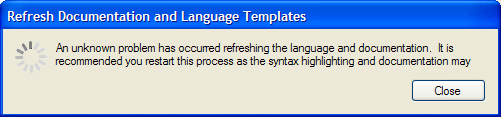
Also I have only a bit of highlighting for BMax. If I refresh intellisense etc I get this error after a couple of seconds:


The ide looks nice and clean, so I hope you could fix these bugs soon. I want to use it :).

Hi Matt. When the IDE started I went to tools, options and used the browse button to browse for the blitzmax directory. That's when the error popped up.

Hope that helps.

Klepto/Amon,

Thanks for the report - I hopefully should be able to relicate that. I think the secondary issue may be related to the path.

I've done and got done quite a bit of testing - sorry for these issues, but never seen the problem.

One question - where is your BlitzMax path??

My original Path is at 'D:\Blitzmax'

No Problem, I know how difficult it is to write these type pf programs, everything works and then after makeing it public one bug after another comes out ;).

OK new version up that fixes the above issue. Please re-download!

Thanks Klepto and Amon for your help.

Hi Matt!

I've been using this now for the last couple of hours. It seems rock solid.

I've downloaded the new version and can confirm that I no longer get the error when selecting the BlitzMax location.

Hi,

i get only this and must use the taskmanger to get back on my desktop.


on a second machine i get lots of error messages in the options pannel. Is there an errorlog somewhere?

bye

Edit: I get i work now and can reproduce.
-> Open the OPTIONS Dialog
-> Select CHANCEL
And you have the same error message. After having it one time, you have it at every start (Also after a new installation) I think that PSE have saved somewhere a damaged file that i can not find. :(


Abrexxes,

Go into My Documents/Project Studio 2007/Settings and delete the UserSettings.pssettings file.

There was a change to the configuration a while ago that relates to your error - You should be right after that.

It's been difficult keeping the settings correct as the program has been changing over the last few months. Now we are just about at the final release it should be right from now on. I didn't want users to have to setup their settings each time they install the program.

I get the same system error on my PC, and I haven't installed any previous versions. After the initial install it opened without errors, and it started OK. All I did then was point it to my Blitzmax & MinGW folders. (and looked at the other settings, but didn't change anything there)

There was no syntax highlighting yet, so I tried to exit / restart the program. From that moment on, it gives me the same popup that abrexxes posted above.

After clicking 'OK' it does give me the IDE, though.

a hand full of keywords are highlighted, but the vast majority is not.
(For example: one of my main code files only highlights the following 5 keywords: function, true, false, end if, end function. It doesn't even recognize just 'if' or 'graphics'.)

Oh, as far as a first impression of the program itself is concerned:

1) Pretty nice overall
2) Love the function folding
3) compared with the standard Blitzmax IDE, I miss having the list of blitz commands or program functions visible on the right side of the screen. It's much faster to jump to a function to click on it directly than to pull down a menu first and search for it in there.
4) a button to add a basic default 'new' file would be convenient, rather than having to pick a template each time...

Hi,

works now for me, on the second machine i have had the same as xlior (text was completely black) and there was never installed a previous version of PSE. (I have switched the Color Template to "Blitzmax")

Next time if i have an error like this, i send you the .pssetting file, so you can take a look. It seems that in some cases PSE save a corrupt file.

Anyway, a very nice IDE & thanks for support.

bye

Guys,

Check out the Options > Languages > BlitzMax > Mods section. The first thing you need is the list of mods on the Modules dialog.

You should then be able to rebuild your Documentation and Language templates from there (which will give you the intellisense). If this section is locked out, your path to BlitzMax is incorrect.

The keywords currently highlighted are the default keywords in BlitzMax (see the help). Once the intellisense is up and running you will see the rest are available (hover the mouse or set the cursor and press F1).

I'm currently reviewing the loading of the settings to be cover the error handling a little better (you will be notified something has happened once the program is loaded).

Let me know how that goes!

Once again I'm sorry for all the issues that have appeared - it unfortunately makes the product look rubbish, when it starts it does work very well.

Matt, sry but I get the same error as posted above.
I followed your description in the post above and all modules are recogniced fine. But while refreshing i still get the error and the highlighting looks like this:


Only the standard ones are highlighted,not a single keyword which is module dependend.

Klepto,

I have up-loaded a new version, please redownload and try again (it should now fix all your problems).

Before starting remove the <user>/My Documents/Project Studio 2007 folder. You will now be prompted to update your configuration etc.

Started new topic here: http://www.blitzbasic.com/Community/posts.php?topic=73989