My new DX10 system has ARRIVED!!!
Miscellaneous Forums/General Discussion/My new DX10 system has ARRIVED!!!
I got home to find a message from someone in my city saying they had my delivery - the carrier had delivered it to them today in error as part of another delivery.
I nearly cried as I did not know who this person was or where they were - they just said they would drop it around to me.
Anyway, within 5 minutes of me getting home, a bloke showed up with a big box for me - I've not even opened it yet.
Stay tuned for exciting news - I have to install B3D on it and do some benchmarking (assuming it works).
EDIT:
Oh my god - you will never believe how badly pack it is - I'm actually going to take pictures as evidence - I cannot belive the packaging.
In fact, part of the packaging is a small INT-AIN1-C internal card reader box (this cardboard box is about the size of a DVD drive) - that was the packaging for one entire side of the case. They put in an old spare internal card reader box. I thought it might have been a free gift.
The rest of the packaging was torn off chunks of foam rubber stuff that were just stuck in.
Honestly, I am not making this up - this is horror story stuff for a £1,400 system.
EDIT:
Luckily, they have repacked the PC in the original Aspire packaging that the PC case came in - so, it should be okay.
EDIT:
In fact, quite a nice touch - they have put packaging inside the PC case itself so that the graphics card and such are held in.
So, just the outer box that looked like it was packed by a 5 year old.
The professional wiring is really amazing - This thing looks really great internally.
It really does look the business internally - even more of a reason to go for a windowed case. Looks like a quality job.
So, your happy then? :)
I got the XFX 8800 GTX. I've heard people happy with that.
I'll probaby have it powered up in 15 mins or so - just checking through the array of gubbins that came with it.
Come on, fork over the pictures. You better take pictures of each step of unpacking/assembly/first boot.
Right, I am hitting the power button now. Praying has commenced.
Um, I turned it on - but no monitor output - there is power, no warning beeps - I didn't spot any activity from the HD light.
Potential sniffage here.
The keyboard is not active, but the mouse is getting power.
Mmm, not sure what to do.
.
Mmm, the motherboard LCS screen is saying 'CPU INIT' - not sure what that means? CPU initialising? Been saying it for 5 minutes.
.
omg puki !
please dont cry .
Erm, I can smell a dilemma here!
Dabz
sounds like an error when the BIOS is trying to connect to you cpu...
anyways.. best to check the manual on it..
probably just recheck that the cpu is firmly attached..
do these new board have a seperate power connector for the CPU as the older P4 boards do? Maybe it's something that simple, you never know, something came loose in transit perhaps?
First time I built my P4 I didn't even know this CPU power plug existed - there followed about an hour of worrying, cursing and swearing, followed by extreme relief once I'd realised my stupid mistake :)
Any new updates on this Puki?
I retried it again.
IT HAS BOOTED TO WINDOWS.
I REPEAT, IT AS BOOTED TO WINDOWS.
WOOO!
I NEARY HAD A HEART-ATTACK!
I guess it has booted to windows then! :D
Dabz
Damn!
CyberPower have put on their own 'Welcome to Microsoft' welcome thing - It tells me 'Let's spend a few minutes setting up your computer'. Probably going to ask me questions.
Potential sniffage.
Right, time to install Blitz3D.
It's like Eastenders with Puki as Pauline Fowler.
Didn't think DirectX 10 was fully available yet.
What does "Potential sniffage" mean anyhow???
What does "Potential sniffage" mean anyhow???
Data gathering, well, thats how I view it! :)
Dabz
Probably expecting something to blow...
or suck...
or both...
It means the potential to cry. Sniffage is sadness.
Blitz3D seems okay.
Now going to Large Quake 4 on there - will max everything up to the Large.
good luck... don't get disappointed now puki!! ;)
Quake 4 is just super great - I am running it in the Ultra high quality - the one that needs at least half a GB of graphics card memory. Everything maxed up.
Whole thing is smooth as hell - no noticeable stuttering for loading sections.
Not sure what to do now, could try Oblivion on it - see who lessons who.
.
Not sure what to do now, could try Oblivion on it - see who lessons who.
I'll be interested in the outcome of that! :)
Dabz
I'll do Oblivion Later.
For speed I am going to install FEAR - it is know to be one of the most demanding games when set to max.
The problem with Oblivion is I will have to fart about to get out of the dungeon to get to the outside world. I'll do that later.
FEAR is first.
Everything I am trying so far is unpatched - including Blitz3D - everything is just the original retail version.
I know there is a 8800 GTX patch for Quake 4. So, this card may go even faster. I've not yet tinkered with any card settings other than in game ones.
FEAR is one of those annyoing games that cannot be installed unless you install the version of DirectX it came with.
I've had to let it install an older version of DX9c - there will be later versions of DX9c.
This type of thing may prove annoying when Vista comes.
FEAR has it's own benchmarking demo thing to test the settings. I put everything up onto Maximum setting.
Result:
Min FPS 71
Average FPS 148
Maximum FPS 416
HELLO? Max FPS 416!!!
Download a game save for oblivion, then you can test the outdoors in all its glory without playing the first bit.
Glad you got your system, otherwise it would have been a cold xmas in the puki household :)
Forget Oblivion (it's too optimized :P) Put in Gothic 3 for the ultimate test.
I'm still confused though. Did I miss an old thread about this or something?
I am half-way through the Oblivion starter dungeon - will report later.
Will do G3 later too.
Yes, there is another thread.
Well, it has lessoned Oblivion.
You got all the driver settings cranked?
If not, report back when you try them games @ 16x Anisotrophic Filtering + 8x AntiAliasing please, I want to see how much these high-end cards suffer under such stress. ;/
I was on 16x AF and the highest each game would go for AA.
I just ran 3D Mark 2006 and got 9931 3DMarks.
SM2.0 - 4682
HDR/SM3.0 - 4815
CPU - 2062
lol, this is quite exciting, puki you should next make a computer game called `puki's pc shop` where micro-puki installs new pc hardware and tests how fast it is. It's a sure hit.
:-)
Congrats. Might take you a whole 6 months before you find a game that doesn't run great at full detail ;]
Some links that might help you determine problems that might happen after installing Vista:
Software compatibility chart -
http://www.iexbeta.com/wiki/index.php/Windows_Vista_RTM_Software_Compatibility_ListHardware compatibility chart -
http://www.iexbeta.com/wiki/index.php/Windows_Vista_RTM_Hardware_Compatibility_ListWindows Vista Upgrade Advisor -
http://www.microsoft.com/windowsvista/getready/upgradeadvisor/default.mspxThe upgrade advisor checks your installed hardware and software and seems to actually know a fair bit of what will and won't work.
.
I'm getting ready to install Gothic 3 - that will be a big test as it is more demanding that Oblivion. I am going to patch it to latest version though as the patch really does fix a lot of stuff.
/scans post
I don't see any pictures of this system you have been hyping over the past few weeks.. this much attention from you better produce some pictures of this system.
Gothic 3 has been lessoned.
There is still the slight pause as the HD drags in data as you move into a new area - but, bare in mind, I am running max settings here.
The only thing I noticed was distant scenary was slightly 'murky' compared to my ATI card - but then the scenary in Oblivion was fine, so it is not a problem with the card overall.
Battlefield 2 (retail, unpatched) has been lessoned on max settings.
The question is, can it save teh Internet faster?
/me cries.
There there BrEgOrS, Vista makes me cry too, I'm here for you dude!
Congrats. Might take you a whole 6 months before you find a game that doesn't run great at full detail ;)
I bet Microsoft Flight Simulator X would slow your GeForce 8800 GTX system to a crawl (<15 FPS maybe) on max settings. MSFS 10 is positively the most unoptimized game I have ever seen - my 7800 GT can't even run it on mid settings above 15 fps.
maybe its written in VB or C#.
.
If you could just like please back that up with some sort of measure, some sort of proof, besides just a cursory evaluation... I would LOVE to start collecting all of the newest products coming from M$ developed with VB.NET (That's Visual-Bloat) or C# (That's "Chrikie I need 4 TeraBytes of RAM to boot the title screen fast" Sharp).
I'm not sure what you mean, but the only proof I have is this: On full settings (but no AA and at 1024x768) Microsoft Flight Simulator 10 runs at less than 15 frames per second on my GeForce 7800 GT, Anthlon 64 3700, 1 GB RAM, computer. That's proof enough I would think.
P.S. I also remember watching a youtube video where someone showed how his new 8800GTX ran MSFS 10 at a awsome 20 FPS!!! (I'm not sure about the actual value but it was really low, especially considering it was being run on an 8800GTX)
.
I'll probaby have it powered up in 15 mins or so
That's what I thought way back when I put together my brand new Pentium 133 -- took out all the 486 parts, put the new motherboard in, started to set the jumpers.... And then found out that I had to specify the CPU voltage. which wasn't mentioned in any of the accompanying papers or information booklet -- just 30 pages in 15 languages explaining where I was allowed to paste the "Intel inside" logo on my computer case and in which orientation (you're expressly forbidden from putting it on a peripheral like your monitor or keyboard, I can tell you that much -- but not how much voltage the chip needed. So I had to dismantle the machine again, put my old 486 parts back in, got online, and searched the internet for the info about this particular chip. I found three hits on the Intel website -- one on an Italian language page, one on a Spanish one, and one in Swedish or something. I know Dutch, English and German, but none of those three. After some babelfish translation I found that neither the spanish nor the swedish pages listed the voltage info, but the Italian one did.
apparently it was more important to educate me on the proper placement guidelines of the intel inside logo than it was to inform me to set the voltage to -x- volts so I wouldn't vaporize the chip after turning on the machine... Wasted over two hours thanks to that little ommision.
But anyway -- congrats with the new system, Puki. Don't forget to contact them regarding the $800 depreciation between the value of the PC when you ordered it and when it finally got delivered to you.
Speaking of which -- technically they still haven't delivered it to you, did they?
I can't get this thing to boot again.
I keep getting this CPU INIT message on the LCD poster - been trying for 20 minutes to get the thing to start.
Maybe the "professional installation" guy had the week off after all. :-?
anyway, if you haven't already (and if opening the case doesn't void your warranty, do at your own risk!), you may try to re-seat any expansion cards and cables -- it's not unheard of for things to wiggle a little loose during shipment, and a bad connection somewhere can really screw things up.
I can't get this thing to boot again.
I keep getting this CPU INIT message on the LCD poster - been trying for 20 minutes to get the thing to start.
For God's sake.
Send the heap of crap back to them demanding a refund, and buy the same thing from elsewhere. Or buy the components and build it yourself.
Its suddenly becoming clear why its taken them so long to find the courage to send this 'Christmas turkey' out to you.
Send it all back and buy a 'real' gaming platform, a game console. Trying to use a PC to play next gen games, especially with Windows is just gonna end in tears everytime.
Provided it doesn't void warrenty do what xlsior said. Start with all the power connectors, unplug and firmly reinsert them into where they came from. Do the same for expansion cards, sata cables, memory modules, and even the CPU! The fact that it posted fine and now it doesn't says something suspicious. It could well be related to your CPU.
Have you performed a CMOS clear? Sometimes the defaults will get it posting and you can tweak it form there. CyberPower might have given it some hard memory timings, or higher FSB speed which might be wreaking havock on the CPU.
Have you performed a CMOS clear? Sometimes the defaults will get it posting and you can tweak it form there. CyberPower might have given it some hard memory timings, or higher FSB speed which might be wreaking havock on the CPU.
Couple of ways to do that:
If you
can get your machine to boot again when you try later, take a look at step #1 first: (Since this it's just a software setting that doesn't require you to open anything, warranty should not be an issue)
1) If you can get it to boot at all, you can go into the BIOS and select the option to load the default settings. Or even better, choose 'fail-safe settings' if you see it listed. That way the computer uses the most conservative settings for memory timing and such which tend to be a little slower, but if you find that it
does work that way, then at least you know it's a timing issue and you can tweak the settings more to find the optimal speed/reliability zone.
2) If it doesn't boot, you can reset the CMOS to the default values by doing either of the following:
- Bridge the CMOS reset jumper on the motherboard, if you know which one it is
- Alternatively, unplug your PC from the wall, temporarily remove the CMOS battery from the motherboard, pressing and holding the power button a bit to drain any residual charge that might still be there, then after a bit reinsert the battery and plug the power back in.
As Leiden suggested, it's definitely possible that they went a little to gung-ho with memory timings or the likes, trying to squeaze another smidgen of speed out of it.
But it could even be as stupid as a misconfiguration by the assemblers -- there are memory modules available in a huge range of voltages, and if they mismatched the DIMM's with the motherboard (unfortunately a lot easier than one would hope) you can get a very unstable system.
Keep in mind, they don't call it the bleeding edge for nothing. :-/
Couple of other thoughts:
- Is it easier to start the machine if it has been off for a while? If so, it might be an overheating problem
- Does it make a difference if you cut the power to the machine altogether first?
- Did you check that all the fans (and especially the CPU fan!) are spinning smoothly? Bad fans can trigger system warnings, which can prevent some systems from starting to minimize the chance for hardware failure due to overheating
This is the best thread this week - I'm pleased you got it to work but am the same time very jealous and happy to hear you're having such problems >:)
Heh, just kidding :)
Would like to see some sort of benchmark in B3D so see how much faster it is than my PC.
The "Puki Saga" continues ...

.
A 1400 quid PC that boots when it wants to - priceless. Maybe it's a little too powerful and developed it's own consciouness. You will be it's slave. Has it started calling you 'Dave', yet? :P
Kick it! You never know! :)
Dabz
and when you get it up and running... run aquamark3 and lemme know what you get.
My best on the desktop was 101,000 (give or take a few... can't remember exactly).
Since they did not deliver it to your house then say you never received it and demand a refund ;)
Yeah, kicking my PC always helps, then the hard-drive made that nasty scrunchcliiiiickkkkkk sound....bugger.
I haven't been able to get it to boot again - I'm going to email them and say I want to return it and get a refund unless this can be resolved without a return to base. Basically, I want to know exactly what this 'CPU INIT' message means and if it is something that is easily fixed.
I might go as far as to tell my bank to chargeback the money - I've heard it is possible to do that sort of thing - basically, your bank take back the money they paid.
I'm going to ask over at Tom's Hardware Forums, just in case the tech guys know how to resolve this.
If CyberPower say it has to go back to be fixed then I will say forget it and say let's just swap your PC for my money back.
Puki lessoned ;)
jeez, this is horrible. Sounds like a bad Christmas present gone crazy
The bloody thing has now just booted up after trying for ages.
I tried something new. I did the usual attempt to turn it on - as usual it failed to boot but, as the mobo, gets power, I pressed the power button that is located inside the case (there are 3 of them that are illuminated Power, Reset and ClrCMOS). Bloody thing whirled into life.
Still, there is definetly a problem here - but at least I found a possible work-around.
I'm going to turn it off again and see if this new 'trick' works again.
Sounds like the professional wiring job was done by amateurs ! Hope you get it sorted soon.
Having said that - What I did not observe in the excitement is that it has booted and frozen, I went to move the mouse and it didn't work, then I noted the keyboard is not responding. It booted into Windows but has frozen.
So, I have had to hit the reset button on the outside of the case (the normal one you would use) and guess what? Yep, it won't reboot again.
What rating is the PSU ?
What rating is the PSU ?
Probly made out of a couple of bits of wire and a lemon by the sound of it.
Well, the PSU is a 700W Tagan Dual Engine SLI ready one. I would have thought that was good enough.
Seriously the nature of the problems you've having sounds like a spazzy connection somewhere. Whether its the CPU or elsewhere I don't know, but something's not been plugged in right, imho.
Could also be a dry joint somewhere but that's an outside bet.
After the money you've spent on this though, you shouldn't be having ANY problems.
I did note one of the RAM clips was not locked - the RAM was safely in but one of the plastic clips was not properly locked. However, that was noticed today - so it worked fine like that for my gaming session last night.
I've just joined the ASUS forums - going to enquire there about this 'CPU INIT' message. I already did a search on their forums and nobody has ever raised it.
Already asked on Tom's Hardware, no replies yet.
I just got to hope that CyberPower don't quibble over this. I want a painless reversal - no pointing me to hidden things in the purchase contract that say you cannot get a refund until a system has been returned 3 times, etc.
here's an interesting quote from googling asus cpu init
Turn off ps and press start button to drain all juice.
Make sure you install at least 1 video card in the slot close to cpu.Make sure mobo is fully screwed down to case.If your ps has the 8 4+4 power then plug them into mobo,then plug your ATX power 24 pins into mobo,then plug your video card up to the ps.Install whatever drive you are going to use sata,ata,etc.Enable your Cmos switch just above the IDE plug in and press it to clear cmos.Plug ps up and start computer dont worry about the lcd on the back.If pc starts then press Del and setup your Bios.If you get this far then post back.
They haven't done something stupid like leave your GPU unpowered?
Well, I eventually got it to boot yesterday and was playing games for hours.
I wouldn't risk poking about too much as per what "skid" posted - I did find that sort of stuff on the internet but won't risk it until I email CyberPower and see what they want to try.
The GPU is certainly in the upper slot, closest to CPU.
One of my problems is I cannot get to the BIOS, the PC simply won't boot - motherboard gets power but will not boot even as far as powering the monitor on. The HD light does briefly come on as though it is attempting something.
However, I have got it to boot to Windows on 4 occasions so it definetly can do so and has been in Windows for about 5 hours last night.
Certainly something is not right but it is odd that it was able to (eventually) work fully last night for several hours (without me prodding inside the case).
I knew I should have gone back to Mesh computers for my new PC, but I just had to be drawn in by CyberPower's massive array of options to configure a system - Like a sausage to the slaughter.
I just checked the contract/disclaimer thing. It says if you report your PC as defective in the first 7 days you can get a return and refund or a return and replace.
I've basically, told them I want a return and refund - or, if they think this can be easily fixed then they can tell me how to do it.
Right, that's sorted.
A larging we will go.
I might just browse that Alienware site again. Then again, I might just wait until Vista is released and buy a new system there. My current sytem totally rocks anyway.
In fact, this whole saga has resulted in 193 posts over 2 threads.
All this for a piece of ass. I could have got a bog-standard looking PC from Mesh.
It says if you report your PC as defective in the first 7 days you can get a return and refund or a return and replace.
The distance selling regulations permit you to return for refund within seven days for ANY reason.
The sale of goods act permits you to return for refund after any reasonable period of time, if the goods are not as described, of merchantable quality, fit for purpose, etc.
Personally, I wouldn't give them the option of telling you how to fix it. If you let them do that, you lose your legal right to a refund, and you're left trusting them to do the right thing. Something they demonstrably haven't done to this point. They clearly knew it wasn't working and sent it out anyway.
Puki, that sucks. I am building a new rig with similar specs this weekend. I ordered half of the parts from a different supplier than usual and they haven't even shipped. I already got my other stuff ordered at the same time from my usual supplier. So I am looking at 2GB of Crucial Ballistix RAM DDR2 PC-8000, BFG 800W Power Supply, BFG 8800GTS, a new Antec P180 case and a Zalman 9700 cooler. All with no Motherboard or CPU yet :( I already have 2 74GB Raptors I am going to run in a RAID 0. Hopefully it will all be here by Friday and I'll have some weekend fun.
The problem was the PC was just gorgeous to look at. It is a nice system, looks great when all lit up with all the blue LEDS.
It's not just the money I spent on it, I spent about £70.00 separatley to get a matching mouse and mouse mat that were black/silver with blue lighting.
It was a dream system:
Asus Guild of Gamers Striker Extreme 680i mobo
Core 2 Duo E6600
8800 GTX gpu
2 GB of Corsair XMS2 RAM
CyberPower burst that little dream. I waited ages for it to arrive, CyberPower seemed to be faffing about with the Quality Control checking of the system - I know if failed at least one of the QC checks - it eventually arrives 2 weeks after the ETA and goes to the wrong address.
Sniffage.
:(
hmm, but that case only costs $69 online!! you can get much better cases, The P180 is a fantastic case even if it looks a bit bland. Has a lot of nice sound proofing, and seperate cooled HD chamber to isolate much of the noise from those. If you disable the top fan its almost silent.
The flashy cases usualy arent that great.
My choise would be a black P180 with a decent multifunction front panel.
anyway, good luck and hope you get it sorted out quickly :)
*Seeing puki defeated Leiden pulls the pins from his Puki-PC voodoo doll*
Mwahahahahah~choke~hahah~gasp~haaa! *cough* Stupid stuffy voodoo tent.
Seriously though, as people say, the last of the old generation is almost always better than the first of the new generation. Thats why I'm going to wait a little before upgrading to a Core2Duo. I'm also going to get an ATi card. Havn't had one since my Radeon 9800SE.
In fact, quite a nice touch - they have put packaging inside the PC case itself so that the graphics card and such are held in.
Did you make sure you removed that packaging? If you did then you would have had to open the pc. Do what I said above and re-seat everything. It might fix your problems.
Woo, woo.
I think I may have spotted something:
I noticed a tiny (thin) little cable running from the back plate of the pc that was touching the heatpipe system around the CPU. It was a funny looking cable that came from the back plate. It had a tiny little 2 pin plug of the end of it - and I mean tiny.
I took a look in the mobo manual and can see only 1 connector anywhere near it that has the same connector.
It is called a P_ELJ1.
In the manual there is a section called EL I/O installation which shows the backplate with this lead thing and the connector on the motherboard - it shows that the thing definetley should be connected.
However, I don't think this will solve the problem - this thing appears to be the connector to make the lettering on the back plate illuminate blue.
I am not going to connect it myself as it is really small and fiddly, but this does go to show that they have not connected every single cable inside the PC. This has not fallen out because of the position I found it hanging in - it was never connected in the first place.
Hello.
And this is why we build PC's ourselves. Sorry to hear you having such problems. You might want to be careful poking around in the case as the company might say that you're responsible for the problems - hope you didn't break any seals?
Goodbye.
Hello.
And this is why we build PC's ourselves. Sorry to hear you having such problems
Of course, if you build a PC yourself by ordering a dozen parts online and assembling them and THEN find out it doesn't work you're even further up the creek that shall remain unnamed -- at least if you buy a pre-assembled computer it's someone else's responsibility to figure out which of the parts is bad, and to make it
right for you. Especially if you don't have a lot of interchangable spare parts laying around yourself, it can be near impossible to figure out the exact problem wtihout invoking a bunch of extra costs.
Yeh, the problem I have could be anything - PSU not delivering enough power, faulty HD not booting - could be a connection on the motherboard, etc.
I just looked at the receipt for this thing - I paid £1,492.25 for this. Might as well call it a £1,500 system considering I bought the mouse and mouse mat separate and have lost interest on the money that I transferred from my savings account on 19/11/06.
Bare in mine peeps, that I potentially have to go through a nighmare scenario to return this thing. I'm going to have to wait for CyberPower to respond to my request to return this - who's to say that won't take a week or two.
Bare in mine peeps, that I potentially have to go through a nighmare scenario to return this thing. I'm going to have to wait for CyberPower to respond to my request to return this - who's to say that won't take a week or two.
Unfortunately, even if everything goes smooth and they take it back without being 'difficult', typically shipping costs aren't refundable...
I doubt that a faulty HD would be giving you a CPU_INIT. It most definately could be the power supply not giving enough juice to the P4 connector (if it has one).
Is it a new style 24 pin atx connector?
Mmm, CyberPower may be reading this. I got an email from them saying:
Sorry to hear you are having issues with your new
computer. I have seen you posted questions on a forum relating to this
and one person has given you guidance into solving it. Did you follow
these instructions? Did it make any difference?
I sat there and thought - which post are they talking about, I've created posts all over the place. I noted they didn't mention which forum or provide the link - so, I think it is pretty safe they are looking at these posts here as well as other ones - considering everything I post is in the name of "puki".
I think they are referring to this:
http://vip.asus.com/forum/view.aspx?id=20061214040418890&board_id=1&model=Striker+Extreme&page=1&SLanguage=en-us
Posted: 12/14/2006 9:51:00 AM
Hi puki,
I had the CPU INIT problem too. This is how I fixed it:
1. Pulled out all my ram, and then just put one stick of ram in the ram slot furtherest away from the CPU.
2. Turned on the PC and went into bios. Set the ram voltage to 2.2v (or set it to whatever your memory should run at).
3. Turned off the PC and put all the memory back in again.
4. I removed my CPU heatsink and CPU. I found a little piece of plastic (I assume from the manufacturing process) stuck in between a few pins on the motherboard. I removed it and re-installed the CPU
My machine has been working perfectly ever since, no CPU INIT problems or strange lockups. I don't know if the crap stuck in the CPU pins was just coincedence, but I'd definately to upping the ram voltage first (if you can get into the bios that is).
Oh and seeing as it's a pre-built system and you may not be able to open the case without voiding warranty I'd get on the phone and find out if they actually tested the PC out before sending it out to you.
I basically, emailed back to say I'd not noticed the reply until I got their email. I had a quick read of it and then realised this guy went somewhat in-depth to resolve the problem - so I emailed them back and asked won't me doing that void my warranty? I pointed out that surely the RAM is already set to the correct voltage.
I don't mind taking the RAM out and replacing one by one, but I am not going to dismantle the CPU. I'm just waiting for confirmation from CyberPower as to whether poking about with the RAM will not void the warranty.
Hey, CyberPower have emailed a response:
Whatever you do to the system (except snap or break any parts) will not void your warranty. The RAM you have should run at 1.9v or 1.95v. Also if you check the latency is correct at 5-5-5-15. If it is then maybe we will have to get the unit back for testing to see if it is an issue with the striker MB.
Is this true? What do you think? I don't mind poking about with the RAM.
I say go for it.. if it may fix your system, I wouldn't hesitate..
You've got a written statement from CyberPower, saying that you can open your system, without voiding your warranty.. :)
Oh.. and I'd try to go for a 1.9V for your RAM, as they say..
If it works, you're all good to go. :)
(and I also think there's a tiny performance increase at 1.9 V instead of 2.2V, as the ram controller won't have to push all the way up to 2.2V.
then again, it might be more affected by noise in the voltage. but never mind)
Right, going in - stand clear - everyone stay back behind the barriers. I've fitted RAM before and swapped it before, so this is not a problem - I'll earth myself on the CPU case with the lead in. Can't remember if I have ever poked about with RAM bios settings before. However, the main thing here is to get it to boot to at least BIOS/POST which it currently doesn't do.
Hey, I just took out one stick as described above (leaving 1 stick in - farthest from the CPU).
It booted up straight away.
I'm going to reboot it a few times - just to make sure it isn't a fluke - then I will swap the sticks and test the other stick.
Things are looking good.
EDIT:
However, I note a problem. When I did the above and rebooted a couple of times, I had the PC on its side - mobo facing up as it is easier to install the RAM with the innards facing up.
When I returned the PC to it's normal upright position, it wouldn't boot again.
So, this could highlight a loose connection somewhere.
I THINK I HAVE SPOTTED IT.
It looks like the 'professional wiring' job is to blame.
Next to the CPU in the top left, is a great big lead and a big socket that is marked 'ATX12V' - the connector is not in straight, it is kind of half pulled of on one side. The lead leads straight to the PSU - coming out of the PSU are loads of similar leads that have a plasic 'tie' around them.
It looks like when they put the PC together - they added the plastic cable 'tie' afterwards - basically, I think when they wrapped it around the 2 inch thick mass of cables and tightened it, it pulled the 'ATX12V' plug away from the motherboard connector.
I had a quick go trying to push it back in but it doesn't seem to want to budge - which makes me think the cable 'tie' is the reason for this - they probably did connect this thing, but the 'professional wiring' guy, dislodged it afterwards.
This explains the intermittent fault and why, when I laid the PC down on it's side (mobo facing up/plug facing down) it booted.
I'm going to email CyberPower to say I am going to have to cut the 'tie' off from around the PSU cables, to be able to push this ATX plug thing back in.
can't you just "wiggle" it 'till it gets in place?
Well, I didn't want to force it - going to be easier to cut the tie they have added, which seems to have dislodged it, then I know it won't be re-pulled out of it's socket - the cable 'tie' around all of those PSU cables is very tight, it must have pulled the 'ATX12V' plug out.
I assume this is the main power to the mobo - so surely this type of connector cannot just 'come away' without being 'pulled'. It either was not inserted correctly and/or or when they added the 'tie' and pulled it tight it was dislodged.
In honesty, that should have been checked when they finished the wiring job.
.
Well, the cable was definetley pulled too tightly across, which was what was causing it to lift on the far side.
I just got the system to boot again - again, I've got it lying on it's side.
The new problem I have spotted is the connecting plug is too big for the system - not only was the connecting plug being pulled side-ways away from the mob by the lead, it is being forced upwards by the fact that the heat-piping around the CPU is pushing it. In a nutshell, they have forced this into the socket - the connecting plug is too big. Even though I have straightened it into the socket length-ways. The CPU heatsink assembly is pushing it upwards, so it is leaning width-ways.
All of this is clearly going to be putting strain on the actual connector on the motherboard - the design of this PC and the size of the connecting plug from the PSU are not a good match.
This problem is being caused by the PSU - you cannot just swap a lead, these are the leads wired into the PSU. I cannot ask CyberPower to send me a new lead with a less bulky connector.
The point is, whoever plugged this in had to force it in against the CPU heatpipe - it clearly doesn't fit. They would have known this.
The PSU and the Mobo are a bad combination - period.
The PSU connector is 'chunky' it is wider than the connector on the mobo. Ordinarially that wouild not be a problem. However, the design of the mobo is that the CPU heatpipe is right over the connector.
Personally, I think it 'invades' slightly over the 'ATX12V' connector. I'd put it down to bad mobo design. However, the person building this system would have been aware of this shortfall.
.
I would stop messing with it and get it sent back for them to sort out. You're gonna break something if you aren't careful then you really will be stuffed.
Is this really the PC you have?

It looks like a posh fish tank.
"GfK" is right.
It is not a case of swapping leads/connectors. The lead with the connector is built into the PSU itself. As far as I can tell, it needs a suitable PSU that doesn't have such a bulky 'ATX12V' plug on it.
However, I honestly think the design of the motherboard has not helped.
Here is the mobo:
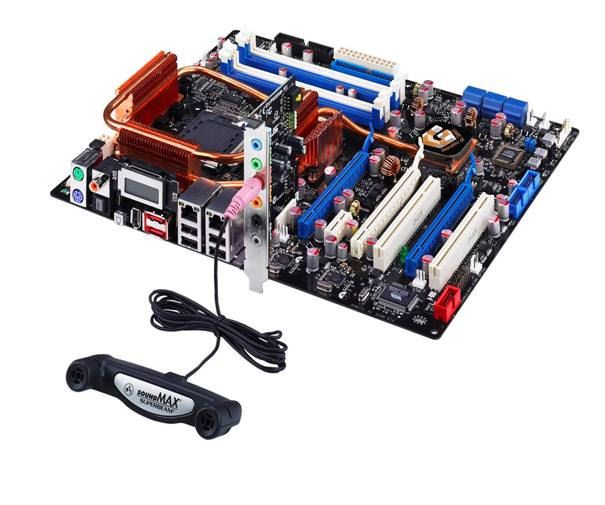
Where the mouse and keyboard connectors are (on the left) you see the copper heatpiping for the CPU. Where it bends to the left you will see a white block (behind the mouse port) - that is the 'ATX12V' - it is cleary a tight squeeze.
They have clearly forced the PSU connector into the motherboard against the heat-pipe - it's leaning like the 'Tower of Pizza'.
This explains why I had a job to push it back in, I was pushing against the heatpipe to do so.
This a common problem with me - PCs I've built usually have some issue where something is pushing against something else in an unforseen manner. It's just the way it is when you have heap of parts from numerous different manufacturers.
It's way better to build your own PC - you know it from top to toe and can sort out problems way quicker already knowing the setup.
It's obvious they knew they had a problem with your rig but just crammed it all in instead of contacting you and suggesting a roomier case or something.
Ooooh! That motherboard is just asking to break somewhere! Fat little piggy.
send it back and get them to fix it, before you break something.. :p
I'll bet it's broken already with a Windows XP installation.
And to the person who will remain nameless who posted about things being better when left to the responsibility of others, you've just been proven wrong in this very thread.
I have no idea who is nameless or what they said, but I really don't think a Puki-thread ( as they're sure to become known in years to come ) could prove anyone right or wrong. He's a law unto himself, in every sense of the phrase. He's even managed to stop me using the phrase "why is it always me?" because apparently he's just about us much of a Jonah as I am.
I blame the sausages.
CyberPower want me to take a picture:
If you could please take a picture of this problem as I have a similar setup here and see no issues.
Thanks for your co-operation in this.
Mmm, this is going to need good lighting to highlight it - I was already trying prior to them asking. It is difficult to get the camera at the right angle to show the bending - it is easy enough by looking at it with your eyes.
It's actually difficult to get the camera in there to highlight the lean - this picture does it reasonably well:

The base of that connector is far fatter than the 'lead' part. However, the fatter base-part is resting on the heat-pipe. It is leaning.
do not let them lead you around by the nose til you are past your 7 day return period if that's an option you might want to pursue. Companies WILL do that. They'll lead you along and have you check this, this this, and some of that until they know you are out of their narrow return policy window. Then you really ARE screwed.
Thank you for your picture. To be honest I will need to get it back here so I can have a look myself and maybe change the PSU so that the cable wont interfere with the heat sink. If you could fill this form in for me I will get it collected tomorrow from the address given on the form. I will also throw in a 1GB USB pen drive and a game for the hassle you have had.
Is this ok?
Well, the USB drive was what I should have got anyway - a game? Well, I'm not sure there is a current one I don't have.
I'm going to request return and refund on this. I don't want the hassle of a replacement.
that sucks but since it's obvious their quality control is "naff" as you brits might say, then it's probably for the best.
Great, now we just need to hope that Blitz'll design a version of BlitzMax for Vista. That should be something to keep our eyes peeled for.
For those wondering what puki looks like:

Hes the one in the blue shirt with one of the infamous sasuage rolls at idigicon...coders workshop 1.
I am the one in the green hat sitting next to him (yes....I have touched puki)
Who's the punk with the "tough dude" look in the muscle shirt?
I didn't go, but I think that's Ion. Puki should take him along when requesting a refund ;)
yes....I have touched puki
Desperate for intimacy?
@puki: Could you slide the rubber sleeve upwards and off the connector back onto the wires so that its a little less chunky?
That really is a bad design by all means. Having the heat pipe running over the 'P4' connector and expecting the P4 plug from the PSU to bend around it is bad design by all means.
Also, the P4 connector isnt the main power supply, the ATX connector is. The P4 connector supplys extra juice to the 'CPU Area' of the motherboard -- some pc's can run without it, usually AMD's. Its their for extra stability and overclocking potential. Lately its become essential though.
The photo you took shows and says it all Puki, refund time.
They had the nerve to allow that though QC too - awesome scary, would never have happened on my watch when I ran a QC Dept. P45 time for that one, no qubbling.
Of course it's screwed; could even represent a fire hazard depending on how hot that pipe gets, and you got something way hot on the end of that thing. How many amps can that CPU draw? Holy Mother they really like a risk don't they? A moment's thought will reveal that to remove that will require that the "pro wiring" is "pro unwired" again, then a new PSU thrown in and "pro wired" yet again! This, because all the wires are connected to the PSU as you already spotted & pointed out! ;O)
I'm surprised the guy expressed the need to see it in the flesh when it's plain enough from the photo. And my eyesight could be better so it's really very plain indeed as to what the problem is.
Really shabby build in my view, I mean powering the system is a kind of basic requirement really, even in this century.
You, your cash, and your custom deserve far better consideration than this.
These guys are quite clearly not behaving like pros, cons perhaps.
So thats what the funniest guy on BB looks like aye!
Well, the USB drive was what I should have got anyway - a game? Well, I'm not sure there is a current one I don't have.
I'm going to request return and refund on this. I don't want the hassle of a replacement.
I'd take the fixing route... if you get a refund, you'll just have the whole battle ahead with another vendor. Get the most expensive game they have and sell it if you don't need it. Their QA might be sucky, but at least you have now someone who's willing to fix things for you.
Jesus -
they are billing me for the return Sorry to hear about the problems you have had with your new PC. It's hard to comment on what may have gone wrong until I get the PC back. Sometimes the cables have to be stretched so much that they can pop out in delivery, however the ASUS Striker is brand new so it may just be a problem that we have not seen yet.
We are conducting an experiment with internal packaging at the moment which may have prevented this problem happening but it is obviously too late in your case.
You are of course entitled to a full refund, you simply need to either deliver the PC back to us, or we can arrange a collection for £20 +VAT which can just be deducted from the final refund amount. We can of course look at fixing this problem, where would would collect FOC and return it back next week.
This thing arrived late, it had problems passing QC, it went to the wrong address, it was poorly packed (
http://media.putfile.com/My--1400-new-PCs-packaging )it arrived defective - on closer inspection it must have been sent with the problem as there is no way anyone can install that ATX12V mobo connector and not realise it was a problem. It was ordered on 19th November.
However, I have to pay to refund something that was clearly defective on despatch. Still, a lot of people warned me about CyberPower.
I would return it and get a refund, use their arranged collection and make sure you get a reciept from the man that collects it.
After you get a refund then chase for the collection costs too, even crappy vendors like e-buyer will refund your return costs if they send you faulty/incorrect goods.
Yeh, I have asked them to collect - that is clearly the safe route back. I've pointed out I think it is excessive to bill me for return. However, they are probably as suspicious of me as I am of them. They could think I have been trying it on and want to get this system back to take a look - they're covering their backs I suppose.
Puki - get in touch with Citizen's Advice, and get them to call these guys to dispute the £20 collection charge. You might also want to point out that it was delivered to the wrong address.
They'll sort it out for you. Whole thing stinks, imho.
Won't be putting any business in Cyberpower's direction.
Well, first I just want to make sure it gets back to them safely. Personally, I think they are actually going to inspect this sytem when it arrives back. I reckon, they are slightly suspicions on the basis that they say they have checked it at their end with a duplicate PSU and mobo.
I have said to them as soon as this comes back they will see what I am referring to.
I am going to wait until it has gone back - let them take a look and then see what happens. They might email and say they see what I am referring to and then want to offer goodwill.
I don't want to kick up too much of a stink.
I was half-tempted to go for the repair, but then I started to ponder:
1 - Time to go back and for them to repair/replace bits;
2 - I wanted a new mobo as I deemed the one I had would have had a lot of strain on that ATX12V connector and could fail in the future - for me it had to be a new mobo too;
3 - I'd expect them to put it back through the 72 hour (3 day) testing;
4 - Despatch back to me.
I could be looking at another week.
I thought about the replacement route and then decided to cut and run.
The point is, this is the 5th PC I have bought and the first one to have problems from start to finish. Baring in mind people were telling me to cancel the order before It finally arrived, I could have saved myself a lot of grief and hassle.
My PC went back yesterday.
I remembered the posts I had created on other sites and went to fill in the final part of the saga.
http://vip.asus.com/forum/view.aspx?id=20061214040418890&SLanguage=en-us&page=1&board_id=1&model=Striker%20ExtremeA poster on the Asus site thinks that a dual core system should have had the 8 pin power connector used:
if u are running a dual core cpu u need to connect the 8 pin power connecter to the AUX ATX
So, it looks like my problem was twofold - the 4 pin connector I had was being bent upwards and also, it should have been the 8 pin connector in there.
I still maintain with CyberPower, that they must have been aware of this problem when they shipped it to me.
I still maintain with CyberPower, that they must have been aware of this problem when they shipped it to me.
Or, they don't know what they're doing?
P.S. Surely this info will be in the mobo manual. They did send it to you, right?
Not sure - I sent the manual back.
CyberPower have emailed me back:
Thanks for the info. I don't see why ASUS send us the motherboards with the remaining 4pins blocked off.
However, I am still waiting for it to dawn on CyberPower that this whole saga is their doing. My system arrived with boot problems relating to that ATX12V. It means that they must have had problems with it too - probably the reason why it arrived so late (after I started chasing it).
The problem I had didn't just manifest itself - they must have known about it - how could they not?
It's going to be interesting to see if CyberPower still maintain they are deducting the 'return to base fee' from my refund on the basis that I chose to return an item that (in my opinion) was sent in a not fully working condition.
They sent you faulty goods. It's their job to pay for any expenses incurred to rectify the situation (refund of replacement). End of story, IMO.
.
Mmm, I got the bulk of my money back.
However, they still stiffed me for returning it to them. That's quite frightening when you consider the circumstances.
If I had allowed them to repair the system they would have done it for free (collect, repair, return). However, to return it as defective and claim a refund, they charge for the return.
So, I am down by £23.50, lost a hell of a lot of time to this and had to faff about with the whole affair.
Still, at least I have £1,468.75 back again.
Puki,
I agree with Big10p - it was their error which forced you to return the goods which were "not fit for purpose".
You should definately speak to Trading Standards and get their advice.
IPete2.
Send them a a letter advicing them that you are goignto take them to a small claims court. Usually this is enough to scare companies to just giving you the money, as they dont' want the hassle or bad publicity that this will bring if you follow through.
And if they don't....then take them to court, its fun!
Just contact your bank/credit card/whatever company and tell them that these people shipped you a faulty product, then stiffed you on that return fee to which you never agreed to. They should know that constitutes a fraudulent transaction and refund you the extra.
I bet Microsoft Flight Simulator X would slow your GeForce 8800 GTX system to a crawl (<15 FPS maybe) on max settings. MSFS 10 is positively the most unoptimized game I have ever seen - my 7800 GT can't even run it on mid settings above 15 fps.
Definitely. FSX is the worst piece of "professional" programming I have EVER seen! It is absolutely unnacceptable. FS9 outperforms FSX, I can run FS9 at the max at 60fps - FSX is jerky even at near minimum settings - settings so low FS9 looks better. Microsoft needs to redo the whole thing.
I have a GeForce 7950 GX2 and I can run any of my other games at max with no slowdowns. Age of Empires III is GPU intensive but I run it just fine.


