3 axis object movement

Blitz3D Forums/Blitz3D Programming/3 axis object movement

Badly worded title... basically I have a three axis mesh like you see in TED or other object placement program:
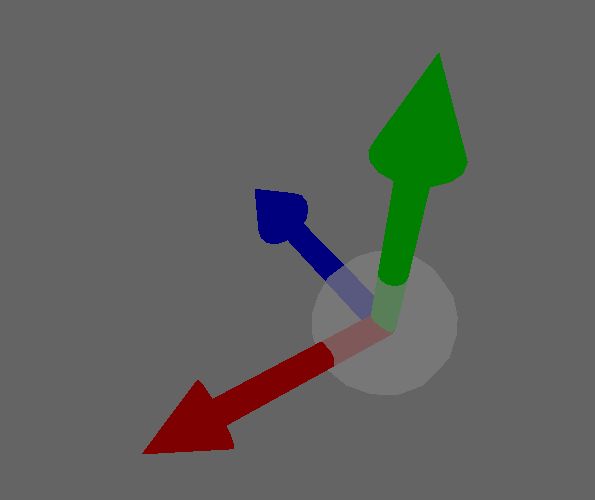

I want it to move the selected mesh (e\sel) when I click and hold on the selected axis

Here's my code:
Select CameraPick(cam,MouseX(),MouseY())   ;start camerapick select ;;;;;;;;;;;;;;;;

Case y_axis ;y ;;;;;;;;;;;;;;;;;

EntityColor y_axis,200,200,0
If MouseDown(1) Then 

If method$="Mouse - Free"
If e\sel=1 
CameraProject(cam,EntityX(e\mesh),EntityY(e\mesh),EntityZ(e\mesh))
If MouseYSpeed()>0 Then MoveEntity e\mesh,0,1,0
If MouseYSpeed()<0 Then MoveEntity e\mesh,0,-1,0
MoveMouse ms,my
EndIf 
EndIf 

EndIf 

Case x_axis ;x ;;;;;;;;;;;;;;;;;;;;

EntityColor x_axis,200,200,0
If MouseDown(1) Then 

If e\sel=1 
CameraProject(cam,EntityX(e\mesh),EntityY(e\mesh),EntityZ(e\mesh))
If MouseXSpeed()>0 Then MoveEntity e\mesh,1,0,0
If MouseXSpeed()<0 Then MoveEntity e\mesh,-1,0,0
MoveMouse ms,my
EndIf 

EndIf 

Case z_axis  ;z ;;;;;;;;;;;;;;;;;;;;;

EntityColor z_axis,200,200,0
If MouseDown(1) Then 

If method$="Mouse - Free"
If e\sel=1 
CameraProject(cam,EntityX(e\mesh),EntityY(e\mesh),EntityZ(e\mesh))
If MouseYSpeed()>0 Then MoveEntity e\mesh,0,0,-1
If MouseYSpeed()<0 Then MoveEntity e\mesh,0,0,1
MoveMouse ms,my
EndIf 
EndIf 

EndIf 

End Select ;end select of axes ;;;;;;;;;;;;;;;;;;;;;


Maybe you can move the object along with the white sphere ?
Then you could get the pitch/yaw/roll of the sphere before rotating it, then rotate it, get the difference in angles and turn the entity along with it.

Sorry I'm so late in replying (getting the house remodeled)
I get what you mean but the code above is my 4th try on this and for some wierd reason all of them move in one direction only.
Perhaps you could post an example (would be a lot of help, more of a visual learner)

I now understand that you don't want to turn the mesh, but you want to move it. I haven't tested this function, but it is what I would try the first:
;to ensure that is an axis is selected, it stays selected while the mouse is down
Global Picked

;check mouse mode
If Not (method$ = "Mouse - Free") Then Return

;test if mouse is down
If Not (MouseDown(1)) Then Return

;move mouse
mouse_Y# = mouse_Y# + MouseYSpeed()

;only perform axis test on mousehit
If MouseHit(1) Then

	;perform mousepick
	picked = CameraPick(cam, MouseX(), MouseY())
	
End If

;test if an axis is picked
test = (picked = x_axis) Or (picked = y_axis) Or (picked = z_axis)
If Not test Then Return

;transform mouse on the Z axis of the picked arrow
;assumed is the orig. arrow model points to the front
TFormPoint 0, 0, mouse_Y, 0, picked

;move selected objects
;For e.Entity = Each Entity
	If (e\sel) Then
		TranslateEntity e\mesh, TFormedX(), TFormedY(), TFormedZ()
		;MoveEntity e\mesh, tformedX(), tformedY(), tformedZ(), 1
	End If
;Next

If it doesn't work, try first to make the object move along with the MouseY() coordinate. If you move the mouse up/down, the object should move forward/backward.
Then you can use TFormPoint to change this angle for the other arrows. Later on, you could fit in MouseX() if needed.