I've been trying my hand in 3D lately and I've only really come accross one major problem. I have a few models made, and I REALLY want them to look good so I made my own model viewer to show off to my friends what I can do. However, when I tried to apply the textures, I end up with something that looks terrible. Heres the code currently
Obviously you're not going to be able to run that without the textures and meshes so heres a sample of what I'm talking about.
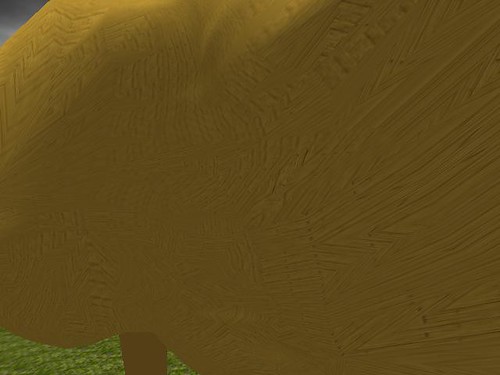
Those textures are SUPPOSED to be straight horizontal...
; PaintMesh Example
; -----------------

Graphics3D 640,480,32,1
SetBuffer BackBuffer()
AntiAlias True
HidePointer()

camera=CreateCamera()

light=CreateLight()
RotateEntity light,90,0,0

mesh=LoadMesh("C:\Program Files\Blender\.blender\Stuff\Trojan Horse\trojan horse.3ds")
world = CreatePlane()
PositionEntity world,0,-5,0
PositionEntity mesh,0,0,10

; Load texture
tex=LoadTexture("C:\Program Files\Blender\.blender\Stuff\Trojan Horse\wood2.jpg")
TextureCoords(tex,0)
tex2=LoadTexture("MossyGround.BMP")
ScaleTexture(tex2,2,2)

; Create brush
brush=CreateBrush()
brush2=CreateBrush()

; Apply texture to brush
BrushTexture brush,tex

; Paint mesh with brush
PaintMesh mesh,brush
EntityTexture world,tex2

clouds=LoadTexture( "cloud_2.bmp",3 )
ScaleTexture clouds,1000,1000
p=CreatePlane()
EntityTexture p,clouds
EntityFX p,1
PositionEntity p,0,250,0

p=CopyEntity( p )
RotateEntity p,0,0,180

While Not KeyDown( 1 )
	UpdateNormals(mesh)
	lastmousex%=MouseX()
	lastmousey%=MouseY()
	yaw#=(320-MouseX()) + 360 Mod(360)
	pitch#=-(240-MouseY()) + 360 Mod(360)
	MoveMouse(320,240)
	TurnEntity camera,pitch,yaw,0
	x#=0
	y#=0
	z#=0
	If KeyDown( 208 )=True Then z=z-.25
	If KeyDown( 200 )=True Then z=z+.25
	If KeyDown( 203 )=True Then x=x-.25
	If KeyDown( 205 )=True Then x=x+.25
	MoveEntity camera,x,y,z
	RenderWorld
	Flip
Wend

End
Obviously you're not going to be able to run that without the textures and meshes so heres a sample of what I'm talking about.
Those textures are SUPPOSED to be straight horizontal...