I downloaded the .B3D format files from the Specs and utils. It has a demo that uses a red sphere and saves and loades it. Works great. Anyone know how to make it save the texture brush?
Saving a .b3d with a brush?
Blitz3D Forums/Blitz3D Programming/Saving a .b3d with a brush? you need to add the [TEXS] chunk before the [BRUS] chunk
This isn't working but it doesn't look too bad I think.
All I need to do is save the floor2.jpg as a brush and then assign it I guess...
All I need to do is save the floor2.jpg as a brush and then assign it I guess...
Function WriteBB3D( f_name$,mesh )

	file=WriteFile( f_name$ )

	b3dSetFile( file )


	b3dBeginChunk( "BB3D" )
		b3dWriteInt( 1 )	;version

		b3dBeginChunk( "TEXS" )
			b3dWriteString "floor2.jpg"			;name
			b3dWriteInt ( 9 )					;flags
			b3dWriteInt ( 2 )					;blend
			b3dWritefloat ( 0 )					;xpos
			b3dWritefloat ( 0 )					;ypos
			b3dWritefloat ( 1 )					;xscale
			b3dWritefloat ( 1 )					;yscale
			b3dWritefloat ( 0 )					;rot
		b3dEndChunk()	;end of TEXS chunk

		b3dBeginChunk( "BRUS" )
			b3dWriteInt( 1 )					;0 textures per brush
			b3dWriteString( "floor2.jpg" )		;name
			b3dWriteFloat( 1 )					;red
			b3dWriteFloat( 1 )					;green
			b3dWriteFloat( 1 )					;blue
			b3dWriteFloat( 1 )					;alpha
			b3dWriteFloat( 0 )					;shininess
			b3dWriteInt( 1 )					;blend
			b3dWriteInt( 0 )					;FX
		b3dEndChunk()	;end of BRUS chunk

		b3dBeginChunk( "NODE" )
			b3dWriteString( "entity_name_here!" )
			b3dWriteFloat( 0 )	;x_pos
			b3dWriteFloat( 0 )	;y_pos
			b3dWriteFloat( 0 )	;y_pos
			b3dWriteFloat( 1 )	;x_scale
			b3dWriteFloat( 1 )	;y_scale
			b3dWriteFloat( 1 )	;z_scale
			b3dWriteFloat( 1 )	;rot_w
			b3dWriteFloat( 0 )	;rot_x
			b3dWriteFloat( 0 )	;rot_y
			b3dWriteFloat( 0 )	;rot_z
			WriteMESH( mesh )
		b3dEndChunk()	;end of NODE chunk

	b3dEndChunk()	;end of BB3D chunk

	CloseFile file
End Function
Here is a sample code to include the [TEXS] chunk:
In your [BRUS] chunk you forgot to include the ID of the texture being used.
Include "b3dfile.bb"
Graphics3D 800,600,16
mymesh=CreateSphere(32)
PositionEntity mymesh,0,0,0
tex=LoadTexture("grassbig.jpg")
EntityTexture mymesh,tex
Print "press a key to write file..."
WaitKey()
WriteBB3D("mesh.b3d",mymesh)
End


Function WriteBB3D( f_name$,mesh )

	file=WriteFile( f_name$ )

	b3dSetFile( file )


	b3dBeginChunk( "BB3D" )
		b3dWriteInt( 1 )	;version

		b3dBeginChunk( "TEXS" )
			b3dWriteString "c:\program files\blitz3d\my games\druid\grassbig.jpg"			;name
			b3dWriteInt ( 1 )					;flags
			b3dWriteInt ( 2 )					;blend
			b3dWritefloat ( 0 )					;xpos
			b3dWritefloat ( 0 )					;ypos
			b3dWritefloat ( 1 )					;xscale
			b3dWritefloat ( 1 )					;yscale
			b3dWritefloat ( 0 )					;rot
		b3dEndChunk()	;end of TEXS chunk

		b3dBeginChunk( "BRUS" )
			b3dWriteInt( 1 )					;0 textures per brush
			b3dWriteString( "grassbig.jpg" )		;name
			b3dWriteFloat( 1 )					;red
			b3dWriteFloat( 1 )					;green
			b3dWriteFloat( 1 )					;blue
			b3dWriteFloat( 1 )					;alpha
			b3dWriteFloat( 0 )					;shininess
			b3dWriteInt( 1 )					;blend
			b3dWriteInt( 0 )					;FX
			b3dWriteInt(tex)					; DON'T FORGET TEXTURE ID HERE
		b3dEndChunk()	;end of BRUS chunk

		b3dBeginChunk( "NODE" )
			b3dWriteString( "sphere01" )
			b3dWriteFloat( 0 )	;x_pos
			b3dWriteFloat( 0 )	;y_pos
			b3dWriteFloat( 0 )	;y_pos
			b3dWriteFloat( 1 )	;x_scale
			b3dWriteFloat( 1 )	;y_scale
			b3dWriteFloat( 1 )	;z_scale
			b3dWriteFloat( 1 )	;rot_w
			b3dWriteFloat( 0 )	;rot_x
			b3dWriteFloat( 0 )	;rot_y
			b3dWriteFloat( 0 )	;rot_z
			WriteMESH( mesh )
		b3dEndChunk()	;end of NODE chunk

	b3dEndChunk()	;end of BB3D chunk

	CloseFile file
End Function

Function WriteMESH( mesh )

	n_surfs=CountSurfaces( mesh )

	b3dBeginChunk( "MESH" )
		b3dWriteInt( -1 )				;no 'entity' brush

		b3dBeginChunk( "VRTS" )
			b3dWriteInt( 0 )			;flags - 0=no normal/color
			b3dWriteInt( 0 )			;0 tex_coord sets
			b3dWriteInt( 0 )			;0 coords per set

			For k=1 To n_surfs
				surf=GetSurface( mesh,k )
				n_verts=CountVertices( surf )-1

				For j=0 To n_verts
					b3dWriteFloat( VertexX( surf,j ) )
					b3dWriteFloat( VertexY( surf,j ) )
					b3dWriteFloat( VertexZ( surf,j ) )
				Next
			Next
		b3dEndChunk()	;end of VRTS chunk

		first_vert=0
		For k=1 To n_surfs
			surf=GetSurface( mesh,k )
			n_tris=CountTriangles( surf )-1

			b3dBeginChunk( "TRIS" )
				b3dWriteInt( 0 )		;brush for these triangles

				For j=0 To n_tris
					b3dWriteInt( first_vert+TriangleVertex( surf,j,0 ) )
					b3dWriteInt( first_vert+TriangleVertex( surf,j,1 ) )
					b3dWriteInt( first_vert+TriangleVertex( surf,j,2 ) )
				Next

			b3dEndChunk()	;end of TRIS chunk

			first_vert=first_vert+CountVertices( surf )

		Next

	b3dEndChunk()	;end of MESH chunk

End Function
In your [BRUS] chunk you forgot to include the ID of the texture being used.
Thanks Kevin.
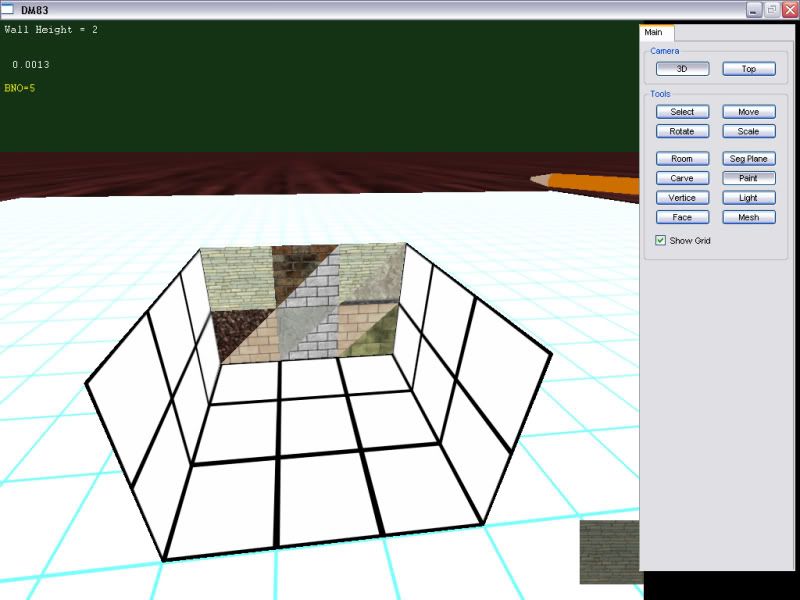
Here's what I'm actually trying to do. My editor creates rooms. Each room is a separate mesh. I am texturing each triangle on each surface. So what I really need is a .b3d saver that saves multiples meshes into one file while storing the brushes for each triangle of every surface(mesh). For example the floors and ceiling of a room have different brushes than the walls.
Here's what I'm actually trying to do. My editor creates rooms. Each room is a separate mesh. I am texturing each triangle on each surface. So what I really need is a .b3d saver that saves multiples meshes into one file while storing the brushes for each triangle of every surface(mesh). For example the floors and ceiling of a room have different brushes than the walls.
Here's an example. The level will have mulitiple rooms and corridors. Each needs to be saved in one .b3d but with all the brushes(textures) in tact.
Just set up a different [BRUS] and [TEXS] chunk for each texture used and set up each [TRIS] and [MESH] chunk with the proper brush ID. The brush and texture chunks can be stacked onto each other, I believe. Example: if you are using 5 textures you can have 5 [TEXS] chunks and the same with the brushes.