Why I Defect - You Be The Judge
Miscellaneous Forums/General Discussion/Why I Defect - You Be The Judge
OK... now this really pisses me off... i've spent so much time coding in some decent stuff for this sub thingeee... and sometimes i fool myself into thingking it really looks good... well, at least half way decent, considering the source...
but every now and then i load my latest models into some of the other 'engines' i've licensed, just to see what it'll look like... to compare in other words...
i'll let you judge why i'm so pissed at Blitz... here's some of the final (close to final) textures i just put on the lil German Type 23 sub... first in Blitz3D


then, the same sub, same textures, in TGE...


now... why is there so much difference in the rendering... hey, i'm just a lowly programmer artist, and i need all the help i can get... i dunno about what you're seeing, but the TGE renders really help my programmers art out a lot...
is it DX7 vs DX8 or something...
man... i'm so confused...
--Mike
Graphics doesn't make a game, gameplay does. Because something looks marginally better in another engine, doesn't really mean the game will be any better. There are plenty of good looking games playing badly, but too few ugly games playing well.
Stick with what you have, wasting another year porting it to something else, will just make you even angrier. Instead invest the time in making it play great!
There is no point in chasing goals you can never achieve, accept that there will always be games that looks better than yours. But there might never be a game playing better...
its because you have a texture splatted terrain, which maskes a variety of textures together, a nice fresnel water shader to spice things up a bit :) That and more contrasty lighting in the torque version.
You could still do a lot better with the B3D version, maybe not with the water, but the terrain and lighting and skybox for sure :P
Red,
I gave up trying to have the "best", graphics ages ago. (A Lot latter than when I realized that the better game wasnt automaticaly the one with the best Graphics)
Whist I can understand that you wish to produce the best that you can, this continued search for a better Graphics Platform can do nothing but harm your other efforts to finish the program as a whole.
As to the four pictures above, the bottom two look better. But not so much better that I wouldnt buy a game that looked like the first two, if that game was concidered better as a whole game.
You have said that you could program c++ well, and I have continualy wondered why you program in b3d, and had assumed that you felt more at ease with it (d3b) as a language. And that therefore you had already made a decistion for b3d because you felt more likly to complete it. If this is so, then please finish this hunt for a better graphics engine, and just program it in the language you are most likly to finish it in. (Hopefully this will be a Blitz Lang, so we can watch its progress).
Dont take this the wrong way Red, but you are only hurting yourself and your program by this hunt.
I for one think that in this sort of simulation game, graphics are not the single most important thing.
true Fredborg... about the gameplay and such...
E... yeah, i know the difference in the terrain between what i'm showing in Blitz and the TGE stuff (which i did do much of anything to)... ok, here's a Blitz shot without the fog and a lil more lighting...

a lil better...but it still bugs the heck outta me...
ah well...
--Mike
You're right to keep looking Mike, good graphics will not stop your end product being good in any department.
Poor graphics will be seen by some as the hap'e'th of tar for which the ship was spoilt.
Keep your standards high; it is the right stuff.
Wild guess? Blitz doesn't give you as much control over "materials" as Torque does. Torque probably lets you set ambient, diffuse, specular and emissive values for all materials ( and by inference all objects ) and you can't really do that with Blitz.
I really don't see enough of a difference to care though. But hey, I get the feeling you're gonna keep on with the grass-is-greener concerns in any case.
thx guys for the comments.. HK, Polygoon, Gabriel...
actually Gabe, Torque is nothing like that at all... i had it running to test the latest engine mod i just coded in and compiled (the water cg water, i decided that today was the day to get the reflections working) so i decided to convert over the model, open up the ingame editor, and drop it right in there...
i then set the lighting and rain, and distanced the fog out a bit... then i added a couple of the models in to see if it would affect the performance any...
i didn't do anything to the materials of the sub models at all... and thats one of the things that gets me...
in blitz3d, i spent a few days testing vaious effects and lighting to come up with just the 'right' metalic look...
in TGE, i just drop in the model... and off i go...
--Mike
heh actualy you don't get any of those in torque. The DTS format is like blitz only without texture layers or multiple UV's.It doesn't even do vertex shinyness like blitz does.
The world editor has a sunlight, and ambient light settings but requires the 3rd party lighting pack to really shine and get richer brighter contrasty lighting. The terrain is the default demo terrain and one of the few that look really nice.
The terrain and skies are straight out of the demo, and are probably the best examples of torques terrain and skies. User created ones rarely come out that well.
i didn't do anything to the materials of the sub models at all... and thats one of the things that gets me..
Sorry, that wasn't quite what I meant. I mean that Torque may be setting these things for you. Maybe it has a few standard materials set up for decent lighting. One for lightmapped geometry, one for landscapes, something like that.
Just a thought.
Well Torque water looks great from the top... but can you do all the things you hope to do including the binoculars thing?
what about the underwater views in torque?
I mean go with what floats your boat! (I couldn't resist that... sorry!) OR use a wrapper for BMax and torque... anyone have one?
i can do the binocular thing... setFOV(2); in torque script... but the underwater scenery is less than spectacular...
i haven't been able to do multitexturing... so the caustic reflections on the sub and the underwater terrain my present a problem... if it's done in Torque, then there may be no external view when submerged :)
ahhhh, whichever one gets done the firstest, and looks the bestest...
--Mike
I personally think the sub looks better in B3D, but the terrain looks better in TGE. Thats just my opinion. Oh but that little bit of water I see in TGE, it blows B3D out of the water.
Red
Regarding your Blitz version, there's still much that can be done with that scene surely?
Firstly, is Fredborg's water code suitable for use in your scene (the one with the rubber ducks floating round) - that was about the best non-shader water I've seen for Blitz.
How about some puffy/billowy clouds in the sky for scale?
Likewise some single quad trees on the distant hills would help mask the obvious texture repetition.
Howabout a little foam where the water intersects with the hull?
How about a little bloom filter (user optional), just to soften the image/textures?
I'm a great fan of the two-pass render myself - 1st pass to render distant landscape features - 2nd render for close up detailed scenery.
The smooth groups look to be differnt in the b3d vs Tge shots.
b3d looks like its about 80 and tge looks about 50.
Tge may reset them?, and b3d uses what ever was set by the modeler.
The Cg water resource does look really nice, doesnt look like the shots are using TLK, are they?
Sam
Not sure. They did integrate TLK into the torque demo for 1.4 I think. Even if you have to purchase it seperately. If Reds simply using the demo it may very well be using TLK.
Mike, I see nothing wrong with the Blitz shots. Infact, since you have so much done already in Blitz, why not just finish is up? You have a lot of followers following you and this project, and postponing it to switch engines would be a big blow.
Don't believe anything these guys tell you Mike, graphics make the game goddammit....and I guess a little gameplay wouldn't hurt either ;-). I'd go with whatever suits you the best.....and I'm finnally catching on this Torque movement (well for TGB that is...). BTW, you might as well also throw in a pic of the sub running in 3Impact...i always that looked the best anyways...but then again, what do I know....:p
hey Red buddy...I can see that you frustrated becouse of this sub..well..appart from tools, I would suggest to be calm and dont use your focus..no matter what engine u use, everything will fail if you get frustrated, soo, if it will help you, I promise I'll buy one copy of your sub game when you release it...sounds fair :) stand up and kich this sub boats :)
The only thing I notice is better lighting. Don't worry about it Red ;)
I just wanna see this thing done before Peak Oil passes and we don't have enough power to run our PCs.
The sub looks too shiny in Blitz - I think that's what kills the effect.
Mike..
Please. Integrate my demo code into your sim, and play with the water, you will see an improvement :)
The weather is better in the blitz version. I therefore vote for this one... :O)
By the way can you export your model to fbx for instance?
thx guys for all the input... i know i joke around a lot, but i take what you have to say very seriously, and appreciate as well as pay attention to all the technical and artistic viewpoints presented...
@ MadJack...
i am using code based on Fredborg's water Comp entty... the shots don't bring it out as well as it looks in action...
@ RegK...
yeah, i kinda like the mmetallic sheen on the Blitz sub... but overall, the other ones look better in the scene... especiall the close ups when i'm on the bridge of the sub...
@ ZMatrix...
i agree... good eye Sam... i noticed the difference, but didn't know quite what it was... i think you're right... and no, no TLK... but i may have to go with it to 'fix' TGE current lighting...
@ Chad, Neuro, NA, IK, Nomen, Cyggy, Taumel...
thx guys for taking the time to add your take... sounds like i got at least 2 sales :) Nomen... it really looks flat otherwise, even with the directional lighting... Cygnus, the clipping code, right... i've started integrating it already...
thx again for th input guys...
--Mike
Red,
You need to stop looking at the sky and the terrain in TGE - they are always gonna be better than stuff you do in B3d because you didnt do them in TGE, the engine provides them for you.
Anyways here the helpful bit...
If you have Gile[s]...(Im assuming you do) take the sub itself into Giles and toggle the texture mipmapping setting for a couple of the textures on the sub, I find this makes a serious detail difference on some textures.
When you load it into B3d it will be whatever you have set in Gile[s].
This was the 'trick' I used in ss GB to make my water look so realistic. The detail on the waves shone out over the mipmapped textures on the ship (which needed to be softer. Doing it this way YOU can control the b3d textures much more easily. You can check out different settings too withou harming the original textures or models.
IPete2.
Alternatively zip it up and send it to me, and I'll show you what I mean.
Mipmapping bias could help to add some more detail to the sub.. but if I remember right there is no such functionality in Blitz3d :( Hey, adding that would be a great update ;)
You need to stop looking at the sky and the terrain in TGE - they are always gonna be better than stuff you do in B3d because you didnt do them in TGE, the engine provides them for you.
yes... and i should also tell the people who are gonna pass my game by to stop looking at the sky as well... ok...
it's not so much the sky in Torque IPete ... but since you mentioned it... yes, that is one less headache i have to deal with... as is the rain... the sun... the ambient lighting... the water... and a few other things that are already done for you in Torque...
as far as gile[s]... nice idea... lets see, i make the model in truespace, set it up for skinning in UUW (where i can also, and do play with the mipmapping settings for the textures) ... now i should add another step to the process to get what i get regardless in TGE...
ahhhh, it's worth looking into... i'll play with it in a few...
thx
--Mike
Red,
Sorry about the terrain and sky stuff comments, you are exactly right to be aware of it and to keep on using it and showing it off, but remember there are loads of really great skyboxes usable in B3d so thats one less to worry about. What I was saying is don't compare pro scenery to Red's "hand made subs", not don't show off the best bits of an engine - I do that ALL the time tee hee.
Btw TerraEd Pro does a really good job of multiple terrains nowadays and skyboxes and such (clouds with movement). Great colour map production and with the right textures you could get something like what you are seeing in TGE - not the same but better than what I see now.
The sky in TGE is something which I am pretty sure you could recreate given the textures and motivation. The sun? Well check out the Barliesque sun spot code in the archives it is wicked. There's other stuff out there too. OK it is not built in but what you cant easily do in Torque is code the stuff which is soooo easy to do in B3d. IE your entire sub sim. probably.
@Finjogi, yeah its there, you just dont have too much control unless you go and get your hands messy.
Look carefully at this screen grab from my ss GB project:
http://www.blitzbasic.com/gallery/view_pic.php?id=1074&gallery=hr&page=2Look at the sea, it shows multiple waves, lots of detail, all moving and all smooth as ever. In the 'flesh' the sea looks really good, but the ship textures looked crinkly, so I used Gile[s] to split the textures into two camps, one with mipmapping set on and one with it set off. The result was fab. That is what Im encouraging Red to look into.
IPete2.
@Finjogi, yeah its there, you just dont have too much control unless you go and get your hands messy.
!!?? you mean control like use mipmapping or not? Thats no control :) If there is something like "TextureMipBias(-1.0....1.0)" I have missed it :(
edit: Lately it has been possible to use compressed textures with Blitz3d... and the blitz does not make mipmaps for them, it only uses mipmapping with them if there is mipmaps with textures... so (old) trick is to make mip map parts crisper than normal -> some control over mipmaps.
sorry Finjogi,
Then I was wrong you can turn it on or off afaik thats all. It helped me a lot though in my project.
IPete2.
Finjogi. There is control but i can't find the link at the mo.
Doesn't the DX7 dll do it? It was a couple of years ago the mipmap stuff became available.
I may have it lying on my drive somewhere.
You need anisotropic filtering. I think someone came out with a lib for it.
Cygnus: You mean this?:
http://www.blitzbasic.com/Community/posts.php?topic=40848Interesting, are there many different DX7 dll's -> all neat functions scattered here and there or have someone managed to collect all funcs in one dll?
edit: just found Tom's newest dx7 zip, it seems to include earlier functionality like mipmap bias..
About the TGE water... it may look better in theory, but that sort of stuff can often look rather dumb.
A bit like the water in a peaceful pond, don't you think?
I think the sub looks fine in Blitz (a bit taller than in Torque, though?!), though TGE seems to be doing the texturing a bit differently. (I've never much liked how B3d does textures, but I always assume it's just me).
I wish I had Gile[s] so I could try out IPete's suggestion... sounds like a good solution!
For your terrain, have you tried L3dt?
I've used it to make terrains for B3d, and it works really well. The outputted terrains are very natural, and the texturing is superb.
...Now, I'm going to dare to mention the water again.
Am I right that your water in B3d is coloured by a texture?
Reflecting the sky with that water instead of being mysteriously coloured blue would give it a lot more life. (And it probably wouldn't hurt to put a skybox in there, since the sky can make a lot of difference).
I think the waves in the b3d water are too steep. If you can, make them wider, with a shallow incline on one side, to achieve that same height. Then they could perhaps be a bit more rounded looking and they wouldn't look as odd against the sub.
Those waves at the moment look more like stormy weather waves.
@Red
So no fbx model? If you have on i could throw it into unity and look how much the lightning could pimp it up.
skybox with a scrolling alpha cloud plane that draws in front of skybox and some light fog will reproduce the animated sky in Torque.
Make use of some of blitz's advantages over torque and do what I think IPete said. Get a skylight and render a global illumination type lightmap over your sub model to better define the shape of the sub without overdoing it with the wrong directional shadows. or sking the whole sub on a larger texture using the new DDS feature in B3D. And bake the lightmap into the diffuse texture.
that should bring out the sub and make it look better. you could also try multipass and make a shiny material and a dirty Matt material and combine them on the sub to get a nice transition between wet sections and dry sections.
@Red, Its been a while since you posted inside the subs, and as Ive said before, I think that the "Command point" view is more important. And that overall, the realisim ISNT the graphics, but the whole ensamble. (And I still think you are underconserned about sound)
Dont obssess over graphics, dont let your game become Doom3
Doom3 was fun. Overrated, but fun.
Try taking more advantage of b3d's features Mike,
Torque almost always looks like Torque, (there are exceptions ofcourse)
maybe add a detail texture and a cubemap to the sub.
Evaks right about Torques Sky, its not hard to reproduce
FOV also aprears slightly differnt in the shots.
I agree that Tge is looking better, but you can get b3d to look good also.
Sam
Red, don't let the battle fatigue get to you! Chin up soldier, we're almost there!
Seriously, Blitz3D can do a lot better looking water scenes than the TGE you showed. It might require some tricks and the water is somewhat problematic but still.
There has been many good comments on this thread already and I'd like to add that the sub itself still needs a lot of (texturing) work IMO if it is the main thing of the whole game. Make it look something like this:
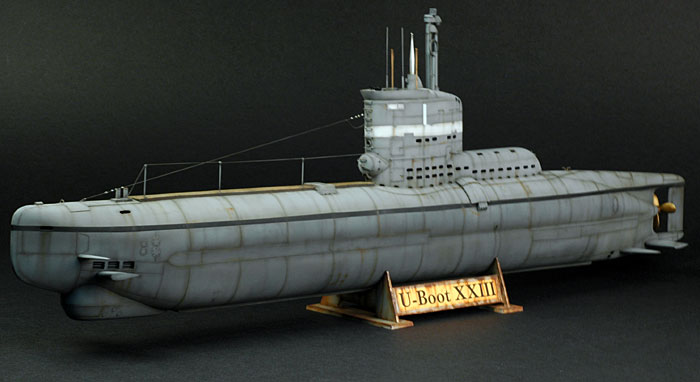
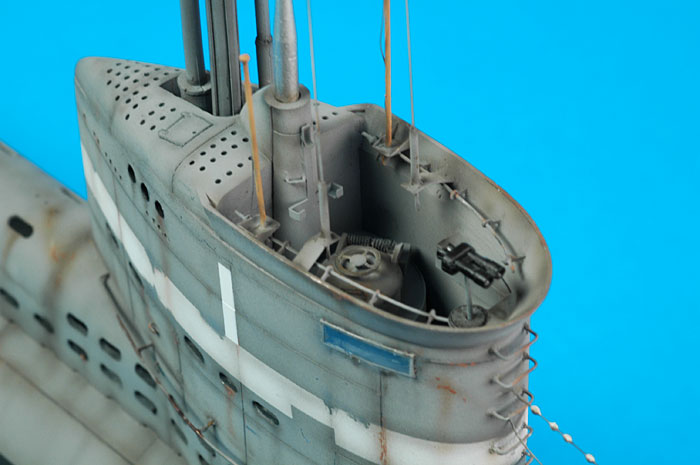 http://hsfeatures.com/features04/uboattypexxiiicw_1.htm
 Why don't you just pay $100 and get a pro-quality sub model off Turbosquid? You could afford to make it 50,000 polys.
It's more satisfying to have your own content than to use a model other have used in their games too.
Why don't you just pay $100 and get a pro-quality sub model off Turbosquid?
They don't have "type XXIII"... if it has to be that, you're stuck so why not make your own. And what IKG said.
again... thx for all the input guys...
yup, the textures on the sub are progressing... what you see is the base textures... i'm working on the detailing decals as we speak... and will code up a set of clouds for the sky tonight...
as far as buying someone elses content... well, that's just not my way... i'd rather go with my own bad looking sub than someone elses great looking one...
gotta agree with 'stang and IK on this point...
that picture is what i'm using to model and skin the sub Mustang... so it should wind up resembling it somewhat...
--Mike
yeah if B3D can handle it, I reckon better textures will make more of a difference initially than fancy lighting effects. However, if you can have both ...
@Red, what would you pay for a good looking USS Dallas or USS Ohio?
geez, you're still starting new threads to harp on this? Nothing personal man, but I'm away for a month, and when I come back what is the first thing I see? Oh look, another thread where Red is comparing his sub in Blitz and Torque!
Can't you defect to a new keyboard?
hehe.. Im watching the movie "The hunt for Red October", and its all about defecting. So - its in his nature :D
I just figured I could make a few bucks by exploiting his mania by selling him a sub model ;)
hahahahahaaaa... yup, it's in my nature retro...
i got a whole slew of 688s and 726 ssbns ready to go on patrol...


... not quite ready for a game yet, but good enough to sail in Virtual Sailor.
jH... sorry, but one day you'll come back and there'll be a finished sub game... maybe before your 90th birthday... meanwhile... what can i say...
ENAY is just plain nuts... cheez brain cow disease i think...
shower, dinner, and beddybye time... later guys...
--Mike
those dark ones look good.
what model is the last one, seems like an odd mix between a destroyer and a sub.
Bastard child?
It'll be one of those ICBM ones.
top one is an Ohio class ssbn in Virtual Sailor...
middle one is the Jimi Carter, last Seawolf Class SSN...
and the bottom one is the USS Growler, cold war era diesel sub which carried 2 nuclear armed cruise missiles... first nuclear deterrent before Polaris subs...
Growler is on display in NY as a museum and tourist attraction (check out pics on the web)...
--Mike
BTW Red did you check out the ocean in the Fisherman's Wharf screen saver? You can find it over on Coders Workshop (it won the graphics demo earlier
this year apparently - you can see why )
http://www.codersworkshop.com/viewshowcase.php?id=801Looks fab in motion this by the way, one of the more imprseeive graphic demos done in B3d.
IPete2.
thx IP... i'll take a look...
i never use screensavers, so i know i missed it...
--Mike
Is it done yet? ;)
Mike, how about showing us some of the interiors again? I'd reallly like to see them.
hey Cyg... i got the code in place, and it seems to be working... sorry it took so long to get back to you, i got sidetracked a bit... looking for some clouds to compete with Torque's :)
anyways... here's what it looks like...

i've got a few small issues, but it may be my positioning or the wave action i've got going in rough seas... it's giving me a lot of reflections back when i raise the wave height...
the reason why it took me so long to integrate your stuff... like i mentioned, i was looking for a decent means of getting in some nice looking clouds... i coded a translucent plane above the view, but that looked a lil shabby...
... then i went and rumaged through the archives... nice stuff, but then i remembered some volumetric looking clouds that Pongo coded up...
i found his demo and ran it... those clouds looked like what i was after, so i modded his code (and images) into my OO engine, and had to rewrite a lil bit of the engine framework to accomodate the new stuff...
actually, doing this helped me locate a possible future problem with the horizon, if i ever needed to have a a sub hunting plane to go airborne in the sim... the distant horizon looked wierd as the view rose above the ground...
seeing as i've got these neat new clouds :) i wound up taking out the sky texture, so there's only a sky color now, which is automatically slaved to the fog color...
check it out...

a view from a thousand feet :)
the new code causes it to blend nicely with the horizon, and gives the illusion of a seamless wide expanse... and i just luv 'flying' through those clouds :) reminds me of the flight sim...
ok... now for the down side...
wait, first lemme THANK Pongo for his beautiful volumetric fog code... and images... it really helps add a bit of life to the scenery...
the only bad thing... and this is not Pongo's fault, is that Blitz is starting to stutter a bit under the weight of all this stuff... the more cloud sprites i add, the more i starti to see signs of frame loss... my wave action is slowing down, and the whole thing seems a lil lethargic now...
maybe it's my machine... but hell, i aint asking it to do any shadered hdr stuff... this is Blitz, it should run...
this is what i was whining about at the top of the thread... i'm not sure if it's the code or what, but Blitz3D just doesn't seem to be able to handle the weight of all this stuff i'm throwing at it... and i haven't even put in rain, sun, night stars, and sun beams, sun flare, or fake bloom...
not to mention the time it takes to implement this stuff (thank god for guys like Fredborg, Rob C, Cygnus, Pongo, and the millions of others whose code i've ripped or been inspired by... else i'd never have gotten this far...
sure it's the graphics... yeah, but it's not just the graphics... Blitz is suitable for smaller games and demos... but i'm finding out that doing something like this may just be a lil too much for poor ole Blitz3D...
anyway... i'm gonna try and optimize what i can, and see if i can speed things back up a bit... it's not all that bad though, actually, if you're not making something like i'm trying to do, this can be kinda usefull... i'll put the OOBlitzEngine code up for anyone still using B3d and is interested... still gotta put in a flexible, long ranging, decent looking terrain system...
yeah, and i gotta put in some code to swap the ocean textures in and out as you go higher...
otherwise, this can be usefull for a lot of stuff... it's just that i'm going out on the fringe trying to squeeze a lil bit of everything into this darn sub sim...
Chad... i'm working up an interior for the uboat... i'll post a few shots soon... maybe even a small demo to test the frame rate at extreme resolutions (i can only go to 1024x768 with my current machines... that's gonna change soon though... a new card is in the plans)...
--Mike
Hey, can you give a link to pongo's clouds thing? I'd like to check that out.
yup... coming...
still looking... can't find anything around here anymore...
--Mike
thanks!
Red, looks like the clipping isnt working, you shouldnt get large reflection artefacts like that :)
yeah... something's wrong... it's not as clean as your demo... plus, it's really slowing down the program as well... especially with these clouds...
i'm investigating... i probably screwed something up somewhere...
--Mike
"but hell, i aint asking it to do any shadered hdr stuff"
nope, this is the old way..much more intensive than a Shader..
might be hitting the Fillrate of you card ( not likey if its modern
)
my guess is its to many surfaces, are the clouds single surface?
When using a realtime cubemap...surfaces x 6 if its drawin them or not. (they get checked for clipping or hiding)
Sam
Red-
remember to HIDE things like the clouds before rendering the reflection- the cube map.
and remember to position the clip plane JUST UNDER the lowest point of water :) it will reduce shadow artifacts.
roger... copy all...
--Mike
the only bad thing... and this is not Pongo's fault, is that Blitz is starting to stutter a bit under the weight of all this stuff... the more cloud sprites i add, the more i starti to see signs of frame loss... my wave action is slowing down, and the whole thing seems a lil lethargic now...
Now you can see why I made my own cloud system ;-) Using sprites in Blitz is a HUGE frame killer (HUGE)! Not only is calculating the rotations on each sprite a pain for blitz, but handling the sprites in such a general purpose way kills the program.
Pong's clouds are nice, very nice. But they use sprites for simplicity, and thus are very slow (sloooooooowwwww). Now ya take his sprite, put that into a single surface system (displace from the camera for the sprite facing the camera effect), and BAMM!!! A big boost in performance!
Cool stuff! And yeah, basic sprites are probably bad way to do clouds in a game.
yeah... i'm looking at your cloud maker also DH...
this was a quick and easy solution that i figured i could add in while i was merging Cyg's clipping routines... i had to look at it...
the results were verrrrrry nice, but it just sucks the wind outta the sails of ole man Blitz... especially if you put in enough clouds, and scale em enough to make a realistic looking outdoor scene...
--Mike
IMO, all of them look ugly. Why not just use the blitz3d cubemapping trick? It'll save power and will look better, especially since most water looks ugly without AA.
Another alternative to clouds - place a stack of large quads in the sky above the camera, texture each quad with the same fuzzy cloud texture, set the quads to blend and scroll the cloud texture each frame - gives a nice impression of volume even with only 5-7 stacked quads. In terms of clipping, you might be able to get away with using entityorder?
Downside is that it's no good for flying through...
Well, my cloud maker might not do the trick for you either, as it was done so long ago as I didn't have the best understanding of the interworkings of blitz at the time...
I could always give you a hand at drafting up a new cloud system if you need.
So let me get this straight, using Pong's clouds over excessivly will slow down the game correct?
This is because they are 2d sprites and using to much video memory to use correct?
And what MadJack is trying to give an example for is setting up quads like this and setting it up like this to create cloud like entities:
x x x
x x
x
Where an x is is where the quad/cloud would be with a certain level of alpha to it to make it blend and look realistic. If I'm incorrect on this please help please.
Thanks,
Chad
So let me get this straight, using Pong's clouds over excessivly will slow down the game correct?
Yes, correct! That doesn't mean it's a bad solution, just not for over-use.
This is because they are 2d sprites and using to much video memory to use correct?
Not correct. There is more to it than just one reason why they are slow. Blitz sprites are a general purpose solution for everyone to use as just that (general purpose). To create a couple of billboarding trees with them is fine, but to have 1000 of them hanging around will kill the app (hell, even a few hundred will kill the app). This is due to the way the sprite is sent to the video card, and how it's math is done to keep it relative to the camera (I would assume).
Doing a single surface solution as opposed to the sprite will make it much faster. Doing transformations from a local mesh to the camera to keep it facing the camera is less expensive than doing the actual math involved in rotations and such.
so its more a combination of things that make it slow. Not a poor choice mind you, just slow for this application.
And what MadJack is trying to give an example for is setting up quads like this and setting it up like this to create cloud like entities:
I believe he is saying to put big 'strips' of quads up in the air and merely scrolling the cloud texture along any given strip to show the impression that the cloud is moving accross the sky. Downfall to that is that you cant get too close to the cloud, or change perspectives on the cloud or you will notice how basic it's geometry is (you will notice its just a strip of cloud).
This is also a good solution for a basic need of clouds. But for what red wants to do, he would be better off adapting pongo's clouds to my way of rendering and controlling them.
My clouds were created for general purpose, meaning there's alot of overhead in there that doesnt need to be there (IE abilities to color all 4 corners of the cloud, rotations and grouping for easy user control and for other functionality such as creating tornadoes and what not, formation control, etc). I packed as much general purpose stuff in there as I could. And on top of that, its sorting all of them in view as well. To strip them of all that and take them down to a very basic 'particle system' type of control (minus the particles need for vectors, velocity, and time/distance active), add some basic functionality to create them, add pong's texture, and you have some decent and FAST clouds. I would probably venture to say you could get about 5-7000 of them on screen before noticing a slowdown (given >= 2.0ghz CPU and >= GForce3/equivelant).
Does that help Chad?
'I believe he is saying to put big 'strips' of quads up in the air'
Just so. And you can still get some nice effects with this simple technique. Here's a small bit of code to demonstrate...
http://homepages.ihug.co.nz/~pajones/cloudtest.zip Red, You appear to be very defective. I'm going to recommend an RMA.
yes i am... is that a bad thing :0)
in the meantime... Evak, you asked about whether or not the TLK was part of Torque... it's not, but you do have some fxLights in Torque which can be used to an extent to light an area and give some effects...
the below shot show daytime scene, and the fxLights being used to round out the sub models ( i left the flares in so you could see where the lights are positioned)...

the next one shows the same scene without the fxLights... the sub models look just a tad 'flatter'...
though not that noticeable...

and the shot below is what using the dxLights looks like in a night scene...

now i could've probably made the day scenes with a single light... still experimenting with this... and these fxLights could be attached to objects that move... and affect sprites and particles emanating from close to em...
so that's something... not quite the TLK, but something...
--Mike
Hey Red,
Have you ever checked out
this water/underwater demo someone made with Quest3d (called "the coast"). It's beautiful. Best water effects I've ever seen.
The only problem is, it was made with Quest3d. It's "channel" programming can be at times exasperating. It makes for a very quick iteration cycle, in that you can change anything you want and see the result instantly (even while your application is running), but then coding things like a while loop are an absolute pain. They've tried to overcome this by allowing some Lua scripting, but relying on too much of that will slow everything down too much.
Yet, with enough persistance you can make a game with it. Someone is already selling a
commercial game ship simulator 2006.
yup... seen it... niiice... verrry nice...
i just don't like Quest and that channeling stuff either... i tried it once... reminded me of AmigaVision...
only AmigaVision was a lot easier...
thx for the heads up GB...
--Mike
Yeah guys, that helps me out a bunch! Thanks for thoroughly explaining it.
Mike, the texture for the XXIII is coming along nicely :)
Red,
What was your verdict on the Lawmaker engine?