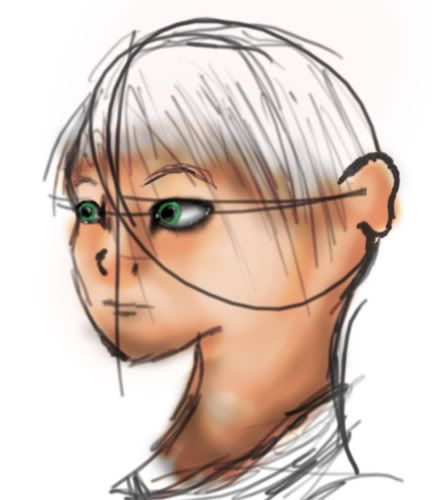
Not often I usually post a topic unless I'm completely stoked about something, like the next best game (although 'puki' did beat me to Oblivion)...
Short version :
Any good tutorials out there (preferably for Photoshop7) with regards to texturing skin and what not? Also preferably not one of those tut's that takes alot of cheap shortcuts that seperates the "meh.." from "nice" or "wow".
Long Version :
Been artistically active the last couple months, doodling figures on the side when I'm not working on my Media Arts class project, which is to create a short film (doing traditional animation with a mix of 3d here, made some progress already, just honing my 2-point perspective abilities so my backgrounds stop looking like crap, oh and btw, animating frame by frame SUCKS solo, god, takes years...). On one of my "on the side" doodles which I'd liked to color, I'd like to try a hand at doing it as realistically as possible, I can already do simple things like eyes, shading with air-brush and what not so-so, but what's the point if the skin got no texture/life to it? Been googling but cant seem to find anything "good" regarding texturing skin (or let alone a good way to airbrush the shades/midtone/hightlights in), yet for some reason there's a billion tutorials regarding skin tones, which I already know.
Adding noise and knocking up the gaussian blur filter doesn't do it justice for me with regards to my own personal work. =\
Also, was curious if any of you with Photoshop CS would recommend it clearly over 7 besides the fact it's more recent? Got a b-day coming up next month, tempted to ask if I can upgrade from 7 to CS (beats paying full price) as a gift (well, unless the Max3D module comes out by then ;P), but unsure if the US$169.00 is worth it if there isn't much in terms of features added.
Short version :
Any good tutorials out there (preferably for Photoshop7) with regards to texturing skin and what not? Also preferably not one of those tut's that takes alot of cheap shortcuts that seperates the "meh.." from "nice" or "wow".
Long Version :
Been artistically active the last couple months, doodling figures on the side when I'm not working on my Media Arts class project, which is to create a short film (doing traditional animation with a mix of 3d here, made some progress already, just honing my 2-point perspective abilities so my backgrounds stop looking like crap, oh and btw, animating frame by frame SUCKS solo, god, takes years...). On one of my "on the side" doodles which I'd liked to color, I'd like to try a hand at doing it as realistically as possible, I can already do simple things like eyes, shading with air-brush and what not so-so, but what's the point if the skin got no texture/life to it? Been googling but cant seem to find anything "good" regarding texturing skin (or let alone a good way to airbrush the shades/midtone/hightlights in), yet for some reason there's a billion tutorials regarding skin tones, which I already know.
Adding noise and knocking up the gaussian blur filter doesn't do it justice for me with regards to my own personal work. =\
Also, was curious if any of you with Photoshop CS would recommend it clearly over 7 besides the fact it's more recent? Got a b-day coming up next month, tempted to ask if I can upgrade from 7 to CS (beats paying full price) as a gift (well, unless the Max3D module comes out by then ;P), but unsure if the US$169.00 is worth it if there isn't much in terms of features added.