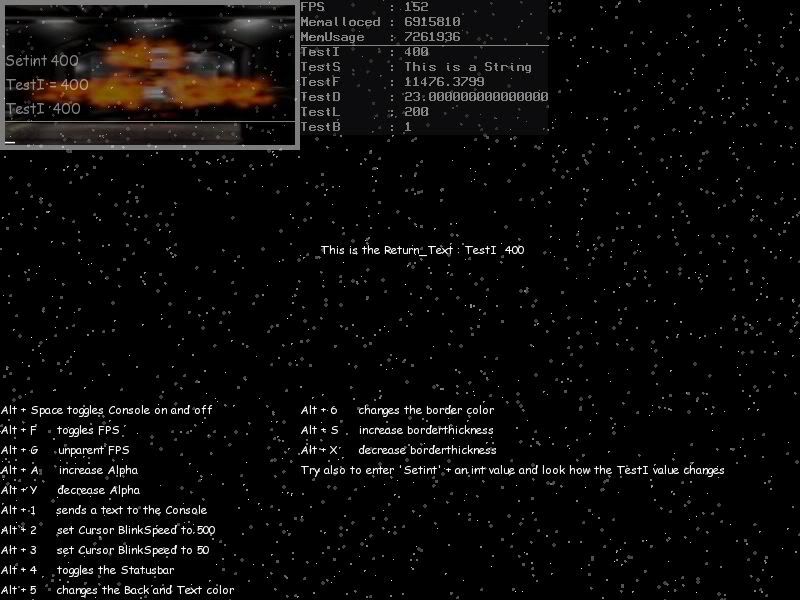
To learn a bit about OOP and the usage in BMAX I have created
a little Module which creates and manage a Console.
Currently available commands(0.53):
Type Console:
Create(width,height,alpha,maxChars)
update()
SetStatus(st:int) ; 1 = Visible 0 = Hidden
Set_alpha(_al:Float) ; 0 - 1 Sets a new Alpha value
Return_Alpha():Float ; returns the current Alpha value
Return Status():Int ; returns the current Status
Return_last():String ; Returns the last entered String
SetFPS(F_ST:Byte) ; enables/disables FPS in the topright of the console
Send_Text(txt:String) ; Send a string directly to the Console (maybe good for debugging)
Set_CursorSpeed(_blink:int) ; sets the blink time of the cursor.
[Edit:]
Edited the Cursor to be independent from the framerate and added new command for the Cursor Blinktime.
The Code is not well written but doesn't use much CPU.
Also fixed a bug which appears when you edit a String with the Cursor keys.
the Update method have to be at the end of your main loop(before the flip command).
And here a working sample :
and now enjoy.
BTW: Critic and Suggestions are welcome :)
a little Module which creates and manage a Console.
Currently available commands(0.53):
Type Console:
Create(width,height,alpha,maxChars)
update()
SetStatus(st:int) ; 1 = Visible 0 = Hidden
Set_alpha(_al:Float) ; 0 - 1 Sets a new Alpha value
Return_Alpha():Float ; returns the current Alpha value
Return Status():Int ; returns the current Status
Return_last():String ; Returns the last entered String
SetFPS(F_ST:Byte) ; enables/disables FPS in the topright of the console
Send_Text(txt:String) ; Send a string directly to the Console (maybe good for debugging)
Set_CursorSpeed(_blink:int) ; sets the blink time of the cursor.
[Edit:]
Edited the Cursor to be independent from the framerate and added new command for the Cursor Blinktime.
The Code is not well written but doesn't use much CPU.
Also fixed a bug which appears when you edit a String with the Cursor keys.
the Update method have to be at the end of your main loop(before the flip command).
Module Pub.Console
ModuleInfo "Name: A Console Module for BMAX"
ModuleInfo "License : None(Credits would be nice)"
ModuleInfo "Copyright 2005 Benjamin 'Klepto2' Rössig"
ModuleInfo "Simple Console like in some Shooters or similar"
ModuleInfo "Version: 0.5"

Import BRL.GLMax2d
Import BRL.Max2D
Import BRL.Keycodes
Import BRL.Retro
Import BRL.LinkedList

Global CText_List:Tlist


Type Console


	Field length:Int
	Field height:Int
	Field index:Int = 0
	Field Alpha:Float
	Field Status:Int
	Field tc:Int
	Field temp_Text:String
	Field Return_Text:String = ""
	Field Show_FPS:Byte = True
	Field fc,ms,mn,fr
	Field MAX_Chars:int
	Field c_timer1:Int = 0
	Field c_timer2:int = 0
	Field c_ms:Int
	Field c_pos:int = 0
	Field list_index:int = 0
	Field c_blink:Int = 500

	Function Create:Console(_length:Int,_height:int,_alpha:Float,_max_chars:Int)
		local c:Console = New Console
		c.length = _length
		c.height = _height
		c.Alpha = _Alpha
		c.MAX_Chars = _max_chars
		Return c

	End Function

	Method Update()
		if status = 1 then
			if Background = Null then
				SetBlend Alphablend
				SetAlpha alpha
		 		SetColor 25,25,25
				Drawrect(0,0,length,height)
				SetColor 255,255,255
				Drawline 0,height-25,length,height-25
				if Show_FPS = True then
					if fc = 0 then ms = Millisecs()
					mn = Millisecs() - ms
					fc = fc + 1
						if mn > 1000 then
						fr = fc
						fc = 0
						endif
					SetColor 25,25,25
					Drawrect(length,0,30,15)
					SetColor 255,255,255
					DrawText fr,length,0
				end if
				local t_index:Int = 0
				if Ctext_List <> Null then
					For t_Text:CText = eachin Ctext_list
						SetColor 255,255,255
						Drawtext(t_Text.Text,0,height-(40+(t_index*20)))
						t_index = t_index + 1
					next
				Endif


			endif

			tc = Getchar()
			SetColor 255,255,255
			SetAlpha alpha*2

			if c_pos = temp_text.Length then
				if tc <> 0 and temp_text.Length < max_chars and tc <> key_backspace and not keydown(key_alt) and tc <> key_enter then
					Temp_Text = Temp_text + CHR(tc)
					c_pos = c_pos + 1
				Endif
				if tc = key_backspace then
					Temp_text = left(Temp_Text,Temp_text.length - 1)
				if c_pos > 0 then c_pos = c_pos - 1
				Endif
			else
			    if tc <> 0 and temp_text.Length < max_chars and tc <> key_backspace and tc <> key_enter then
					t_text1:String = left(temp_text,c_pos)
					t_text2:String = right(temp_text,temp_text.length-c_pos)

					T_Text2 = CHR(tc) + T_Text2
					Temp_text = T_text1 + T_text2
					Temp_Text = left(temp_text,temp_text.length)
					Debuglog t_text1.Length + " : " + t_text2.length + " : " + temp_text.Length
					c_pos = c_pos + 1
				Endif
				if tc = key_backspace then
				    t_text1:String = left(temp_text,c_pos-1)
					t_text2:String = right(temp_text,temp_text.length-c_pos)
					Temp_text = t_text1 + t_text2
					Temp_Text = left(temp_text,temp_text.length)
					Debuglog t_text1.Length + " : " + t_text2.length + " : " + temp_text.Length
					if c_pos > 0 then c_pos = c_pos - 1
				Endif
			Endif
			if keyhit(key_right) then
				if c_pos < temp_text.length then
					c_pos = c_pos + 1
				Endif
			endif
			if keyhit(key_left) then
				if c_pos > 0 then
					c_pos = c_pos - 1
				Endif
			endif
			if keyhit(key_up) then
			if Ctext_List <> Null then
			if list_index <= Ctext_list.Count() then list_index = list_index + 1
				if list_index > Ctext_list.Count() then List_index = 1
				local n = 0

					For t_Text:CText = eachin Ctext_list
						temp_text = t_text.Text
						n = n + 1
						if n = list_index then
							n = 0
							exit
						endif
					Next
				Endif
			 c_pos = temp_text.Length
			endif

			if keyhit(key_Down) then

			if Ctext_List <> Null then
				if list_index >= 0 then list_index = list_index - 1
				if list_index < 0 then List_index = Ctext_list.Count()-1
					For t_Text:CText = eachin Ctext_list
						temp_text = t_text.Text
						n = n + 1
						if n = list_index then
							n = 0
							exit
						endif
					Next
				Endif
			 c_pos = temp_text.Length
			endif
			if tc = key_Enter then
					'Temp_Text = left(temp_text,temp_text.length-1)
					CText.Create(Temp_Text.Trim())
					Return_Text = Temp_Text
					Temp_Text = ""
					c_pos = 0
					list_index = 0
			end if
			DrawText(Temp_text,0,height-20)

			'Draw Cursor
			if c_timer1 = 0 then c_timer1 = millisecs()
			if c_ms - c_timer1 > c_blink then
				DrawText "_",c_pos*8,height-18
			    if c_timer2 = 0 then c_timer2 = millisecs()
				if c_ms - c_timer2 > c_blink then
					c_timer1 = 0
					c_timer2 = 0
				endif
			endif
			c_ms = millisecs()
		'	Debuglog temp_text.length
			'End Cursor
		endif

	End Method
	Method SetStatus(st:int)
		Status = st
		Flushkeys()
	End Method

	Method Set_Alpha(_al:Float)
		Alpha = _al
	End Method

	Method Return_Alpha:Float()
		Return Alpha
	End Method


	Method Return_Status:Int()
		Return Status
	End Method

	Method Return_last:String()
		Return Return_text
	End Method

	Method SetFPS(f_ST:Byte)
		Show_FPS = f_ST
	End Method

	Method Send_Text(txt:String)
		CText.Create(txt)
	End Method

	Method Set_CursorSpeed(_blink:int)
		c_blink = _blink
	End Method

End Type

Type CText
	Field Text:String

	Function Create(_Text:String)
		if CText_List = Null then CText_list = New TList
		t_Text:CText = New CText
		t_Text.Text = _Text
		CText_List.Addfirst(t_Text)
	End Function

End type
And here a working sample :
Framework pub.console


Graphics(640,480,0,-1)

c:console = console.Create(300,100,.5,20)
c.setFPS(False)
c.setstatus(1)
While Not KeyHit(key_escape)
Cls

Global A_st:Float = c.Return_Alpha()

If KeyHit(key_space) And KeyDown(key_alt) Then
	_st = 1 - _st
	c.setstatus(_st)
	End If
If KeyHit(key_F) And KeyDown(key_alt) Then
	F_st = 1 - f_st
	c.setFPS(F_st)
End If
If KeyDown(key_A) And KeyDown(key_alt) Then
	A_st:Float = A_St + .001
	End If
If KeyDown(key_Y) And KeyDown(key_alt) Then
	A_st:Float = a_st - .001
End If
If KeyHit(KEY_1) And KeyDown(key_alt) Then
	c.send_Text("Test")
EndIf
if keyhit(KEY_2) and keydown(key_alt) then
	c.set_CursorSpeed(500)
endif
if keyhit(KEY_3) and keydown(key_alt) then
	c.set_CursorSpeed(50)
endif

DrawText(c.Return_text,320,240)
c.set_Alpha(A_st)
c.Update()
FlushMem()
Flip

Wend
and now enjoy.
BTW: Critic and Suggestions are welcome :)