Hi folks. Recently I posted a tutorial on how to render fast 2D blobby objects in BlitzMax in realtime, in this thread:
http://www.blitzbasic.com/Community/posts.php?topic=45716
I decided to release a more complex version of my blob routines that uses lots of direct OpenGL and almost no Max2D commands. This version loads and needs four pre-rendered blob-field images (examples included below) which are 512x512 grayscale RGB images in PNG format. It also loads a `filler` image texture which is a 256x256 color RGB image in PNG format (example also included below).
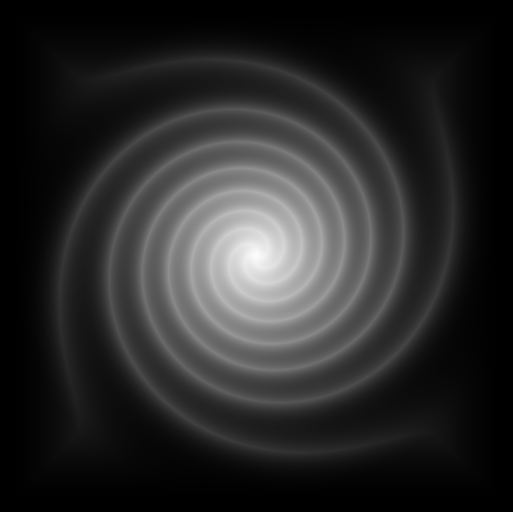
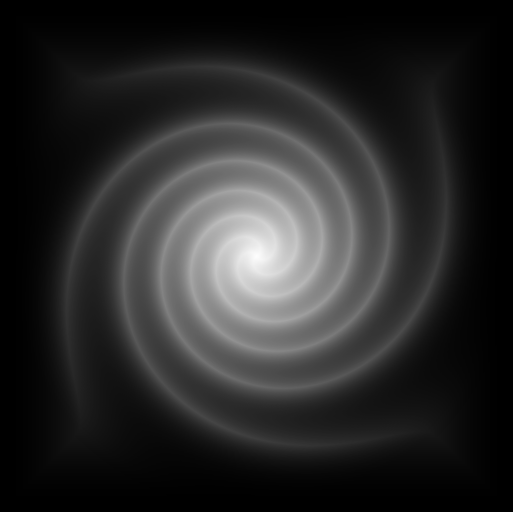
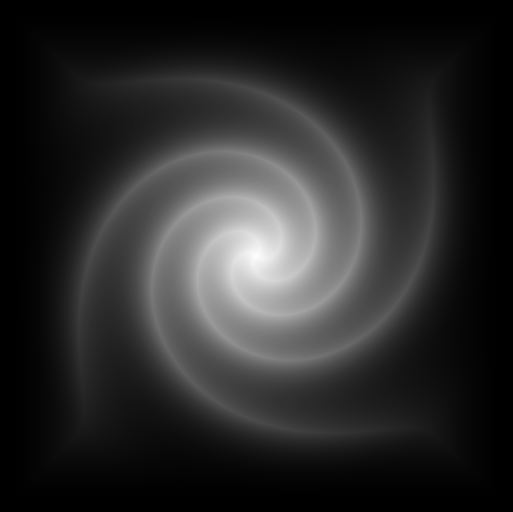
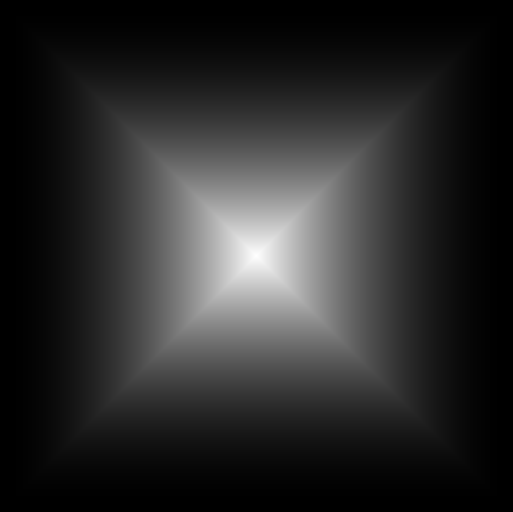
This version can actually load 4 different blob-field images at once so you can experiment with using the same one four times or more than one kind. These blob images are based on a standard blob field as generated by the included `DrawSquare512` and `DrawBall512` programs. Using those programs you can generate the basic blob field - I use a screengrab to save them to disk as PNG's. They have been loaded into image processing graphics software and manipulated, for example applying a simple `twist/twirl/spin` effect. There are many effects you could apply, for example a wave or ripple effect. Effects that move the pixels around, preserving the basic content, are the best and still produce a blob effect.
This version doesn't include animation but I have since implemented an animated version that loads 20 frames of a cyclic animation, produced with image processing software applied to the standard blob field image with a rippling wave effect.
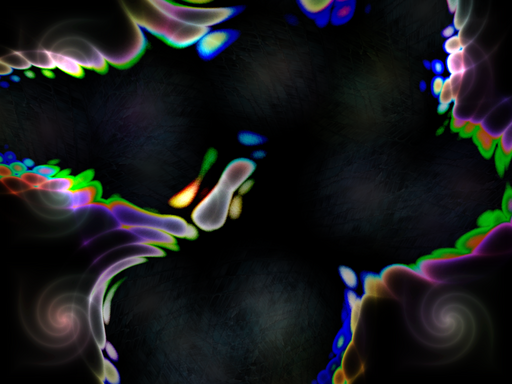
You can move the mouse around to move all of the blobs. Positioning the mouse near the lower right at about 3/4 of the width and height of the screen produces a fairly stationary shape.
I haven't tidied up the code too much and there is some old/optional bits that are commented out. There's also some extraneous OpenGL calls near the start that may not be needed - but I found that the `default` state of the OpenGL machine was different on different platforms, so I'm just making sure things are set up right.
For me this runs okay on an iMac 1GHz G4 with an nVidea GeForce 4MX at around 30fps with vblank synching. You may need a comparable gfx card performance (750 million texels/second or so at least, I would guess - the GeForce 4MX is 1 billion texels/second).
Feel free to use this for whatever purpose you like, no strings attached. I hope it will work on your system with no problems.
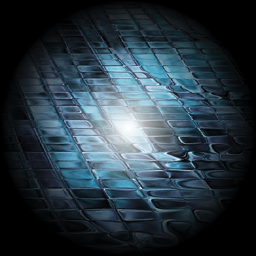
These are four different blob field images that you will need. Currently the code will load all four but you could change it to load only one repeatedly. The reason I applied a `twist` effect to the blob field is that it produces much smaller blobs and is still smooth. It took a lot of experimentation to come up with this effect.
You also will need this filler texture image (or something similar). Any 256x256 PNG will do but it should be RGB not RGBA (no alpha). This image is just faded out at the edges so as to smoothly blend together. Other images that I found interesting were based on clouds or fractals.
This is the main program and is freeware. I apologize for any untidyness or `procedural coding` technique, it's not very object-oriented. The blob images are uploaded as GL_ALPHA textures, which are just one 8-bit color component per pixel. This saves on storage space, and allows use of particular blend modes later on. The filler image is regular color texture. The rendering code within the main loop - you can comment out whole sections if you'd like to see the effect that each part has. There are also some flags at the top of the code to turn certain things on and off. You can also modify the rotation angle increments and the kind of colors that are produced at other points in the code.
This is the program you use to generate a basic blob field image, freeware also. This one generates circular blob fields (standard blobby objects). This produces blobs that form nicely curved outlines as standard. The commented-out code at the end adds various extra little effects to it (just experiments).
And this one generates a blob field image based on squares - this produces a very interesting bubbling blob effect of many different shapes and sizes (of course freeware too). I have never seen this done before so maybe I can lay claim to actually inventing this! Since it is based on squares you might think it couldn't produce a blob shape, but it actually does, and goes further to add a lot of variety.
The effect should end up looking something like this:
All these files are free for your use in whatever manner. :-)
http://www.blitzbasic.com/Community/posts.php?topic=45716
I decided to release a more complex version of my blob routines that uses lots of direct OpenGL and almost no Max2D commands. This version loads and needs four pre-rendered blob-field images (examples included below) which are 512x512 grayscale RGB images in PNG format. It also loads a `filler` image texture which is a 256x256 color RGB image in PNG format (example also included below).
This version can actually load 4 different blob-field images at once so you can experiment with using the same one four times or more than one kind. These blob images are based on a standard blob field as generated by the included `DrawSquare512` and `DrawBall512` programs. Using those programs you can generate the basic blob field - I use a screengrab to save them to disk as PNG's. They have been loaded into image processing graphics software and manipulated, for example applying a simple `twist/twirl/spin` effect. There are many effects you could apply, for example a wave or ripple effect. Effects that move the pixels around, preserving the basic content, are the best and still produce a blob effect.
This version doesn't include animation but I have since implemented an animated version that loads 20 frames of a cyclic animation, produced with image processing software applied to the standard blob field image with a rippling wave effect.
You can move the mouse around to move all of the blobs. Positioning the mouse near the lower right at about 3/4 of the width and height of the screen produces a fairly stationary shape.
I haven't tidied up the code too much and there is some old/optional bits that are commented out. There's also some extraneous OpenGL calls near the start that may not be needed - but I found that the `default` state of the OpenGL machine was different on different platforms, so I'm just making sure things are set up right.
For me this runs okay on an iMac 1GHz G4 with an nVidea GeForce 4MX at around 30fps with vblank synching. You may need a comparable gfx card performance (750 million texels/second or so at least, I would guess - the GeForce 4MX is 1 billion texels/second).
Feel free to use this for whatever purpose you like, no strings attached. I hope it will work on your system with no problems.
These are four different blob field images that you will need. Currently the code will load all four but you could change it to load only one repeatedly. The reason I applied a `twist` effect to the blob field is that it produces much smaller blobs and is still smooth. It took a lot of experimentation to come up with this effect.
You also will need this filler texture image (or something similar). Any 256x256 PNG will do but it should be RGB not RGBA (no alpha). This image is just faded out at the edges so as to smoothly blend together. Other images that I found interesting were based on clouds or fractals.
This is the main program and is freeware. I apologize for any untidyness or `procedural coding` technique, it's not very object-oriented. The blob images are uploaded as GL_ALPHA textures, which are just one 8-bit color component per pixel. This saves on storage space, and allows use of particular blend modes later on. The filler image is regular color texture. The rendering code within the main loop - you can comment out whole sections if you'd like to see the effect that each part has. There are also some flags at the top of the code to turn certain things on and off. You can also modify the rotation angle increments and the kind of colors that are produced at other points in the code.
Strict

Const wid:Int=1024
Const hig:Int=768
Const objs:Int=26
Const moveobjs:Int=True
Const rotobjs:Int=True
Const background:Int=True
Const rotatecolor:Int=True

Local ballsize:Int=512 'based on 512x512 image
Local ballsizehalf:Int=ballsize Shr 1
Local ballsize2:Int=256 'based on 256x256 color image
Local ballsizehalf2:Int=ballsize2 Shr 1

AutoMidHandle True
Local px1:TPixmap[4]
px1[0]=LoadPixmap("BigBall48.png") '1 to 22 RGB - 512x512 grayscale
px1[0]=ResizePixmap(px1[0],ballsize,ballsize) 'Make sure of size
px1[0]=ConvertPixmap(px1[0],PF_RGBA8888) 'Make it 4 bytes per pixel
px1[1]=LoadPixmap("BigBall47.png") '1 to 22 RGB - 512x512 grayscale
px1[1]=ResizePixmap(px1[1],ballsize,ballsize) 'Make sure of size
px1[1]=ConvertPixmap(px1[1],PF_RGBA8888) 'Make it 4 bytes per pixel
px1[2]=LoadPixmap("BigBall46.png") '1 to 22 RGB - 512x512 grayscale
px1[2]=ResizePixmap(px1[2],ballsize,ballsize) 'Make sure of size
px1[2]=ConvertPixmap(px1[2],PF_RGBA8888) 'Make it 4 bytes per pixel
px1[3]=LoadPixmap("BigBall01.png") '1 to 22 RGB - 512x512 grayscale
px1[3]=ResizePixmap(px1[3],ballsize,ballsize) 'Make sure of size
px1[3]=ConvertPixmap(px1[3],PF_RGBA8888) 'Make it 4 bytes per pixel

Local px2:TPixmap=LoadPixmap("Ball48.png")'"BigBallC02.png") '1 to 14 RGB - 512x512 color
px2=ResizePixmap(px2,ballsize2,ballsize2) 'Make sure of size
px2=ConvertPixmap(px2,PF_RGBA8888) 'Make it 4 bytes per pixel

bglCreateContext(wid,hig,32,0,BGL_BACKBUFFER|BGL_FULLSCREEN)
glViewport(0,0,wid,hig)
glMatrixMode (GL_PROJECTION)
glLoadIdentity
glOrtho(0,wid,hig,0,-1,1)
'gluOrtho2D(0,wid,0,hig)
glMatrixMode(GL_TEXTURE)
glLoadIdentity
glMatrixMode(GL_MODELVIEW)
glLoadIdentity
glClear(GL_COLOR_BUFFER_BIT)
bglSwapBuffers
glClear(GL_COLOR_BUFFER_BIT)
bglSwapBuffers
glDisable(GL_DEPTH_TEST)
glDisable(GL_STENCIL_TEST)
glDisable(GL_ALPHA_TEST)
glDisable(GL_SCISSOR_TEST)
glDisable(GL_CULL_FACE)
'glDisable(GL_POLYGON_SMOOTH)
glEnable(GL_POLYGON_SMOOTH)
'glDisable(GL_LOGIC_OP)
glColorMask(GL_TRUE,GL_TRUE,GL_TRUE,GL_TRUE)
'bglSetSwapInterval(0) 'no vbl sync
GLDisable(GL_DITHER)
glTexEnvi(GL_TEXTURE_ENV,GL_TEXTURE_ENV_MODE,GL_MODULATE)'GL_DECAL/GL_BLEND
glPolygonMode(GL_FRONT_AND_BACK,GL_FILL) 'face
glDrawBuffer(GL_BACK)

glClearColor(0,0,0,0)
glColor4b($FF,$FF,$FF,$FF)
SeedRnd(MilliSecs())

'Create bank space to store an alpha buffer
'Local bnk:TBank=CreateBank(ballsize*ballsize) 'to store alpha image
'Local where:Byte Ptr=BankBuf(bnk)

''Create an alpha buffer
Local pxp:Byte Ptr[4]
pxp[0]=PixmapPixelPtr(px1[0],0,0)
pxp[1]=PixmapPixelPtr(px1[1],0,0)
pxp[2]=PixmapPixelPtr(px1[2],0,0)
pxp[3]=PixmapPixelPtr(px1[3],0,0)
Local pxp2:Byte Ptr=PixmapPixelPtr(px2,0,0)
Local pitch:Int[4]
pitch[0]=PixmapPitch(px1[0])
pitch[1]=PixmapPitch(px1[1])
pitch[2]=PixmapPitch(px1[2])
pitch[3]=PixmapPitch(px1[3])
Local pitch2:Int=PixmapPitch(px2)
'Local aimage:Byte Ptr=where 'to create alpha by itself
Local aimage:Byte Ptr[4]
aimage[0]=pxp[0]+3 'to create alpha within RGBA
aimage[1]=pxp[1]+3 'to create alpha within RGBA
aimage[2]=pxp[2]+3 'to create alpha within RGBA
aimage[3]=pxp[3]+3 'to create alpha within RGBA
Local aimage2:Byte Ptr=pxp2+3 'to create alpha within RGBA
For Local yy:Int=0 To ballsize-1
	Local yloc:Int[4]
	yloc[0]=yy*pitch[0]
	yloc[1]=yy*pitch[1]
	yloc[2]=yy*pitch[2]
	yloc[3]=yy*pitch[3]
	For Local xx:Int=0 To ballsize-1
		(aimage[0])[xx Shl 2]=$FF'pxp[yloc[0]+(xx Shl 2)] 'copy the red component into the alpha buffer
		(aimage[1])[xx Shl 2]=$FF'pxp[yloc[1]+(xx Shl 2)] 'copy the red component into the alpha buffer
		(aimage[2])[xx Shl 2]=$FF'pxp[yloc[2]+(xx Shl 2)] 'copy the red component into the alpha buffer
		(aimage[3])[xx Shl 2]=$FF'pxp[yloc[3]+(xx Shl 2)] 'copy the red component into the alpha buffer
		If xx<ballsize2 And yy<ballsize2 Then aimage2[xx Shl 2]=$18'pxp[yloc[0]+(xx Shl 2)] 'copy the red component into the alpha buffer
	Next
	aimage[0]:+pitch[0]'256
	aimage[1]:+pitch[1]'256
	aimage[2]:+pitch[2]'256
	aimage[3]:+pitch[3]'256
	aimage2:+pitch2'256
Next

'glPixelStorei(GL_UNPACK_ALIGNMENT,1) 'bytes for stand-alone alpha
glPixelStorei(GL_UNPACK_ALIGNMENT,4) 'ints for RGBA with alpha
glPixelStorei(GL_UNPACK_ROW_LENGTH,ballsize) 'How many pixels in a row
glPixelStorei(GL_UNPACK_SWAP_BYTES,GL_FALSE)
glPixelStorei(GL_UNPACK_LSB_FIRST,GL_FALSE)
glPixelStorei(GL_UNPACK_SKIP_PIXELS,0)
glPixelStorei(GL_UNPACK_SKIP_ROWS,0)
glPixelTransferf(GL_RED_SCALE,1.0)
glPixelTransferf(GL_RED_BIAS,0.0)
glPixelTransferf(GL_GREEN_SCALE,1.0)
glPixelTransferf(GL_GREEN_BIAS,0.0)
glPixelTransferf(GL_BLUE_SCALE,1.0)
glPixelTransferf(GL_BLUE_BIAS,0.0)
glPixelTransferf(GL_ALPHA_SCALE,1.0)
glPixelTransferf(GL_ALPHA_BIAS,0.0)
glPixelTransferi(GL_MAP_COLOR,GL_FALSE)
glPixelTransferi(GL_MAP_STENCIL,GL_FALSE)

'Define blob images
Global name:Int[4]
For Local Counter:Int=0 To 3
	name[Counter]=0
	glGenTextures(1,VarPtr(name[Counter]))
	glBindTexture(GL_TEXTURE_2D,name[Counter])
	'glTexImage2D(GL_TEXTURE_2D,0,GL_ALPHA,ballsize,ballsize,0,GL_ALPHA,GL_UNSIGNED_BYTE,where) 'Renderable alpha image
	glTexImage2D(GL_TEXTURE_2D,0,GL_RGBA,ballsize,ballsize,0,GL_RGBA,GL_UNSIGNED_BYTE,pxp[Counter]) 'Renderable RGBA image
	glTexParameteri(GL_TEXTURE_2D,GL_TEXTURE_WRAP_S,GL_CLAMP) 'must come after the glBindTexture()
	glTexParameteri(GL_TEXTURE_2D,GL_TEXTURE_WRAP_T,GL_CLAMP)
	glTexParameteri(GL_TEXTURE_2D,GL_TEXTURE_MAG_FILTER,GL_LINEAR)
	glTexParameteri(GL_TEXTURE_2D,GL_TEXTURE_MIN_FILTER,GL_LINEAR)
Next

'Define color image
glPixelStorei(GL_UNPACK_ROW_LENGTH,ballsize2) 'How many pixels in a row
Global name2:Int=0
glGenTextures(1,VarPtr(name2))
glBindTexture(GL_TEXTURE_2D,name2)
glTexImage2D(GL_TEXTURE_2D,0,GL_RGBA,ballsize2,ballsize2,0,GL_RGBA,GL_UNSIGNED_BYTE,pxp2) 'Renderable RGBA image
glTexParameteri(GL_TEXTURE_2D,GL_TEXTURE_WRAP_S,GL_CLAMP) 'must come after the glBindTexture()
glTexParameteri(GL_TEXTURE_2D,GL_TEXTURE_WRAP_T,GL_CLAMP)
glTexParameteri(GL_TEXTURE_2D,GL_TEXTURE_MAG_FILTER,GL_LINEAR)
glTexParameteri(GL_TEXTURE_2D,GL_TEXTURE_MIN_FILTER,GL_LINEAR)

'For objects and their color
Local objx:Float[objs]
Local objy:Float[objs]
Local xadd:Float[objs]
Local yadd:Float[objs]
Local colr:Byte[objs+3]
Local colg:Byte[objs+3]
Local colb:Byte[objs+3]
Local spin:Float[objs]
Local angle:Float[objs]
Local ohalf:Int=objs/2
For Local Counter:Int=0 To ohalf-1
	objx[Counter]=Rand(0,wid-21-ballsizehalf)+10-(ballsizehalf Shr 1)
	objy[Counter]=Rand(0,hig-21-ballsizehalf)+10-(ballsizehalf Shr 1)
	xadd[Counter]=Rnd(0,0.75)-Rnd(0,0.75)
	yadd[Counter]=Rnd(0,0.75)-Rnd(0,0.75)
	If Rand(0,1)=1
		colr[Counter]=Rand(0,255)
		colg[Counter]=Rand(0,255)
		colb[Counter]=Rand(0,255)
	Else
		colr[Counter]=$FF
		colg[Counter]=$FF
		colb[Counter]=$FF
	EndIf
	If rotobjs
		spin[Counter]=0.5'Rnd(1.0,1.5)
		'If Rand(0,1)=1 Then spin[Counter]=-spin[Counter]
		angle[Counter]=Rnd(0,360.0)
	EndIf
Next
For Local Counter:Int=0 To 2 'for drawing extra colors for ball textures
	colr[objs+Counter]=Rand(0,255)
	colg[objs+Counter]=Rand(0,255)
	colb[objs+Counter]=Rand(0,255)
Next
For Local Counter:Int=ohalf To objs-1
	objx[Counter]=objx[Counter-ohalf]'Rand(0,619-ballsize)+10
	objy[Counter]=objy[Counter-ohalf]'Rand(0,459-ballsize)+10
	xadd[Counter]=xadd[Counter-ohalf]'Rnd(0,0.5)-Rnd(0,0.5)
	yadd[Counter]=yadd[Counter-ohalf]'Rnd(0,0.5)-Rnd(0,0.5)
	If Rand(0,1)=1
		colr[Counter]=Rand(0,255)
		colg[Counter]=Rand(0,255)
		colb[Counter]=Rand(0,255)
	Else
		colr[Counter]=$FF
		colg[Counter]=$FF
		colb[Counter]=$FF
	EndIf
	If rotobjs
		spin[Counter]=0.5'Rnd(1.0,1.5)
		'If Rand(0,1)=1 Then spin[Counter]=-spin[Counter]
		angle[Counter]=Rnd(0,360.0)
	EndIf
Next
For Local Counter:Int=0 To 2 'for drawing extra colors for ball textures
	colr[objs+Counter]=Rand(0,255)
	colg[objs+Counter]=Rand(0,255)
	colb[objs+Counter]=Rand(0,255)
Next

'For colorization of display
Const keach:Int=256 'size of background textures
Const ksize:Int=((wid/keach)+1)*((hig/keach)+3)
Const krow:Int=(wid/keach)+1
Local kullar:Byte[ksize]
Local kullag:Byte[ksize]
Local kullab:Byte[ksize]
For Local Counter:Int=0 To ksize-1
	If background
		kullar[Counter]=Rand($11,$28)
		kullag[Counter]=Rand($11,$28)
		kullab[Counter]=Rand($11,$28)
	Else
		kullar[Counter]=0
		kullag[Counter]=0
		kullab[Counter]=0
	EndIf
Next

Global mx:Int
Global my:Int
Repeat
	'Move objects
	If moveobjs
		For Local Counter:Int=0 To objs-1
			objx[Counter]:+xadd[Counter]
			If objx[Counter]>wid-10-ballsizehalf Or objx[Counter]<10-ballsizehalf
				xadd[Counter]=-xadd[Counter]
				objx[Counter]:+xadd[Counter]
			EndIf
		Next
		For Local Counter:Int=0 To objs-1
			objy[Counter]:+yadd[Counter]
			If objy[Counter]>hig-10-ballsizehalf Or objy[Counter]<10-ballsizehalf
				yadd[Counter]=-yadd[Counter]
				objy[Counter]:+yadd[Counter]
			EndIf
		Next
	EndIf
	For Local Counter:Int=0 To objs-1
		angle[Counter]:+spin[Counter] Mod 360
	Next

	mx:Int=Int(MouseX())-ballsizehalf
	my:Int=Int(MouseY())-ballsizehalf

	glColor4b($FF,$FF,$FF,$FF)
	glColorMask(GL_TRUE,GL_TRUE,GL_TRUE,GL_TRUE)
	glClear(GL_COLOR_BUFFER_BIT) 'cls
	glColorMask(GL_TRUE,GL_TRUE,GL_TRUE,GL_FALSE)
	glEnable(GL_BLEND)
	glBlendFunc(GL_SRC_ALPHA,GL_ONE)
	glEnable(GL_TEXTURE_2D)
	glShadeModel(GL_SMOOTH)
	glEnable(GL_POLYGON_SMOOTH)
	glMatrixMode(GL_MODELVIEW)
	Local txtr:Int=0 'what texture to use?
	For Local Counter:Int=0 To objs-1
		If Counter Mod 2=0
			glBindTexture(GL_TEXTURE_2D,name[txtr]) 'select renderable image texture for drawing
			txtr:+1
			txtr:Mod 4
		EndIf
		glLoadIdentity()
		glTranslatef(objx[Counter]+ballsizehalf,objy[Counter]+ballsizehalf,0)
		glRotatef(angle[Counter],0,0,1)
		glTranslatef(-ballsizehalf,-ballsizehalf,0)
		glBegin GL_QUADS
			glColor3b(colr[Counter],colg[Counter],colb[Counter])
			glTexCoord2f(0,0); glVertex2f((wid/2)-mx,(hig/2)-my)'glVertex2f(objx[Counter],objy[Counter])
			glColor3b(colr[Counter+1],colg[Counter+1],colb[Counter+1])
			glTexCoord2f(1,0); glVertex2f((wid/2)-mx+ballsize,(hig/2)-my)'glVertex2f(objx[Counter]+ballsize,objy[Counter])
			glColor3b(colr[Counter+2],colg[Counter+2],colb[Counter+2])
			glTexCoord2f(1,1); glVertex2f((wid/2)-mx+ballsize,(hig/2)-my+ballsize)'glVertex2f(objx[Counter]+ballsize,objy[Counter]+ballsize)
			glColor3b(colr[Counter+3],colg[Counter+3],colb[Counter+3])
			glTexCoord2f(0,1); glVertex2f((wid/2)-mx,(hig/2)-my+ballsize)'objx[Counter],objy[Counter]+ballsize)
		glEnd
	Next
	glLoadIdentity()
	glTranslatef(mx+ballsizehalf,my+ballsizehalf,0)
	glRotatef(angle[0],0,0,1)
	glTranslatef(-ballsizehalf,-ballsizehalf,0)
	glBindTexture(GL_TEXTURE_2D,name[2])
	glBegin GL_QUADS
		glTexCoord2f(0,0); glColor3b($FF,$FF,$FF); glVertex2f(0,0)
		glTexCoord2f(1,0); glColor3b($FF,$FF,$FF); glVertex2f(ballsize,0)
		glTexCoord2f(1,1); glColor3b($FF,$FF,$FF); glVertex2f(ballsize,ballsize)
		glTexCoord2f(0,1); glColor3b($FF,$FF,$FF); glVertex2f(0,ballsize)
	glEnd
	glLoadIdentity()
	glDisable(GL_TEXTURE_2D)
	glDisable(GL_BLEND)
	glDisable(GL_POLYGON_SMOOTH)

	'Image currently become blobs when intensity is 255, add $40 (multiplied by 2 is $80) to make blobs begin at 128 intensity
	glColorMask(GL_TRUE,GL_TRUE,GL_TRUE,GL_FALSE)
	glEnable(GL_BLEND)
	glBlendFunc(GL_SRC_ALPHA,GL_ONE)
	glColor4b($40,$40,$40,$40)
	glBegin GL_QUADS
		'glColor3b($FF,0,0)
		glVertex2f(0,0)
		'glColor3b(0,$FF,0)
		glVertex2f(wid,0)
		'glColor3b($FF,0,$FF)
		glVertex2f(wid,hig)
		'glColor3b(0,0,$FF)
		glVertex2f(0,hig)
	glEnd
	glDisable(GL_BLEND)

	'Saturate to make the edges sharp
	glColorMask(GL_TRUE,GL_TRUE,GL_TRUE,GL_FALSE)
	glEnable(GL_BLEND)
	glBlendFunc(GL_SRC_ALPHA_SATURATE,GL_DST_COLOR)
	glColor4b(0,0,0,$FF)
	For Local Counter:Int=1 To 3
		glBegin GL_QUADS
			'glColor3b($FF,0,0)
			glVertex2f(0,0)
			'glColor3b(0,$FF,0)
			glVertex2f(wid,0)
			'glColor3b($FF,0,$FF)
			glVertex2f(wid,hig)
			'glColor3b(0,0,$FF)
			glVertex2f(0,hig)
		glEnd
	Next
	glDisable(GL_BLEND)

	'Invert the image, draw background textures and add color
	glColorMask(GL_TRUE,GL_TRUE,GL_TRUE,GL_FALSE)
	glEnable(GL_BLEND)
	glBlendFunc(GL_ONE_MINUS_DST_COLOR,GL_ONE_MINUS_DST_COLOR)
	glShadeModel(GL_SMOOTH)
	'glColor3b($FF,$FF,$FF)
	glEnable(GL_TEXTURE_2D)
	Local Counter:Int=0
	For Local yy:Int=0 To hig-1 Step keach
		For Local xx:Int=0 To wid-1 Step keach
			glBegin GL_QUADS
				glColor3b(kullar[Counter],kullag[Counter],kullab[Counter])
				glTexCoord2i(0,0); glVertex2f(xx,yy)
				glColor3b(kullar[Counter+1],kullag[Counter+1],kullab[Counter+1])
				glTexCoord2i(0,1); glVertex2f(xx+keach,yy)
				glColor3b(kullar[Counter+1+krow],kullag[Counter+1+krow],kullab[Counter+1+krow])
				glTexCoord2i(1,1); glVertex2f(xx+keach,yy+keach)
				glColor3b(kullar[Counter+krow],kullag[Counter+krow],kullab[Counter+krow])
				glTexCoord2i(1,0); glVertex2f(xx,yy+keach)
			glEnd
			Counter:+1
		Next
		Counter:+1
	Next
	glDisable(GL_TEXTURE_2D)
	glDisable(GL_BLEND)

	'Brighten the image, too dark due to previous addition of brightness
	glColorMask(GL_TRUE,GL_TRUE,GL_TRUE,GL_FALSE)
	glEnable(GL_BLEND)
	glBlendFunc(GL_DST_COLOR,GL_DST_COLOR)
	glColor4b($FF,$FF,$FF,$FF)
	For Local Counter:Int=1 To 3
		glBegin GL_QUADS
			'glColor3b($FF,0,0)
			glVertex2f(0,0)
			'glColor3b(0,$FF,0)
			glVertex2f(wid,0)
			'glColor3b($FF,0,$FF)
			glVertex2f(wid,hig)
			'glColor3b(0,0,$FF)
			glVertex2f(0,hig)
		glEnd
	Next
	glDisable(GL_BLEND)

	'Draw color objects for fill
	glColor4b($FF,$FF,$FF,$FF)
	glColorMask(GL_TRUE,GL_TRUE,GL_TRUE,GL_FALSE)
	glEnable(GL_BLEND)
	glBlendFunc(GL_SRC_ALPHA,GL_ONE)
	glEnable(GL_TEXTURE_2D)
	glShadeModel(GL_SMOOTH)
	glEnable(GL_POLYGON_SMOOTH)
	glBindTexture(GL_TEXTURE_2D,name2) 'select renderable image texture for drawing
	glMatrixMode(GL_MODELVIEW)
	For Local Counter:Int=0 To objs-1
		glLoadIdentity()
		glTranslatef(objx[Counter]+ballsizehalf,objy[Counter]+ballsizehalf,0)
		If rotatecolor Then glRotatef(angle[Counter],0,0,1)
		glTranslatef(-ballsizehalf2,-ballsizehalf2,0)
		glBegin GL_QUADS
			glColor3b(colr[Counter],colg[Counter],colb[Counter])
			glTexCoord2f(0,0); glVertex2f((wid/2)-mx,(hig/2)-my)
			glColor3b(colr[Counter+1],colg[Counter+1],colb[Counter+1])
			glTexCoord2f(1,0); glVertex2f((wid/2)-mx+ballsize2,(hig/2)-my)
			glColor3b(colr[Counter+2],colg[Counter+2],colb[Counter+2])
			glTexCoord2f(1,1); glVertex2f((wid/2)-mx+ballsize2,(hig/2)-my+ballsize2)
			glColor3b(colr[Counter+3],colg[Counter+3],colb[Counter+3])
			glTexCoord2f(0,1); glVertex2f((wid/2)-mx,(hig/2)-my+ballsize2)
		glEnd
	Next
	glLoadIdentity()
	glDisable(GL_TEXTURE_2D)
	glDisable(GL_POLYGON_SMOOTH)
	glDisable(GL_BLEND)

	bglSwapBuffers
'	Repeat;Until KeyHit(KEY_SPACE)
Until KeyHit(KEY_ESCAPE)
End
This is the program you use to generate a basic blob field image, freeware also. This one generates circular blob fields (standard blobby objects). This produces blobs that form nicely curved outlines as standard. The commented-out code at the end adds various extra little effects to it (just experiments).
Strict

Local ballsize:Int=512
Local ballsizehalf:Int=ballsize/2
Local balldivider:Float 'cant figure out formulae for what this needs to be dynamically, so hardwired
If ballsize=128 Then balldivider:Float=64
If ballsize=256 Then balldivider:Float=256
If ballsize=512 Then balldivider:Float=1024

Graphics 800,600,0
Cls
DrawText "Generating ball image...",10,10
Flip
SetClsColor $FF,$FF,$FF
Cls
SetColor 0,0,0
DrawRect 0,0,ballsize,ballsize
SetColor $FF,$FF,$FF
For Local r:Float=1 To ballsize-1 Step 0.5
	Local level:Float=r		'Numbers ranging from 0 to 255
	level:*level		'Square the level (radius)
	level=level/balldivider
	SetColor level,level,level 'Proper blobby object
'SetColor r,r,r 'Linear blobs
	DrawOval r/2,r/2,ballsize-r,ballsize-r
Next
SeedRnd(MilliSecs())

'glEnable(GL_LINE_SMOOTH)
'SetBlend LIGHTBLEND
'SetColor $08,$08,$08
'For Local l:Int=0 To 500
'	Local angle:Float=Rnd(0,360.0)
'	DrawLine ballsizehalf,ballsizehalf,ballsizehalf+(ballsizehalf*Cos(angle)),ballsizehalf+(ballsizehalf*Sin(angle)),False
''	DrawLine ballsizehalf+(Rnd(ballsizehalf)*Cos(angle)),ballsizehalf+(Rnd(ballsizehalf)*Sin(angle)),ballsizehalf+(ballsizehalf*Cos(angle)),ballsizehalf+(ballsizehalf*Sin(angle)),False
''	Plot ballsizehalf+(Rnd(ballsizehalf)*Cos(angle)),ballsizehalf+(Rnd(ballsizehalf)*Sin(angle))
''	DrawRect Rnd(ballsize),Rnd(ballsize),Rnd(50),Rnd(50)
''	DrawOval Rnd(ballsize),Rnd(ballsize),Rnd(50),Rnd(50)
''	DrawLine Rnd(ballsize),Rnd(ballsize),Rnd(ballsize),Rnd(ballsize)
'Next
Flip
Repeat
Until KeyHit(KEY_ESCAPE)
And this one generates a blob field image based on squares - this produces a very interesting bubbling blob effect of many different shapes and sizes (of course freeware too). I have never seen this done before so maybe I can lay claim to actually inventing this! Since it is based on squares you might think it couldn't produce a blob shape, but it actually does, and goes further to add a lot of variety.
Strict

Local ballsize:Int=512
Local ballsizehalf:Int=ballsize/2
Local balldivider:Float 'cant figure out formulae for what this needs to be dynamically, so hardwired
If ballsize=128 Then balldivider:Float=64
If ballsize=256 Then balldivider:Float=256
If ballsize=512 Then balldivider:Float=1024

Graphics 800,600,0
Cls
DrawText "Generating ball image...",10,10
Flip
SetClsColor $FF,$FF,$FF
Cls
SetColor 0,0,0
DrawRect 0,0,ballsize,ballsize
SetColor $FF,$FF,$FF
For Local r:Float=1 To ballsize-1 Step 0.5
	Local level:Float=r		'Numbers ranging from 0 to 255
	level:*level		'Square the level (radius)
	level=level/balldivider
	SetColor level,level,level 'Proper blobby object
'SetColor r,r,r 'Linear blobs
	DrawRect r/2,r/2,ballsize-r,ballsize-r
Next
SeedRnd(MilliSecs())

'glEnable(GL_LINE_SMOOTH)
'SetBlend LIGHTBLEND
'SetColor $08,$08,$08
'For Local l:Int=0 To 500
'	Local angle:Float=Rnd(0,360.0)
'	DrawLine ballsizehalf,ballsizehalf,ballsizehalf+(ballsize*Cos(angle)),ballsizehalf+(ballsize*Sin(angle)),False
''	DrawLine ballsizehalf+(Rnd(ballsizehalf)*Cos(angle)),ballsizehalf+(Rnd(ballsizehalf)*Sin(angle)),ballsizehalf+(ballsizehalf*Cos(angle)),ballsizehalf+(ballsizehalf*Sin(angle)),False
''	Plot ballsizehalf+(Rnd(ballsizehalf)*Cos(angle)),ballsizehalf+(Rnd(ballsizehalf)*Sin(angle))
''	DrawRect Rnd(ballsize),Rnd(ballsize),Rnd(50),Rnd(50)
''	DrawOval Rnd(ballsize),Rnd(ballsize),Rnd(50),Rnd(50)
''	DrawLine Rnd(ballsize),Rnd(ballsize),Rnd(ballsize),Rnd(ballsize)
'Next
Flip
Repeat
Until KeyHit(KEY_ESCAPE)
The effect should end up looking something like this:
All these files are free for your use in whatever manner. :-)